October 8, 2018
Solved

Mark-up amount showing on invoices

  • October 8, 2018
  • 2 replies
  • 0 views

My mark-up amounts are showing on my invoices to customers and of course I don't want that. How do I change that?


Best answer by vpcontroller

@jesspro


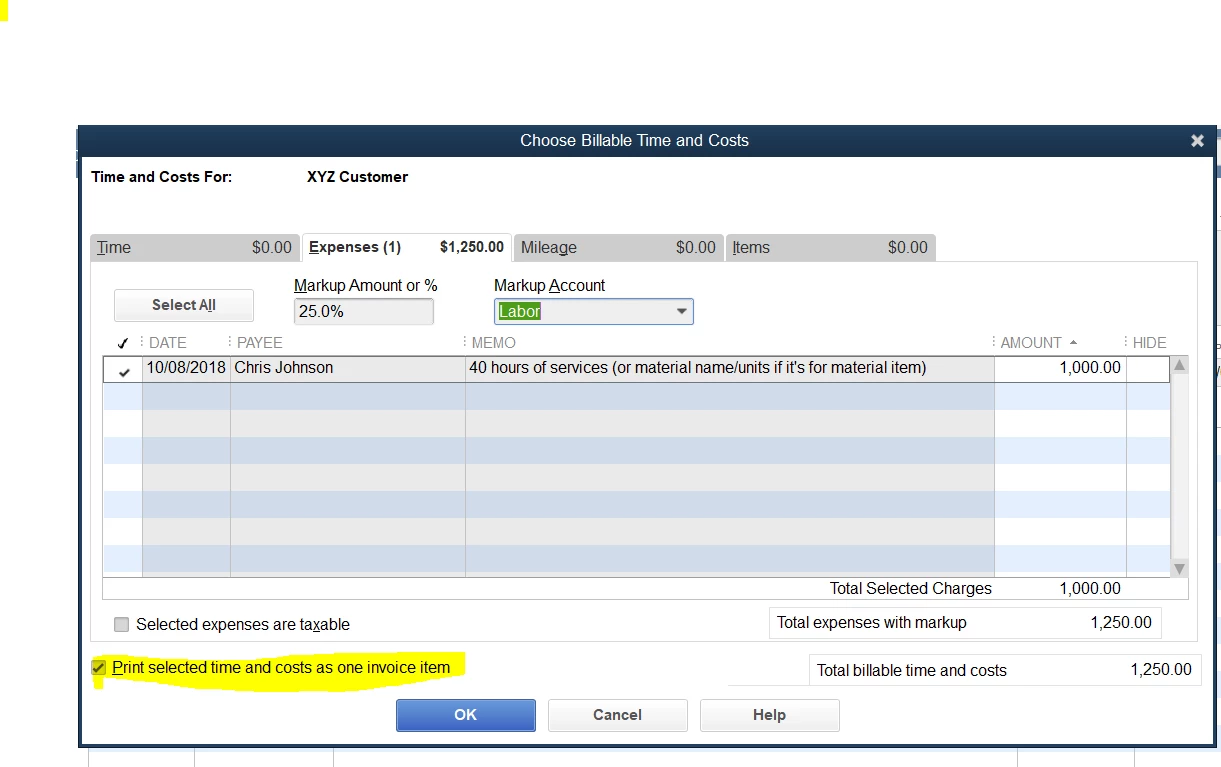
To hide MarkUp on Invoice, you will need to select box "Print selected time and costs as invoice item" at the bottom. See attached screenshot below for reference.


Also, copy "25lb. of ... T-shirt" description and paste it to the "Total Reimbursable Expenses" description line. That way you will see the Product name description on the Invoice.

.
2 replies

vpcontroller
October 8, 2018

@jesspro


To hide MarkUp on Invoice, you will need to select box "Print selected time and costs as invoice item" at the bottom. See attached screenshot below for reference.


Also, copy "25lb. of ... T-shirt" description and paste it to the "Total Reimbursable Expenses" description line. That way you will see the Product name description on the Invoice.

.

October 26, 2018

I want to markup an item by 20% and do not see the markup box when I try to invoice the customer.  Is there a way to add that similar feature to what you see under expenses when you mark up an expense.

October 26, 2018

Hello there, SandyB12.


Glad you joined us here in the Community space. I’m here to share some information about mark up in QuickBooks Desktop.


The markup box will only show on your invoices if the item or product you’re using has a markup on it. To add a markup on an item, follow the steps below:
1.    Go to List on the top menu bar.
2.    Select the Item List.
3.    Double-click on the item you want to markup.
4.    Click Edit Markup tab on the right pane.
5.    On the Type of Markup, select Use default (“Percent over Cost”).
6.    Under the Markup Percent, enter 20%.
7.    Click OK to save and close.
8.    Click OK again to exit from the screen.


To mark up items on an invoice by expense type, perform the following:
1.    Click on the Customer menu and select Create Invoices.
2.    Select Customer: Job from the drop-down menu.
3.    Click on Add Time/Costs on the upper portion of the screen.
4.    On the Choose Billable Time and Costs window, navigate to the Expense tab and choose the item expense that you want to mark up.
5.    In the Markup Amount or % field, choose how much you want to mark up the item.
6.    Indicate the revenue account you want to use to track the income in the Markup Account field.
7.    Click OK.


You can also manually change the price if you don’t want to markup all the expense items on an invoice. To do this, leave the Markup Amount field blank and change the number of items in the Amount column. However, if you do this, QuickBooks will recognize the markup as an additional expense rather than a business profit.


By following the steps above, you should be able to use markup on your invoices in QuickBooks Desktop.


Please let me know if you need anything else. I’ll be around to help. Wishing you and your business success!

January 25, 2024

Hi there....We use Quickbooks Online and when we invoice we would like to show the Markup as it is all inter company invoicing.  How do we show the markup as a separate line on the invoice.  Right now it shows the markup but when we send the invoice to the client it puts everything on one line.

January 25, 2024

Welcome to the Community space, @Nikki M.


I am here to share some insights on how to show the markup on your invoice when sending it to your customers in QuickBooks Online (QBO).


First, you'll need to create a billable expense, here's how:


  1. Click the +New icon. 
  2. Choose Expense.
  3. Add the Payee's name.
  4. Select a category and enter the amount.
  5. Check the Billable box and add the customer's name.
  6. Enter the needed details.
  7. Click Save and close.


Once done, recreate the invoice and add the billable expense.


  1. Click the +New icon, then select Invoice.
  2. Choose the customer's name from your billable expense.
  3. Click the little arrow in the upper-right-hand corner.
  4. Select Add on the billable expenses.
  5. Click Save.


Moreover, I'm adding this helpful article as your reference in managing your expenses in recording invoice payments in QBO: Record invoice payments in QuickBooks Online.


Please don't hesitate to return to this post if you have other concerns in managing your invoices and expenses in QBO. I'll be here to lend a hand. Have a good one!


January 25, 2024

We are doing this now.  However, we add a markup.  When the invoice is created and sent to the client it groups the markup amount in with the original category.  We want the markup to show up as a separate line on the invoice.  So lets say we have supplies and a markup, we want the invoice to show 2 lines, one for the supplies amount and one for the markup.  That way when we get the invoice in the other company we can separate the markup from the supplies amount.