Matching Invoices entered in QBO to Payments Made via Square
Hi All,
Scenario:
NOTE: All my bank accounts and my Square account are connected and synched to QBO.
1. I enter an invoice in QBO and send it to the customer.
2. They ask me to charge it to their card on file (we use Square), which I do.
3. The next day, the payment transaction shows under Square in App Transactions for the net amount (invoice amount minus fees). Clicking for more detail I can see the gross amount and the fees broken out. The QBO customer and item show, but I cannot Match the QBO invoice to the transaction. The "Category or Match" column says "Miscellaneous."
4. My only option is to Add the transaction, which I do.
5. In the Bank transactions tab, I see the amount Square deposited and it say "Match Found." It matches the deposit to the Square transaction. The net amount is now available in the bank account to reconcile and the fees are coded to the appropriate account.
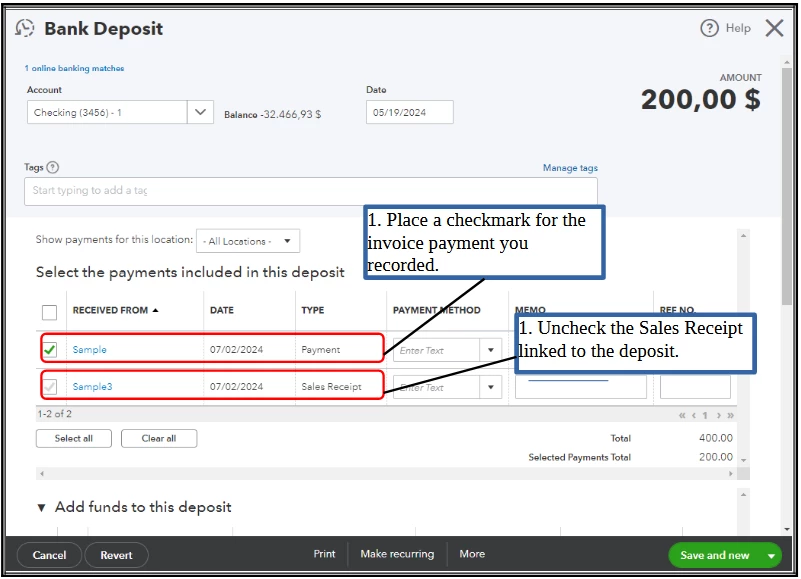
6. There is no way for me to clear the QBO invoice. I cannot match it to the Square transaction (this is where it should be matched) and if I mark it paid, it puts the gross amount into the bank rec (in addition to the Square amount).
I believe I was able to match QBO invoices to Square transactions in the past, but it's been about 6 months. This should be a standard function - otherwise how do you clear open invoices?
Any insight is appreciated.