

September 22, 2022
Solved

Payroll auto creates check payments - QBs desktop

  • September 22, 2022
  • 1 reply
  • 0 views

Hi,


I set up payroll and health insurance deductions for employees. QBs automatically creates check payments addressed to the health insurance company. Problem is, payments are paid via my credit card and not by check.  How do I change auto deduction payment method from check to credit card? 
Best answer by BigRedConsulting

I don't know of any feature in QuickBooks that will automatically create payroll liability checks to pay your various liabilities and taxes.


QuickBooks Desktop Payroll doesn't have a transaction type to directly match/represent paying liabilities by credit card. Customers have been asking for it for decades, but still nothing.


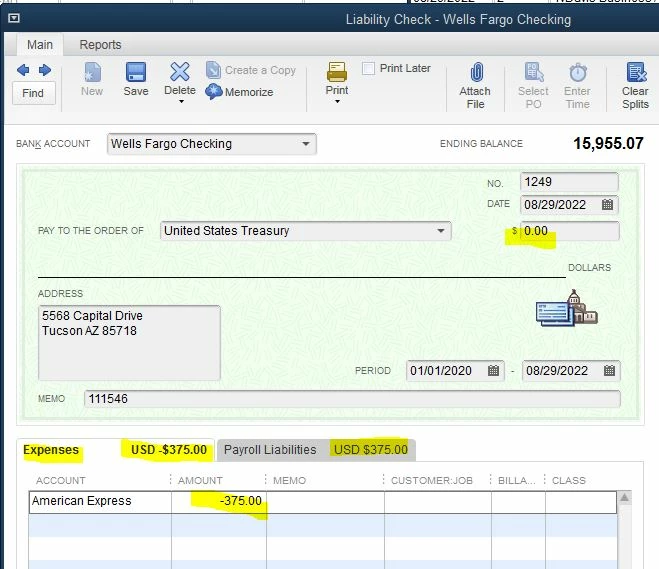
So, the way to do this is to create a liability payment check and then redirect the funds to your CC account by adding a line item to the expenses tab, zeroing out the check.


It should look like this:


Optionally, if you don't want to see the check in your main/real checking account, create and use a "wash" bank account for the check.

1 reply

BigRedConsulting
September 22, 2022

I don't know of any feature in QuickBooks that will automatically create payroll liability checks to pay your various liabilities and taxes.


QuickBooks Desktop Payroll doesn't have a transaction type to directly match/represent paying liabilities by credit card. Customers have been asking for it for decades, but still nothing.


So, the way to do this is to create a liability payment check and then redirect the funds to your CC account by adding a line item to the expenses tab, zeroing out the check.


It should look like this:


Optionally, if you don't want to see the check in your main/real checking account, create and use a "wash" bank account for the check.