May 31, 2024
Solved

Printing invoices from closed periods requires password?

  • May 31, 2024
  • 1 reply
  • 0 views

Hi All,


I have a business which creates several hundred invoices each month.  It is fairly common for customers to email us and ask for another copy of their invoice.  It used to be that all users could go in and print an invoice from a closed period.  Recently QBO changed settings or something.  Now, to be able to print an invoice, or even share a payment link, QBO prompts for the close password.  This does not seem correct.  Printing an invoice should not edit the transaction.  Printing the invoice should not require the period end close password.


What setting do I need to change to fix this?
Best answer by Jelayca V

Let me provide you with an alternative on how to print invoices of closed periods without requiring you to input a password in QuickBooks Online (QBO), Jake.


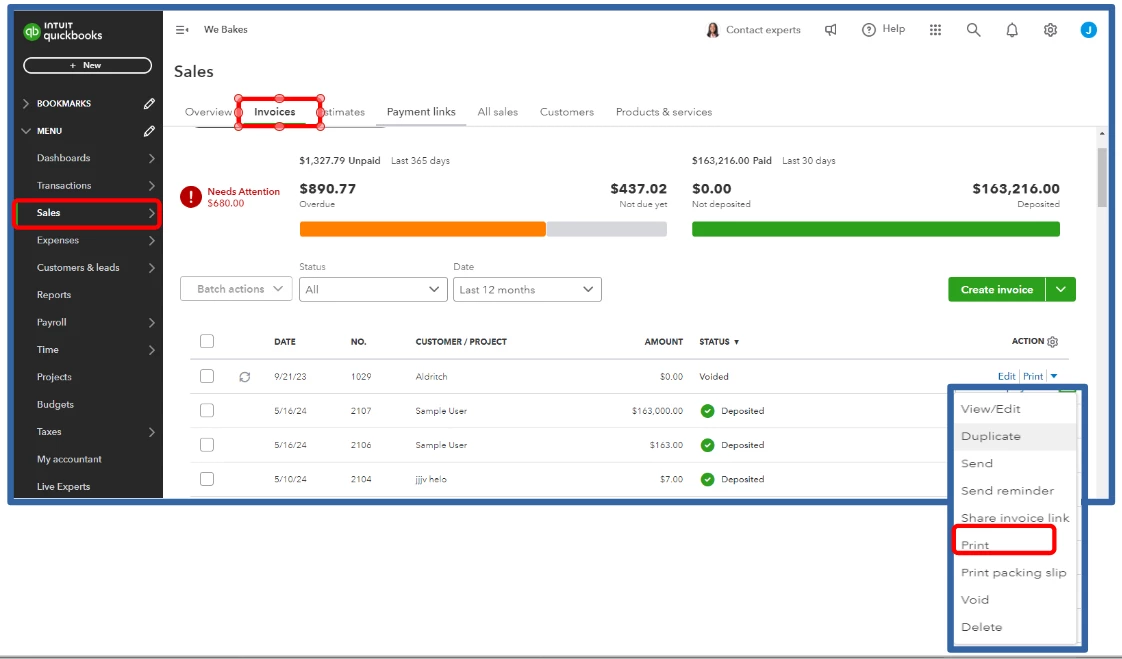
To print the invoices, it’s recommended to avoid opening them directly. Instead, navigate to the Invoices tab and click on the dropdown arrow associated with the specific invoice you wish to print. This method prevents the system from interpreting your action as an attempt to edit the invoice, which would typically prompt a password request. 


Let me show you how:


  1. Navigate to Sales, then Invoices.
  2. In the ACTION column, click the dropdown arrow of the invoice you want to print.
  3. Select Print.


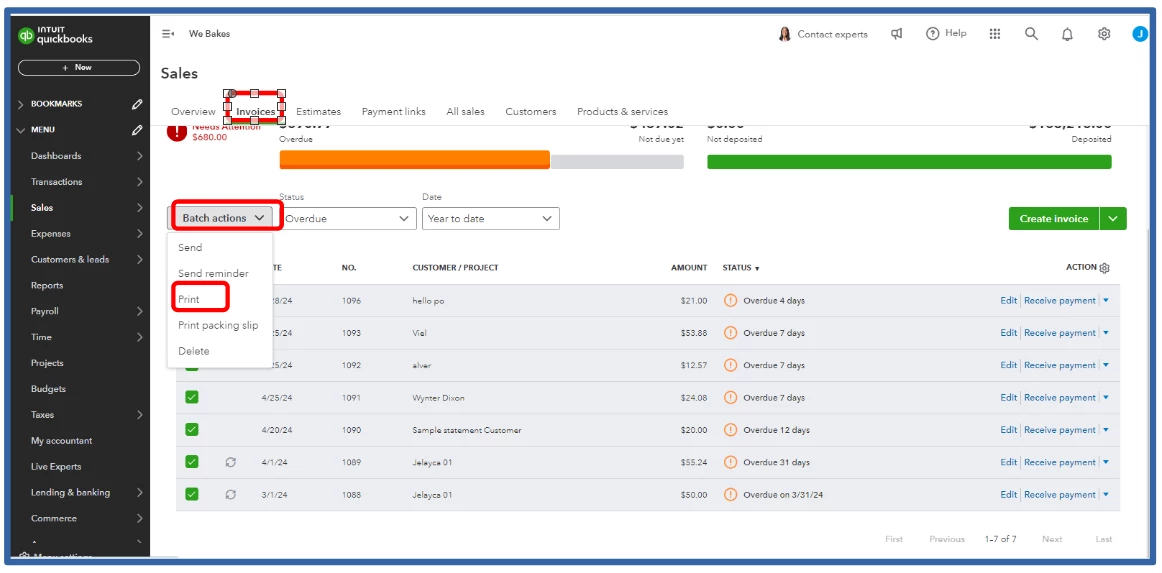
In addition, to batch print multiple invoices, here's how:


  1. Check the boxes of the invoice you want to print.
  2. Click the Batch actions dropdown.
  3. Select Print.


For more tips in preventing changes to past transactions, I encourage browsing this article: Close your Books in QuickBooks Online.


I'm only a few clicks away if you have further questions about printing invoices in QBO. I'll be here to help. Keep safe.


1 reply

Jelayca VAnswer
May 31, 2024

Let me provide you with an alternative on how to print invoices of closed periods without requiring you to input a password in QuickBooks Online (QBO), Jake.


To print the invoices, it’s recommended to avoid opening them directly. Instead, navigate to the Invoices tab and click on the dropdown arrow associated with the specific invoice you wish to print. This method prevents the system from interpreting your action as an attempt to edit the invoice, which would typically prompt a password request. 


Let me show you how:


  1. Navigate to Sales, then Invoices.
  2. In the ACTION column, click the dropdown arrow of the invoice you want to print.
  3. Select Print.


In addition, to batch print multiple invoices, here's how:


  1. Check the boxes of the invoice you want to print.
  2. Click the Batch actions dropdown.
  3. Select Print.


For more tips in preventing changes to past transactions, I encourage browsing this article: Close your Books in QuickBooks Online.


I'm only a few clicks away if you have further questions about printing invoices in QBO. I'll be here to help. Keep safe.


May 31, 2024

This works!


I spend over a hour on the phone with support to told me this was not possible!! I knew there had to be a way. 

May 31, 2024

Hello there, JakeTYondr.


We in the Community are happy that you were able to find my colleague's post helpful. We're more than happy to help you if you need more assistance.


Keep us posted if you have other questions or concerns. I’m here to help you out. Take care and have a great day!