

December 7, 2021
Solved

QuickBooks Desktop Bill Pay "powered by Melio"

  • December 7, 2021
  • 4 replies
  • 0 views

tl;dr - There is no guide on how to properly set up a user to use the new QB desktop bill pay. There are guides on how to use it, but nothing showing how to give access to any particular user.


I have gone back and forth with a most unhelpful person reached at the "support at qbdtusers.melio.com" email with the following issue: I am trying to take my existing AP person and give them access to pay bills with the new fancy desktop bill pay "powered by melio." 


The issues seems to stem from the fact that there are two roles assigned to all users - one is the Company file role (assigned to roles within QB) and the Intuit account role (assigned via Merchant Services to have access to payroll, bill pay, etc). For this discussion assume the following - I am the full admin in the company role and full admin in the Intuit account role. Below is a screen shot of my AP person's roles. Their company role is the standard QB role of "accountant" and their assigned Intuit role is payroll processor and Full Admin on the payment side.
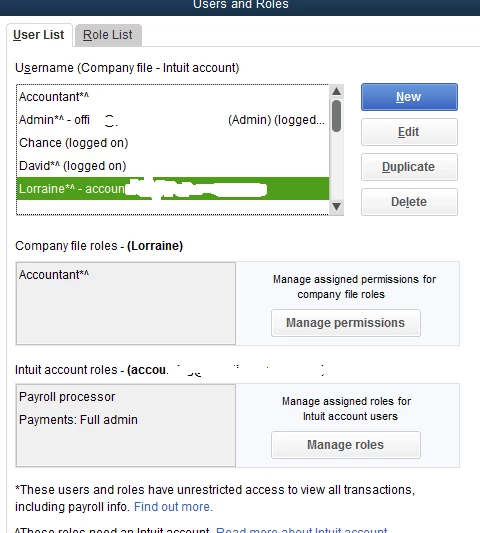


I have been able to make the new bill pay work with my login so I know it works (and I love the ease of it!). My AP person, on the other hand, gets the message that they are unable to access since they do not have the required permissions. The "support" person keeps telling me the user needs to be a full admin without answering which of the two roles the user needs to have full admin rights in.


Either A) in order to have access the user needs to have full admin rights in the Company file, or B) the user needs full admin within the Intuit account role (which mine has), there has to be some additional access rights granted under their Company role and that is what I am seeking.


I have a hard time believing A is true. If so, QB really messed up. No one in their right mind would give a payables person full admin rights in the company file. That would make this essentially worthless to anyone with an accounting staff with users with restricted access rights. 


Looking forward to some help, thanks for reading!

Best answer by Catherine_B

Hello there, PrestigeD.


Yes, the option to add a user to be able to process payment through Bill Pay "powered by Melio" needs to have an Admin role of your company file. For now, I suggest submitting feedback directly to our product engineers about being able to add users without granting them as an admin. They may look into this suggestion and consider adding the option in the future update. 


To submit feedback, you can go to the Help menu and select Send Feedback Online.


You might also want to visit our feedback forum to check the recent updates made in QuickBooks.


Please know that the Community forum is always open if you need further assistance running reports in QuickBooks Desktop. Have a good one.

4 replies

December 8, 2021

Hello there, PrestigeD.


Yes, the option to add a user to be able to process payment through Bill Pay "powered by Melio" needs to have an Admin role of your company file. For now, I suggest submitting feedback directly to our product engineers about being able to add users without granting them as an admin. They may look into this suggestion and consider adding the option in the future update. 


To submit feedback, you can go to the Help menu and select Send Feedback Online.


You might also want to visit our feedback forum to check the recent updates made in QuickBooks.


Please know that the Community forum is always open if you need further assistance running reports in QuickBooks Desktop. Have a good one.

PrestigeDAuthor
December 8, 2021

Talk about a decision made by committee......No one should be granting admin access to a bookkeeper or staff accountant just so they can pay bills online. This feature has such potential to be great and you have seriously limited its functionality. The new version of QB already has several new great levels of bill approval process. Those should work in conjunction with this new bill pay option and give the admin and business owners plenty of assurances that proper procedures are being followed. 


I would also suggest you put together a user set up support article. There is nothing official (other than searching other user questions) about how to properly set up users for this.


Starting tomorrow, I am going to submit daily feedback on this issue. I suggest anyone that stumbles upon this support thread do the same. Quickbooks has made a ridiculous decision with this and needs to change it asap.

March 16, 2022

That is nuts. The upgrade needs to be done ASAP. 

July 7, 2022

I would love to connect with someone who would be willing to walk me through setting up Bill Pay by Melio. 

July 7, 2022

Willing to walk us through setting it up? Or posting instructions? Can't even seem to get it signed in as Admin. 

Fiat Lux - ASIA
July 7, 2022

@KatieJ1234 

Are you using QB Desktop or QB Online?

July 8, 2022

Desktop. We are on QB Enterprise on a Windows server. Everything is up to date as far as we know. We can't even see the options to use Melio and do not seem to get anywhere with QB Support.