Hi there, @Bluemanta.
Thanks for the prompt response and the additional information. I'm here to provide clarification about receiving payments in QuickBooks Desktop.
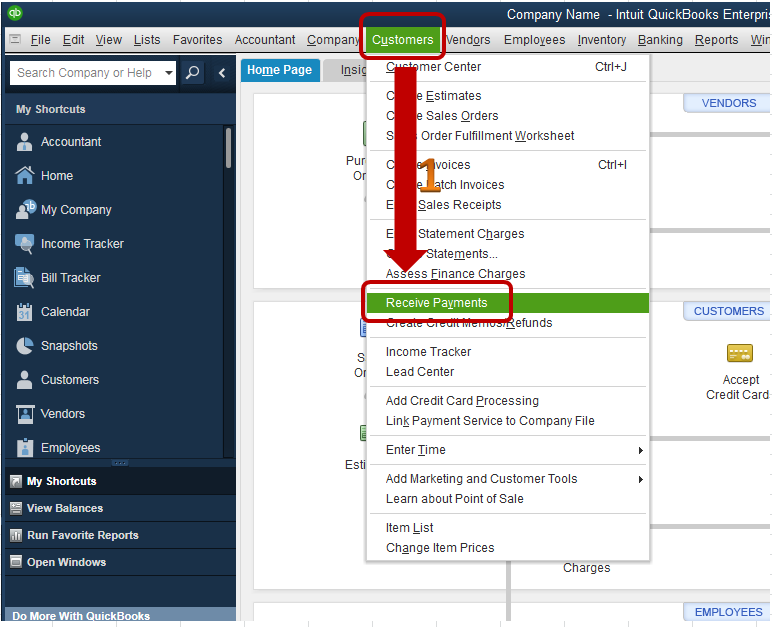
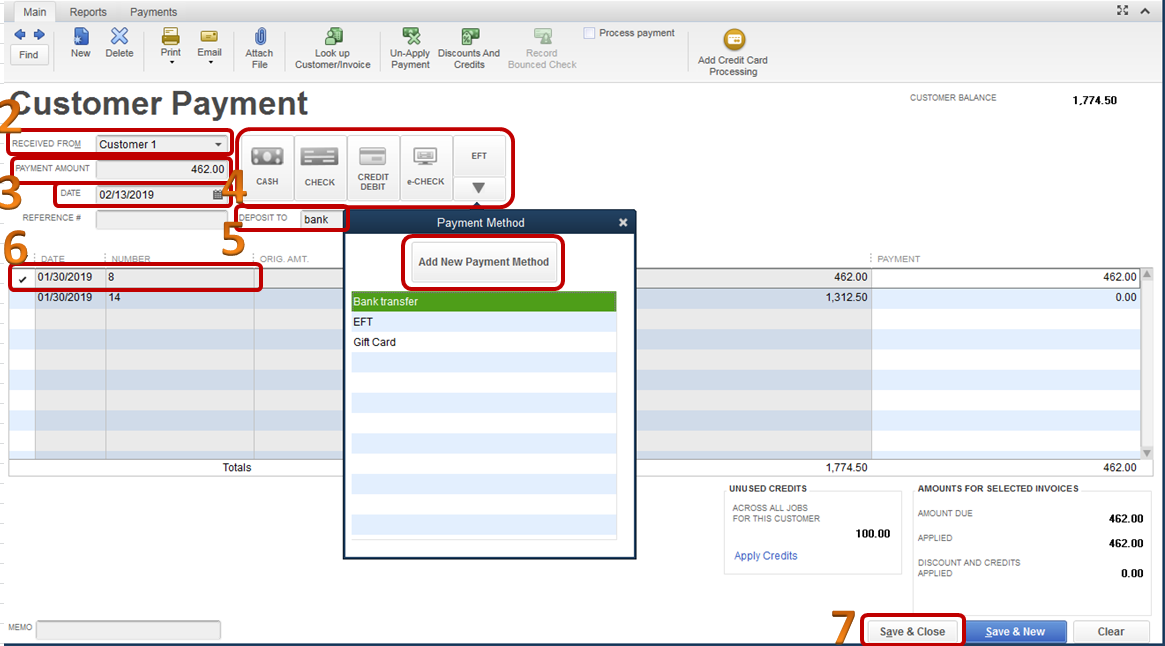
Since the payment is for an invoice entered in QuickBooks, record it by using the Receive Payments screen. Here’s how:
1. Go to the Customer menu at the top and select Receive Payments.
2. On the Received From drop-down field, choose the customer's name.
3. Enter amount in the Payment Amount field.
4. Make sure the date is correct, then choose EFT as the Payment method. (Click the More drop-down to add EFT as payment method).
5. Choose the deposit checking account in the Deposit To field.
6. Select the invoice to be paid by putting a check mark next to it.
7. Hit Save & Close.
Here’s an article for your reference: Record payment for an invoice.
That should answer your question for today. Please reach out to me if you have questions or concerns, I’ll be more than happy to answer them for you. Take care and have a great day!