January 15, 2019
Solved

Setting up different membership dues with different payments

  • January 15, 2019
  • 2 replies
  • 0 views

Hello, I'm the treasurer for a non-profit organization on campus and was looking to get set our bookkeeping set up in quickbooks. I was wondering how I would go about recording different membership types with different amounts. We have 4 membership types and can get these paid either with cash, card, check or through paypal. The first thing that comes to mind would be to give each of our members an invoice with an item code to each membership type (other charge)  with the fee tied to each membership type. From here I could receive a payment either in full or broken down in a payment plan. Would I also make each of these other charges a subset of the "membership dues" income account? Or could there be an easier way to get this set up? Thanks!
Best answer by Rose-A

A warm welcome to the Community, BedrickT.

I'd be delighted to provide with you the steps on how to set up different membership with different amounts in QuickBooks Desktop.


With QuickBooks Desktop, you can create a service item with different amounts to serve as your item code for each membership type.


Here's how:

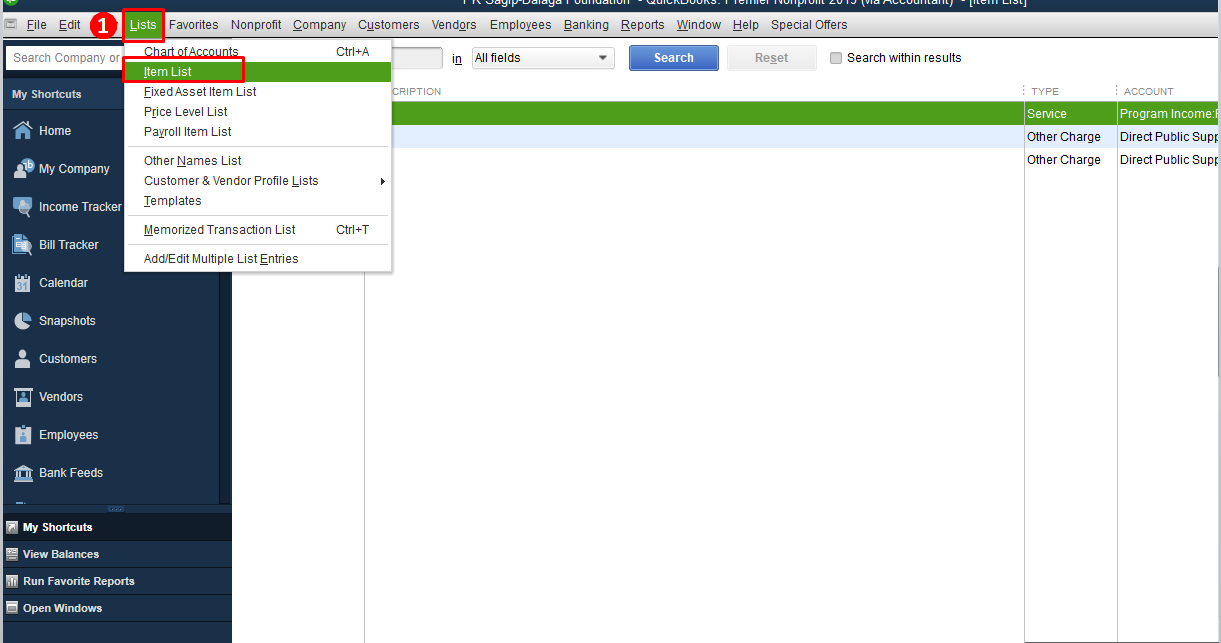
  1. Click List at the top menu bar and click Item List.
  2. Click the Item at the bottom and select New.
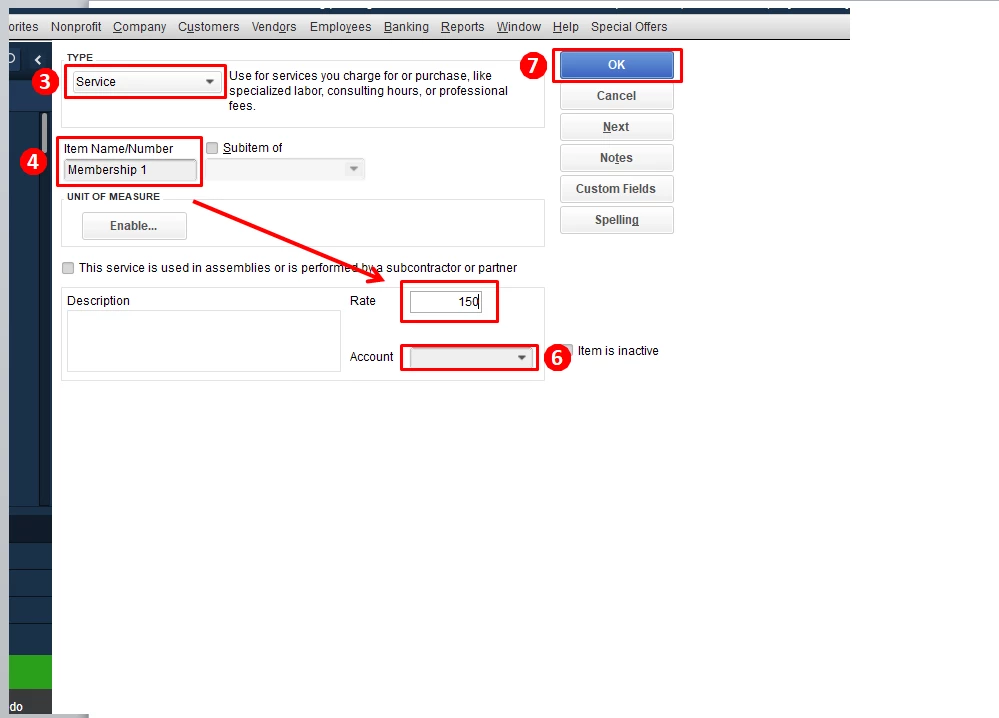
  3. Choose the Service item under Type.
  4. Enter the Item Name.
  5. Enter the Rate.
  6. Choose an Income Account.
  7. Hit OK.

I've attached some screenshots to guide you through the steps.


Continue this process to set up the other membership type and rates.


For more details about adding items in QuickBooks Desktop, check out this recommended article: Add, edit, and delete items.


Feel free to get back in touch with me if you have other concerns about QuickBooks. I'd love to help.


2 replies

Rose-A
Rose-AAnswer
January 15, 2019

A warm welcome to the Community, BedrickT.

I'd be delighted to provide with you the steps on how to set up different membership with different amounts in QuickBooks Desktop.


With QuickBooks Desktop, you can create a service item with different amounts to serve as your item code for each membership type.


Here's how:

  1. Click List at the top menu bar and click Item List.
  2. Click the Item at the bottom and select New.
  3. Choose the Service item under Type.
  4. Enter the Item Name.
  5. Enter the Rate.
  6. Choose an Income Account.
  7. Hit OK.

I've attached some screenshots to guide you through the steps.


Continue this process to set up the other membership type and rates.


For more details about adding items in QuickBooks Desktop, check out this recommended article: Add, edit, and delete items.


Feel free to get back in touch with me if you have other concerns about QuickBooks. I'd love to help.


qbteachmt
January 16, 2019

I agree with @Rose-A


You want Service Items for Dues, because this is your routine activity. Other Charges are, for instance, Postage, Mileage, etc.


You also can use Customer Type. That way, you can use that in reporting, such as Sales by Item, filter on only the one Customer Type. This would let you see if you charged a Customer Type the wrong Dues item, for quality assurance and review. I also like Sales by Customer Summary, with Columns by Item Type or Item Detail = each type of Dues is now a column.


All of the Dues Items link to just the one Dues account. That keeps the P&L simple, and the Items List does the better reporting for you. Item reporting includes Quantity, for instance, when that is helpful to analyze the activities.

BedrickTAuthor
January 16, 2019

Would it be a matter of using both? As in using the service charge to actually charge the member then attaching a customer type for reporting? 

December 15, 2019

How do I bill members for each different type of membership