terrapindreamer
January 18, 2019
Solved

Single Customer - Multiple Contacts

  • January 18, 2019
  • 2 replies
  • 0 views

In many cases we work for multiple individuals at the same company (customer). This requires us to send invoices to the individuals' attention for approval. Is there a way to utilize the Contacts tab within the customer record to allow for selection of the appropriate contact when creating an invoice? 

Best answer by IamjuViel

Delighted to hear again from you, @terrapindreamer.


I appreciate you for clarifying your concern and for providing additional details of it. Allow me to share some information on how you can achieve your goal.


With QuickBooks Desktop, you have the option to manage and keep track of your sales and accounts receivables both company wide and department level. You can add sub-customers to your list and send invoices and other forms to them. By doing so, you can keep track of each income, expense and balance for the company and each department. This is the same on how job costing works in the system.


Here's how:

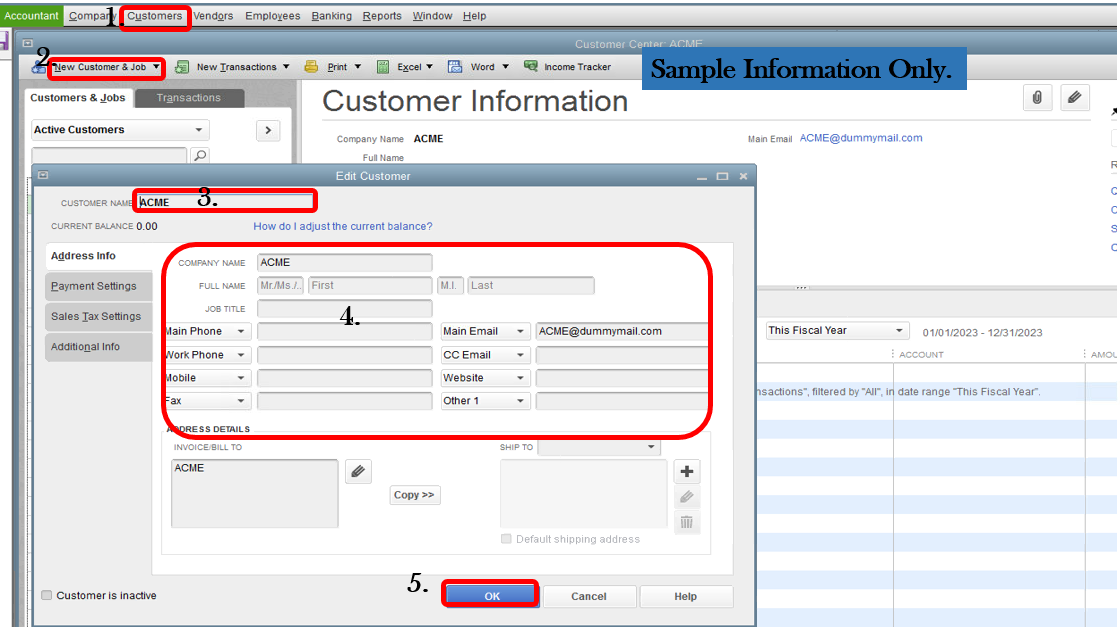
  1. Go to Customer.
  2. Choose Customer Center.
  3. Click Add New Customer.
  4. Select New Customer.
  5. Enter the company information.
  6. Click Ok.

Now, let's add the sub-customer or the departments of the company. Here's how:

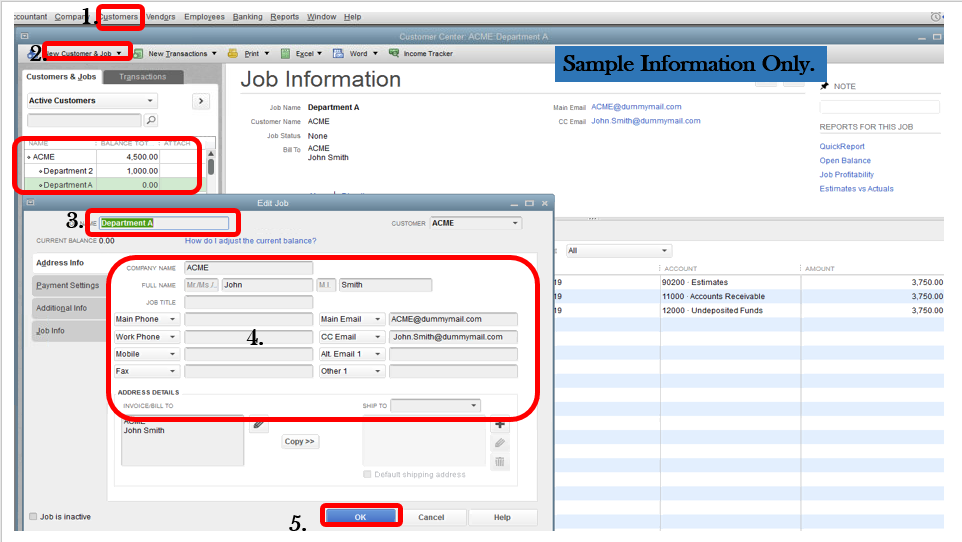
  1. In the Customer center, highlight the name of the Parent Customer (name of the customer).
  2. Click Add New Customer.
  3. Select Add Job.
  4. Type in the sub-customer's information.
  5. Hit  Ok.

That should do it! Repeat the same process if you 'll need to add more sub-customers. 


Once you create an invoice, you'll be able select which sub-customer will it be sent.


Fill me in if you have other questions about creating and sending invoices to your customer. I’m always here to help.

2 replies

IamjuViel
January 18, 2019

Glad to have you here, @terrapindreamer.


I'd like to have this opportunity to share some information on how you can create and send an invoice to customer in QuickBooks Desktop.


Since your customer has multiple email address, you can set it up in your customer's profile. Here's how:

  1. Go to Customer.
  2. Choose Customer Center.
  3. Select the customer.
  4. Click on the Pencil Icon to edit the customer's information.
  5. Go to Address Info tab.
  6. Enter all the email address of the customer.
  7. Click Ok


Once you have set up your customer information, you can now use it in sending the invoice to your customer.


On the other hand, if you have an invoice you want to send to multiple customers, you don't need to create a separate invoice for each customer. Instead, you can create a single batch.


For additional insights, you may check out this article: Send forms by batch in QuickBooks Desktop.


If  you're having difficulty sending your invoices to your customer, I'd suggest contacting our Customer Care Team . A specialist will be able to further walk you through via secured remote access session.


Here’s how to contact us:

  1. Visit: https://help.quickbooks.intuit.com/en_US/contact. 
  2. Choose your QuickBooks Product.
  3. Select your QuickBooks Version.
  4. On the Contact Us page, click a topic
  5. Click on the View Contact Info button to see the support number.

Don’t hesitate to click the Reply button if you have other questions about sending an invoice to multiple receivers. I’m here to help.

terrapindreamer
January 18, 2019

Thank you for the reply but from a quick overview this doesn't truly solve my problem. First, we are using QuickBooks Desktop Pro (should have established that initially).


Let me try to explain it differently:

  • Let's call the company ACME. 
    ACME is setup with Accounts Payable as the first and last name - this is where invoices would be sent by default. 
  • A monthly invoice for a recurring service is sent to Accounts Payable - this currently works fine.
  • We have now also provided services for two separate divisions of ACME each led by two different representatives: John Smith & Jane Lu. Invoices for these services need to be sent independently to the representatives - one addressed to John and one addressed to Jane.  
  • We want to be able to monitor customer balances and perform company wide customer reports (aging for example) inclusive of all invoices sent to ACME - this would include invoices sent to Accounts Payable, John Smith and Jane Lu. 
  • John and Jane are both entered into QuickBooks as Contacts with the Customer Information screen:
    Screen capture

Is there a way when creating an invoice to select which contact the invoices should be sent to? This would result in proper addressing but still attribute the invoices to the proper Customer Account within QuickBooks. 

Thank you!

IamjuViel
IamjuVielAnswer
January 19, 2019

Delighted to hear again from you, @terrapindreamer.


I appreciate you for clarifying your concern and for providing additional details of it. Allow me to share some information on how you can achieve your goal.


With QuickBooks Desktop, you have the option to manage and keep track of your sales and accounts receivables both company wide and department level. You can add sub-customers to your list and send invoices and other forms to them. By doing so, you can keep track of each income, expense and balance for the company and each department. This is the same on how job costing works in the system.


Here's how:

  1. Go to Customer.
  2. Choose Customer Center.
  3. Click Add New Customer.
  4. Select New Customer.
  5. Enter the company information.
  6. Click Ok.

Now, let's add the sub-customer or the departments of the company. Here's how:

  1. In the Customer center, highlight the name of the Parent Customer (name of the customer).
  2. Click Add New Customer.
  3. Select Add Job.
  4. Type in the sub-customer's information.
  5. Hit  Ok.

That should do it! Repeat the same process if you 'll need to add more sub-customers. 


Once you create an invoice, you'll be able select which sub-customer will it be sent.


Fill me in if you have other questions about creating and sending invoices to your customer. I’m always here to help.

April 10, 2025

How does this work with Quickbooks Online?

April 10, 2025

I appreciate your emphasis on the QuickBooks version you're using, Daniel. Given the range of concerns discussed in this thread, I'll provide scenarios to ensure we're aligned.


Do you have the same concern as the original poster regarding sending invoices to multiple contacts under the same customer? If so, we can manually add numerous addresses for each invoice you send or in the client's profile. Please see the attached screenshots for visual reference.


Additionally, we can create a sub-customer to manage and track transactions for different contacts within the same customer account.


If this is what you're trying to achieve, please follow these steps:


  1. Navigate to the Sales menu and select Customers.
  2. Click on New Customer and enter your preferred name for the client.
  3. Fill in the contact details and put a checkmark on the Is a sub-customer area.
  4. Choose the parent customer to link them, then hit Save.


Moreover, let us know if you're referring to something different from the scenarios above. Any extra details you can share will help us provide guidance that meets your needs.


Furthermore, you can visit these resources as a guide in handling your invoice payments and customer balances in QuickBooks Online:


Following the steps above, you can send and track invoices for different contacts within the same customer account. We're still here to help if you encounter any challenges or have additional queries. Best wishes, Daniel.