June 18, 2019
Solved

Voided Payment but Credits didn't void

  • June 18, 2019
  • 3 replies
  • 0 views

I have a payment that I had to void but the credits attached didn't fall off.  Now the check I want to apply to several invoices is off as the credits have changed the amount of the bills not paid.

FYI The first payment was an ACH which wasn't put in right away so now it doesn't come out right.


Thank you

Best answer by AlcaeusF

Greetings, @WearHaus.


When you void a bill payment check in QuickBooks Desktop (QBDT), the credit applied to it will remain attached. To fix this, you need to manually unapply the credit, and I'm happy to show you how:


1. Go to the Vendors menu at the top.
2. Pick Vendor Center at the drop-down.
3. Locate the vendor and open the credit.
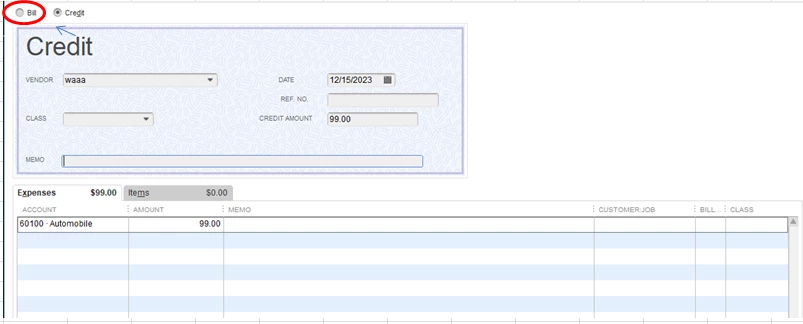
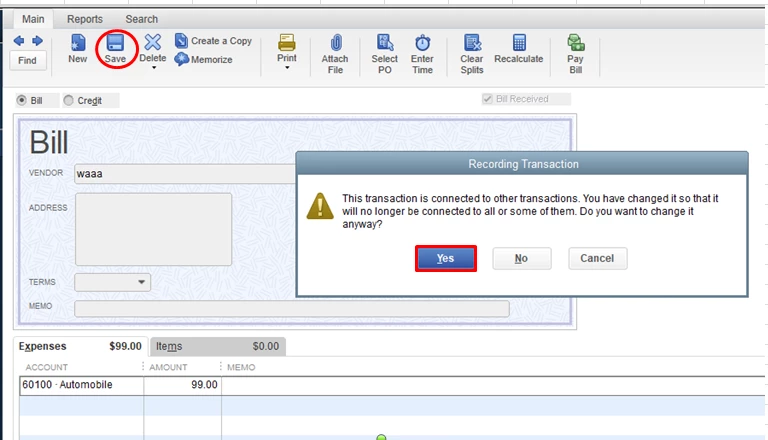
4. Change the radio button to Bill and Save (not Save and Close), then select Yes on the warning that it is linked.
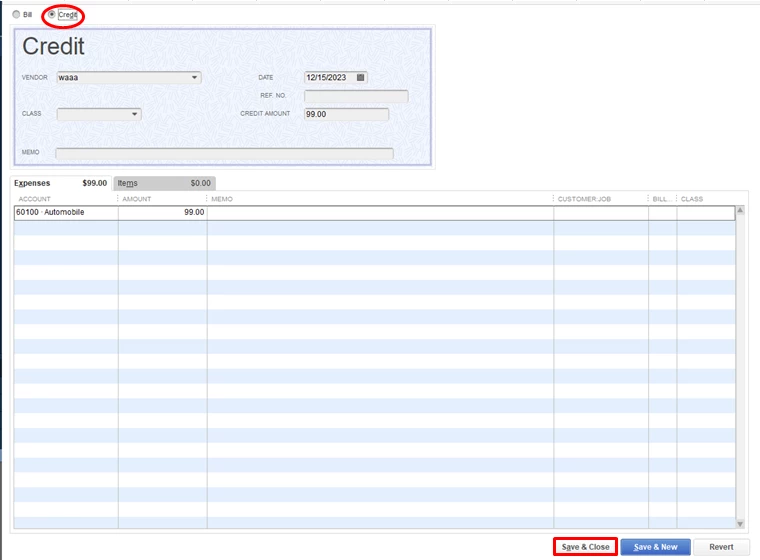
5. Now, change it back to Credit, then Save and Close.


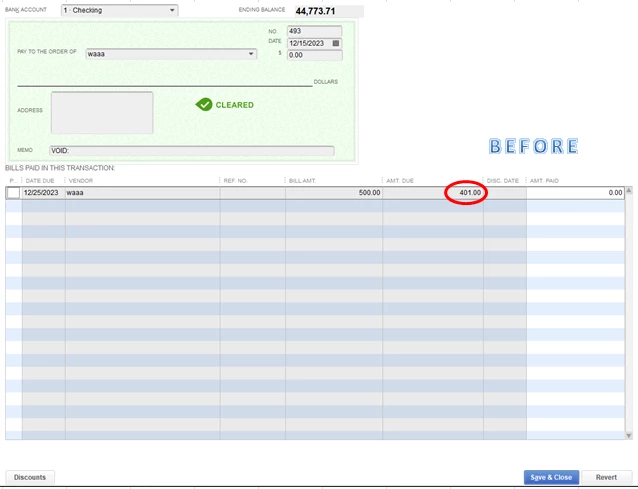
That should remove the credit from the voided bill payment check.
 

For additional resources, check out this article: Void or delete a bill or bill payment check.


Keep me posted on how it goes in the comment. I'll be here to help. Have a good one.

3 replies

AlcaeusF
AlcaeusFAnswer
June 18, 2019

Greetings, @WearHaus.


When you void a bill payment check in QuickBooks Desktop (QBDT), the credit applied to it will remain attached. To fix this, you need to manually unapply the credit, and I'm happy to show you how:


1. Go to the Vendors menu at the top.
2. Pick Vendor Center at the drop-down.
3. Locate the vendor and open the credit.
4. Change the radio button to Bill and Save (not Save and Close), then select Yes on the warning that it is linked.


5. Now, change it back to Credit, then Save and Close.


That should remove the credit from the voided bill payment check.
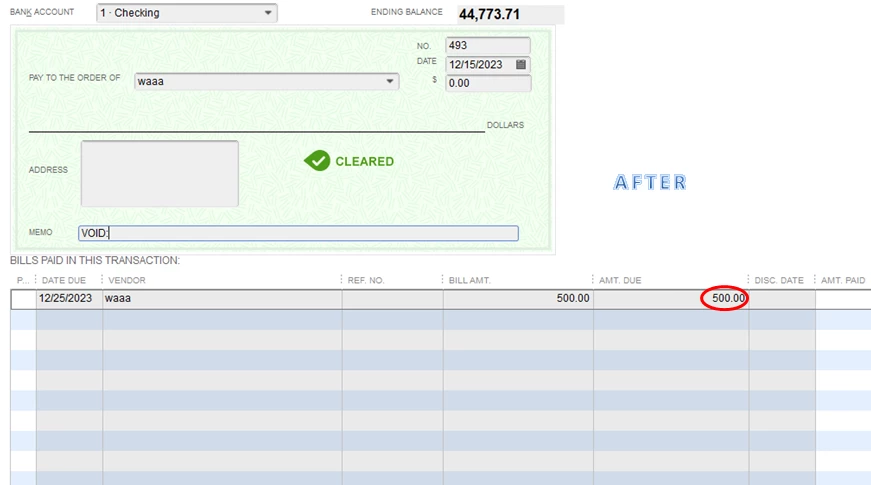
 

For additional resources, check out this article: Void or delete a bill or bill payment check.


Keep me posted on how it goes in the comment. I'll be here to help. Have a good one.

WearHausAuthor
June 20, 2019

Thank you!!!

June 9, 2020

I have a payment I have voided that included a credit memo. I have used this process many times to reset the credit memo to a bill, save it, then turn it back into a credit memo and save and close. For some reason I have a credit memo that will not let me save it as a bill. When I hit the save button, nothing happens, I don't get the warning message or anything. I've tried assuming that it saved and put it back as a credit, but the result is the same, the credit memo still has a zero balance.

Has anyone had this happen before? I'm ready to void the credit memo to see if that might work, but hate to go that route since this process has worked for me so many times.

Thank you for your input!

MaryLandT
June 9, 2020

Thank you for joining this conversation, Txroofer,


The credit memo could be damage, and that's why you're unable to save it in QuickBooks Desktop. To fix it, the following steps shown below will help repair the transaction:


  1. Identify damaged transactions based on the QBWin.log.
  2. Apply the appropriate fix on the transaction/s:

       * Damaged link or date
           a. Open the damaged transaction.
           b. Change the date to 20 years after (for example: 3/1/2017 to 3/1/2037).
           c. Select Save & Close.
           d. Re-open the damaged transaction.
           e. Change the date back to the original date.
            f. Click Save & Close.

            * Transaction out-of-balance
                a. Open the damaged transaction.
                b. Add any item.
                c. Select Save & Close.
                d. Re-open the damaged transaction.
                e. Remove the item added in step b.
                 f. Click Save & Close.


            * Damaged item history
               a. Open the damaged transaction.
               b. Go to the first blank item line.
               c. In the Description column, type three periods (...).
               d. Click Save & Close.


Once done, try to save the credit memo. If the same issue persists, you can run the Rebuild and Verify Data utilities for other troubleshooting steps.


Let me know how everything goes by commenting below. I'm always around whenever you need help.


Thank you and stay safe!

November 30, 2023

This solution is more than 4 years old. 


What would be the fix in 2023 for QBDT/Premier????? 


I cannot find where to un-apply a credit that was used on a check that was voided. This seems to be different question than the one asked in 2019 that is just SOOOOOOOO close. 


This is very frustrating. This happens rarely for me, so it was not assumed this would not be easily re-payable. I know I've "restored" or "un-applied" a credit at least one time in the past.


But the credits today made a bill "disappear", that I also cannot restore to be re-paid w/o the incorrect credit applied. 


An AJE/GJE popped up as a usable credit in my "apply credits" window and I was not thinking when I clicked on it, prob cuz I couldn't see the entire name or date of it so I thought it was "real time" available. That was my mistake for sure. Now how do I make sure it is "un-applied" as a credit?


So, I voided the payment. Now cannot restore the correctly used credit, cannot find the incorrectly used credit that wasn't a credit but was an AJE, and cannot re-pay the bill from QB. Not happy about prospect of re-entering a bill that was paid, because won't that imply an extra payable that's actually fake? 


I am not enjoying dealing with issues that handwritten accounting would NEVER create, it's only software that creates a nightmare like this, wastes hours and hours of time correcting/re-entering, etc. 


I hope there's an update for 2023 for this problem "out there". Thanks for reading. 


(and "no", i did not make a local backup before I voided this check because i didn't realize or imagine there was going to be any complicated issue about it; I'm sure i've "restored" a credit in the past, it was not straightforward, but it was do-able; this evening I've spent nearly 2 hours researching this plus getting QBDT phone and screenshare help, no solution reached yet; not that I would know how use a local backup anyway; I am frustrated about this at this time)


Maybe there's an update for 2023 for how to do this.
