

February 23, 2023
Question

Why does the "Not Deposited" bar on the top of the Invoicing screen show $0 when there are undeposited payments?

  • February 23, 2023
  • 1 reply
  • 0 views

There are current (within the last 30 days) payments that have been made by check and recorded in QBO (applied to the invoices), but the green bar still shows $0 in not deposited. Why is this?
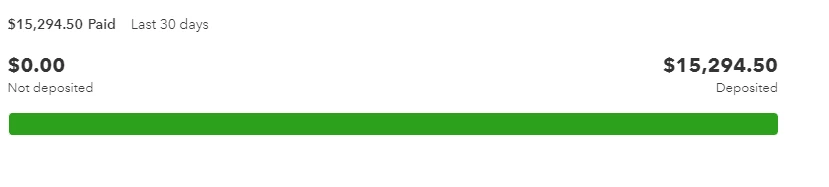
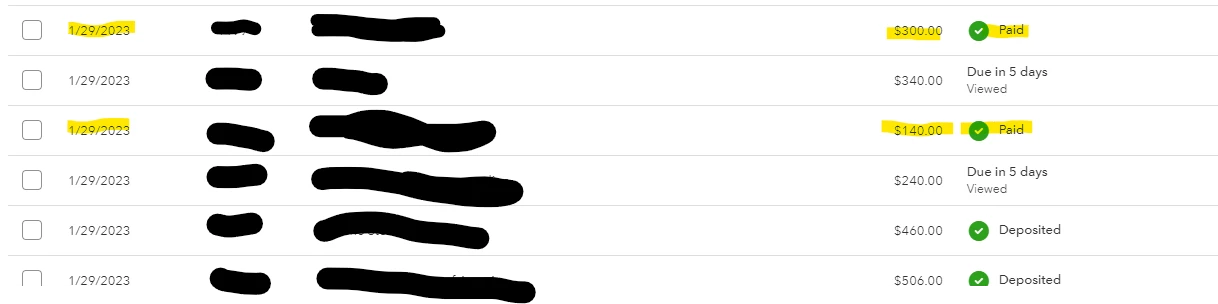


The images show the $0 bar, and the currently undeposited payments. Why don't these payments show as undep in the bar, and where else can I easily see the total undeposited funds (besides the Chart of Accounts)? I swear years ago there used to be an easy way to view a list of undeposited payments. Seems like QBO keeps updating things that don't need to be changed. 

1 reply

MaryLandT
February 23, 2023

I'll take away your worries and provide the steps where to see all undeposited payments, kellykellykelly.


The Bank Deposit screen is where you can see the accurate undeposited payments waiting to be deposited to the bank register. Therefore, the Not deposited bar should show the total undeposited payments.


I'm adding this sample screenshot as a visual guide.


You can try to clear the browser's cache and cookies to fix the issue. If it doesn't work, I'll show you how to view a list of undeposited payments.


I verified the amounts by clicking Paid from the $2,369.52 amount. Click the View payment link for each payment and from there you'll see what amount is deposited and what isn't.


You can try to navigate the paid invoices and check if payments are deposited. If they aren't, simply select the bank account from the Deposit to field on the Receive Payment form, then save to remove it from the Undeposited Funds account.


Otherwise, you can also go to the Bank Deposit page and make the deposits from there. Mark those undeposited payments from the Select the payments included in this deposit table, then click Save and close.


To learn more about making bank deposits and how to put payments to the Undeposited Funds account, use these articles below. 


Keep me posted if you have other things to clarify while managing payments in QuickBooks. Thank you very much for your time. I look forward to working with you in the future. Have a great day!

February 24, 2023

Thank you. It looks like clearing my browser's cache solved the problem. I did nothing else and now it's showing the undeposited funds on the bar. 


This has been driving me crazy for all my clients. I'll check the other ones now that I've cleared my browser. Any suggestions on how to make sure this doesn't keep occurring? I have a lot of clients and I'd like to rely on the invoicing screen for accuracy without having to preemptively clear my browser everyday.