

September 24, 2021
Question

AP Aging Detail Report showing Expense Accounts

  • September 24, 2021
  • 1 reply
  • 0 views

Hello,

How can I customize the AP Aging Detail report to show the related Expense account?
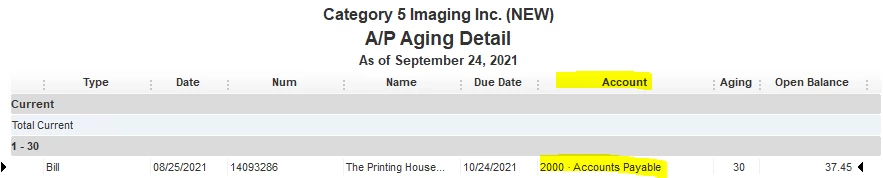
When I customize the report to show the account, it only shows the Accounts Payable account.

We use this report to prepare the bills that need to be paid, and management would like to see which related expense accounts the transactions have been booked to. Is there any way to modify the AP Aging Detail report to show this? Or is there another report I can prepare that shows the same information?

In the attached screenshot, it would be ideal if the account column showed the expense account not the AP account. In this case, it would show "Cost of Goods Sold: Subcontract Litho" for example.


Thanks
1 reply

September 25, 2021

Hi there apodkos1,


It's important that you're able to see the amount you owe to your suppliers in order to pay them the right amount and on time. QuickBooks Desktop offers a variety of reports in order for you to get a better picture of the financials of your business. I can point you in the right direction for assistance with reports.


For best assistance with which reports can be customized to see the expense account, I recommend reaching out to the QuickBooks Desktop support team. They'll be able to provide you the best information about customizing reports to be able to view the most information possible on one report. You can reach out to them using the methods provided in the Quickbooks Desktop software support policies.


If you have any other questions, feel free to reach out here.