

Exporting a report (GL) in Excel: problem with number formatting
Hi!
I've seen some troubleshooting, but I can't seem to solve my problem.
With QB2006 I had been using for years, I was able to export my data to Excel 2007 without much problems. Now with QB2020 Pro Desktop, I can't seem to obtain the 2 last columns to work right. I am using Microsoft 365 MSO 64 bits.
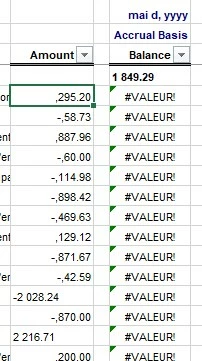
At first, I tried all the possible ways to convert the cells from Text to any kind of numbers, without success.
I've tried modifying the Regional settings for the computer, and many other things, but I am not getting ahead.
Now, it is important for me to keep the formatting as ### ###.##, thereby using a period between dollars and cents, and a space between hundreds and thousands.
At this point, I would love to be able to use the reporting directly to Excel without having to use the CVS detour...
A note: In the picture above, if for example I delete the space between the 1 and the 8 in the 1849.29 (first row) then the calculation is made until the -2 028.24. If I delete the space between the 2 and the 0, it will populate the Balance column until the next number. I did try to make a search and replace for that space, but it doesn't work.
Please .... help?
Thanks!