

May 26, 2021
Question

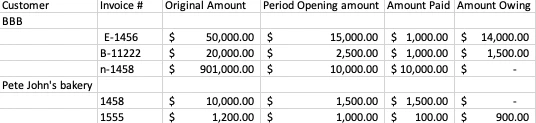
Generating a report that displays invoices sent to customer, amount of invoice paid in period and amount remaining
  • May 26, 2021
  • 1 reply
  • 0 views

Hey everyone, I hope your day is going well. I' m trying to generate a report that displays the info above on QB; I've tried generating a few customer detail reports but it doesn't quite display the info I'm looking for. Does anyone know what type of report I'd need to print to get the info in the chart above? Thanks!

1 reply

May 26, 2021

Hi SahibJotC,


Being able to view and customize your reports to get the information you need is a great way to save time. I'd be happy to help point you in the right direction for this.


QuickBooks Desktop has lots of reports that allow you to quickly pull up information that you need so you can get back to business. In order to get the information you're looking for in the image above you'll need to pull a few different reports such as the Sales By Customer Detail and the Customer Balance Detail. These can be found by going to Reports>Customer & Receivables> Customer Balance Detail and Reports>Sales>Sales By Customer Detail. You can also customize the report to include more information by following the steps in this link.


Once you have the information you need I recommend exporting it to an excel document for easier editing. You can do so by following the steps here.


Should you have any further questions or concerns please feel free to reach back out to us and we would be happy to help!