


Huge Large Report LOGO SIZE is huge and destroys the reports...? Bug Fix needed
Hey Everyone,
I've reached out to QBO Support on this but they gave me the run-around and said they'd look into it but it's really affecting our practice now.
The issue is that Logos have gone crazy in QBO Quickbooks online lately, sometimes they just don't show and others they are SO LARGE they push the report into a small are of the page (See below example)
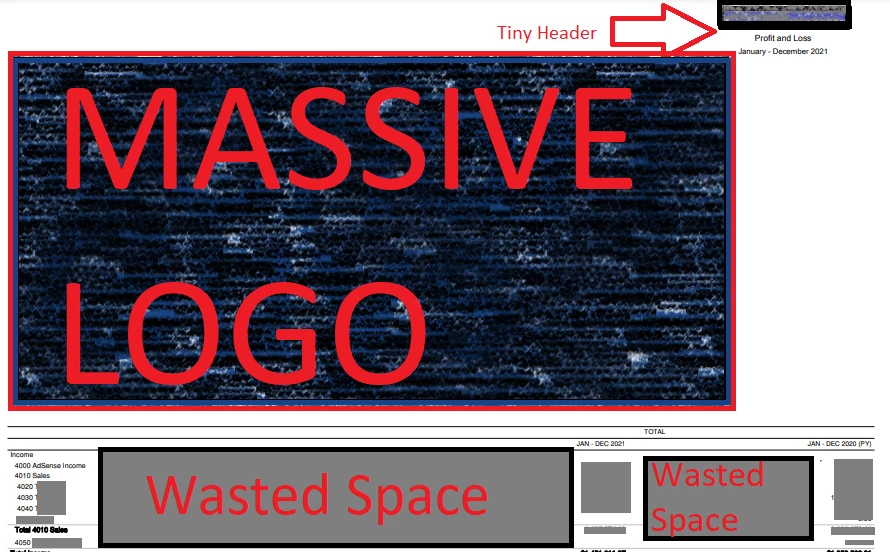
This is just the top of a Profit and loss report. Previously this never happened with this company file. Now you can see the HUGE logo pushes the header over to the upper right and expands the report width. This then creates a large amount of wasted space between the accounts and the first totals, then again to the second set of totals. The areas i've marked out as wasted space were completely blank white space.
We've tested this on maybe a dozen company files on different Computers all using different browsers with cleared Cache and also incognito mode so it's nothing to do with that.
I'm thinking this is a Quickbooks Bug causing the logo size to display at the full resolution uploaded as it only happens in files with decent size logos, you can maybe 'fix it by downsizing the logo and reuploading it but I'm not sure we should have to do that if it's been working for years up until recently??
If you're having this issue, please "Cheer" this post and reply so that hopefully something gets done and it is fixed by intuit.

Thanks
McBride Bookkeeping