Solved
I can't see any report that would show my Accounts Payable by supplier. How can I find this on QBO?
Original commenter did not share additional details


Hi - I am on an EasyStart plan. I am just looking to see my outstanding accounts payable for a specific supplier, but can't seem to find where to see that.
Thanks!
Hey Tonic,
Yeah, unfortunately, @Jen_D was on the right track there with her answer, You do not have "Payables" with the Easy Start Plan, so naturally there's no payables report. See the below screenshot from her Link on "What reports are included in your Plan"
Easy Start is meant to track expenses, not bills, hence the lower tier/price. It suits some people for sure who just track expenses when they are paid.
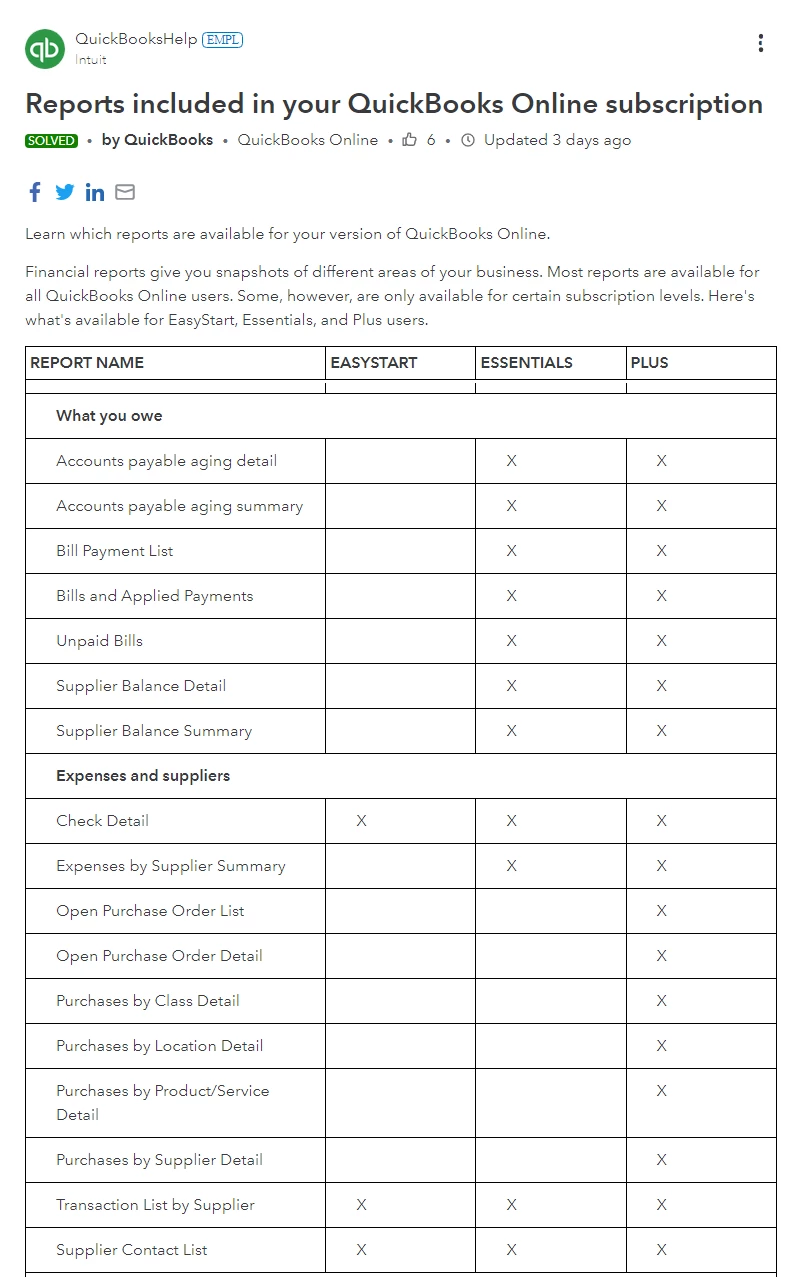
I guess, good new is that you don't' owe anyone anything (at least, according to QBO & yes that was a poor taste joke, sorry, you gotta laugh or cry sometimes, right?) So yeah, the bad news is, the entries you've made so far were all posted as "Expenses" meaning they've been posted as Paid to your Ledgers.
If you have a look at your Balance Sheet it should confirm, you have NO Accounts Payable balance.
So if you're thinking you entered unpaid bills in QBO then I'm afraid they were posted to a bank or Credit Card Account. You'll need to reconcile those in order to find the unpaid items and take them out.
Also you should still be able to pop into your Supplier Menu and look up transactions by Supplier that way, but again, QBO thinks these are paid, and there would be a payment account (Bank or Credit Card) listed on each of them.
I hope this helps get you on the right track but if not, reach out to a QBO Proadvisor in your area or look for a recommendation from a colleague or trusted source. Everything can be fixed with the right knowledge, trust me!
Please mark this answer as a helpful solution if it answers your question
Thanks
McBride Bookkeeping
Enter your E-mail address. We'll send you an e-mail with instructions to reset your password.