May 29, 2019
Solved

How do I enter an HST payment on a used vehcile

  • May 29, 2019
  • 2 replies
  • 0 views

We recently purchased a used vehicle by cheque from a private seller.  The next day when I registered the vehicle I paid the HST owed on the vehicle to the MTO by Visa.  My question is how do I enter the HST portion paid by Visa so that the total amount is an HST credit?  I have only ever purchased new vehicles before where the purchase price and HST were a single transaction.


Thanks
Best answer by Rochelley

Hello @Xarinn ,


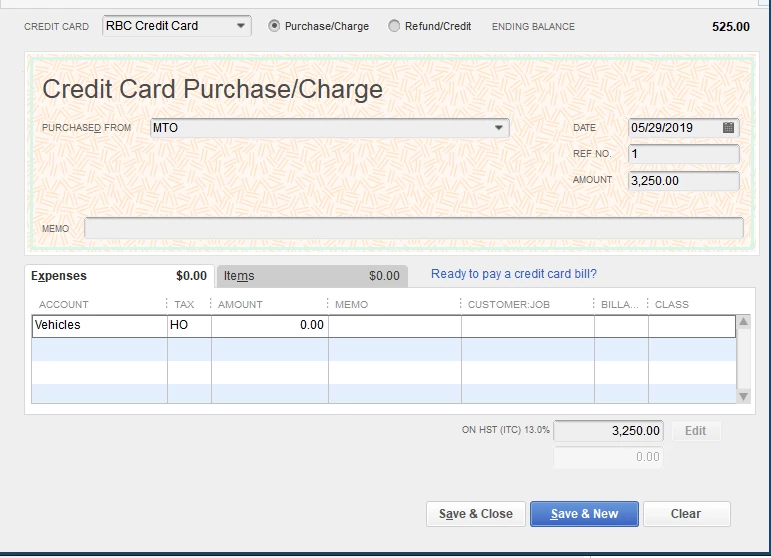
If you are not comfortable making general journal entries then I would suggest the following method:

  1. Open your Visa credit card account from the ledger.
  2. Fill in your payee (MTO, I presume), and enter the amount of the HST payment.
  3. Under the Expenses tab, enter an account (it doesn't really matter which one, but it will be a $0.00 entry so I have used the Vehicle Asset account as it is somewhat related).
  4. Enter your HST tax code.
  5. Enter $0.00 in the amount.
  6. Tab down to the Tax field at the bottom right and manually enter the amount of the HST, which is also the total of your transaction.

You have now successfully recorded your HST cost and it will show up on your tax reports as an ITC.


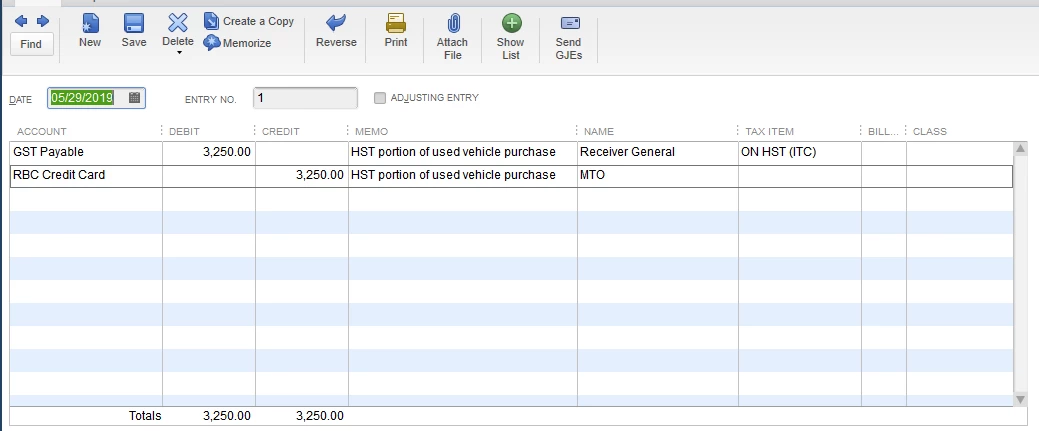
If you are familiar and comfortable with GJE's, then you can also accomplish it this way:

Hope that helps :smileyhappy:


2 replies

May 29, 2019

Hi Xarinn,


Congrats on the new vehicle! I want to make sure you get expert advice on how to enter the HST portion paid by Visa so that the total amount is an HST credit. 


I encourage you to reach out to an accounting professional about this. Our site makes it easy to get in touch with one. You can search for a QBDT accounting professional using just your postal code. Give this a shot and let me know how you make out. I'll be on standby. 

XarinnAuthor
May 29, 2019

Thanks for your reply, I am assuming that this is something that other people have encountered and I hope that there is some way to easily learn how to do this without paying for help...lol.  If all else fails I will definitely reach out to the pro advisors.


Thanks

May 29, 2019

No worries. I'll make sure to reach back to you if I come across any helpful info. :) 

RochelleyAnswer
May 29, 2019

Hello @Xarinn ,


If you are not comfortable making general journal entries then I would suggest the following method:

  1. Open your Visa credit card account from the ledger.
  2. Fill in your payee (MTO, I presume), and enter the amount of the HST payment.
  3. Under the Expenses tab, enter an account (it doesn't really matter which one, but it will be a $0.00 entry so I have used the Vehicle Asset account as it is somewhat related).
  4. Enter your HST tax code.
  5. Enter $0.00 in the amount.
  6. Tab down to the Tax field at the bottom right and manually enter the amount of the HST, which is also the total of your transaction.

You have now successfully recorded your HST cost and it will show up on your tax reports as an ITC.


If you are familiar and comfortable with GJE's, then you can also accomplish it this way:

Hope that helps :smileyhappy:


XarinnAuthor
May 30, 2019

Thank you, both of these methods make sense and I am comfortable doing either.  It’s amazing how simple it seems now.


Thanks again😁