

May 26, 2021
Question

How do I enter tax with the amount more than the duty?

  • May 26, 2021
  • 1 reply
  • 0 views

Hello,


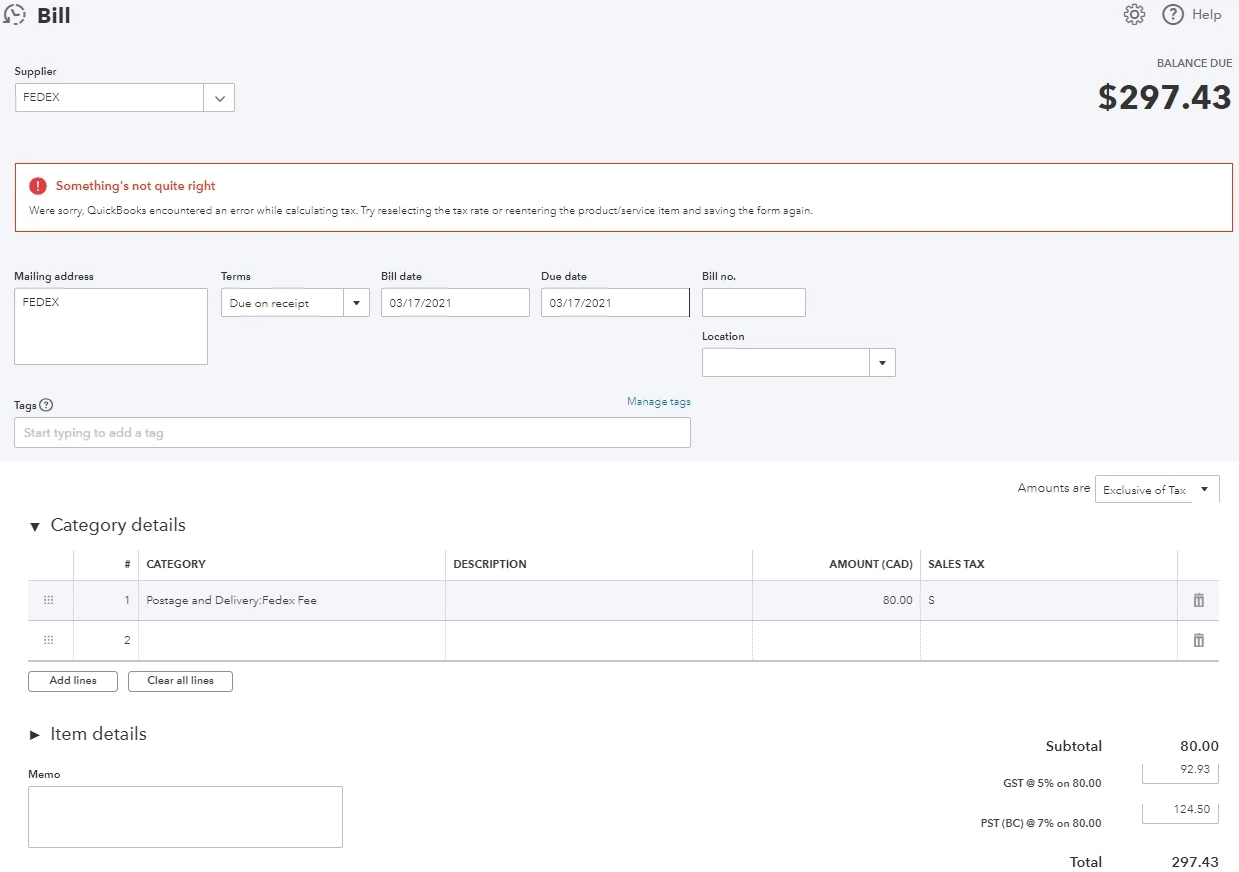
This is the sample of the bill that I'm trying to enter into Quickbooks Online

GST: $88.93

PST: $124.50

Fee: $80

GST on Fee: $4


What I used to do was to enter the fee then change the tax amount manually to match the bill. For some

reason, it just doesn't work anymore and gave me the following error code (see screenshot). Tried to contact support but they said there's no other way to do it. Any advice on work around? Thanks!
 

1 reply

May 26, 2021

Hi kokoli84,


The QuickBooks Community is an excellent place to get answers to your questions. It's wonderful to see that you're using QuickBooks Online for your business needs. Often when the program isn't producing the result, you expect it means that your cache needs to be emptied. Don't worry. I can provide guidance on how to do this.


Each website you open when using the internet downloads cookies into your internet browser's cache. Eventually, it requires emptying, or it begins disrupting communication in internet-based programs like QuickBooks Online. 


To troubleshoot your internet browser, follow these simple steps:

You may be required to log out and back into your QuickBooks Online Account. Between steps, check to see if the issue has resolved itself. 


This should fix your problem as I am unable to replicate the issue. In the case that it's still happening, reach back out. I'm here to help. Warmest regards.​​​​​​​