September 10, 2022
Solved

Unable to create 100% Sales Tax option (Canada/US) (Canadian QB)

  • September 10, 2022
  • 1 reply
  • 0 views

Hi there,

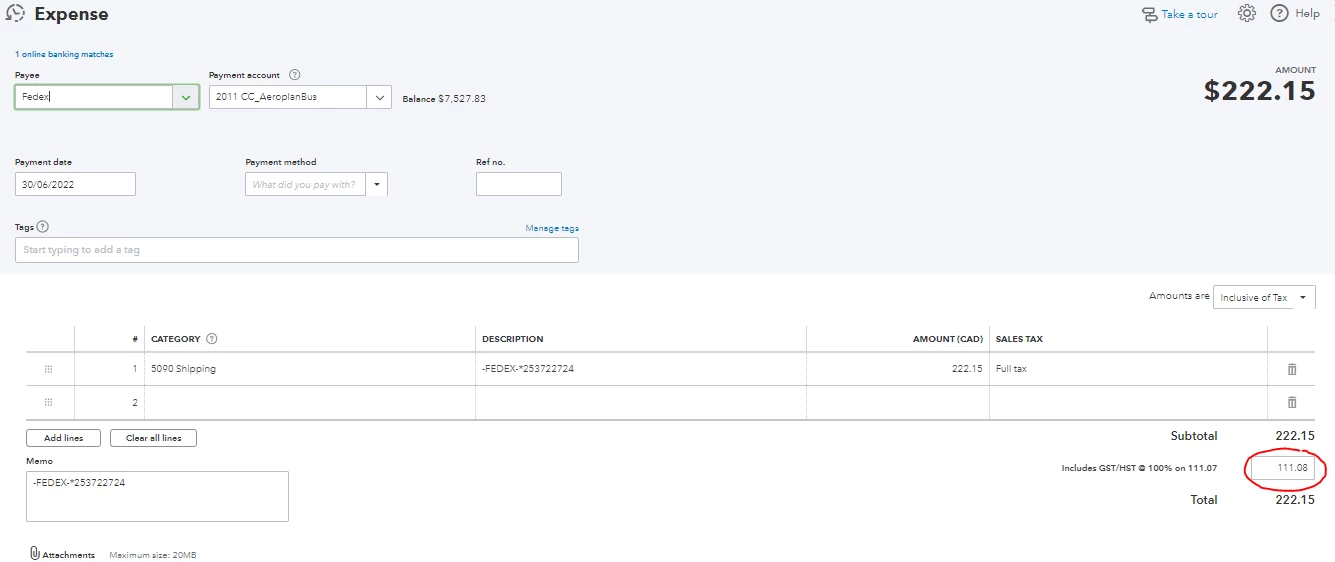
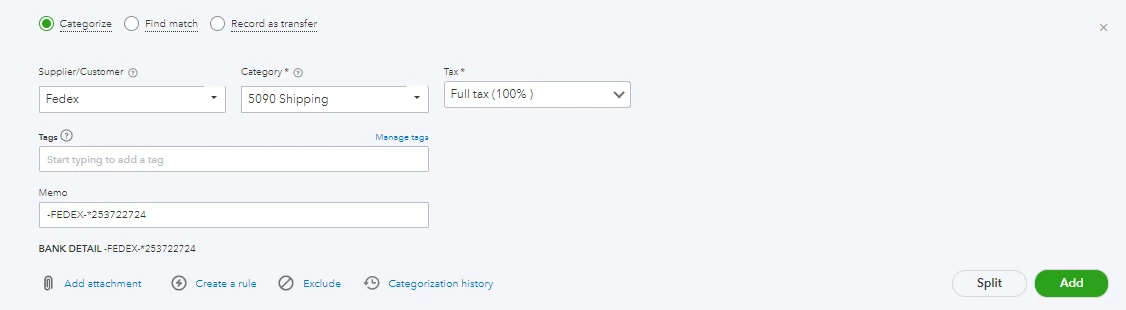
I need to create a 100% sales tax option where an expense is 0% expense and 100% tax. I have some US shipping charges that actually are 100% sales tax. When I create a 100% custom sales tax in Quickbooks, and book the expense to "Shipping" and select my 100% custom sales tax, it recognizes 50% of the expense as "Shipping" and 50% of the expense as sales tax. If I try to book the expense directly to the GST/HST payable account, I get an error that I'm not allowed to do that. So I am unable to correctly categorize the expense as 100% tax.

Thanks in advance.
D

Best answer by randylutic

I often have to enter unusual tax amounts for imported goods.  The import shipper give a bill for excise tax, GST and PST (BC).  GST is more than half the bill!


The only way I have found to do this one is to:

- code the payment to Uncategorized expense

- Do a journal entry to move the amounts to where they need to go:

   - Credit Uncatagorized Expense

   - Debit Excise Tax (in my case)

   - Debit GST Payable for whatever amount you need to (on the right, you will be asked to choose a GST form line to allocate the amount to, so be prepared to answer that as appropriate)

   - Debit PST Payable for whatever amount needed (in my case)


In your case it is the same, just put everyting into Debit GST Payable line.

1 reply

September 10, 2022

I often have to enter unusual tax amounts for imported goods.  The import shipper give a bill for excise tax, GST and PST (BC).  GST is more than half the bill!


The only way I have found to do this one is to:

- code the payment to Uncategorized expense

- Do a journal entry to move the amounts to where they need to go:

   - Credit Uncatagorized Expense

   - Debit Excise Tax (in my case)

   - Debit GST Payable for whatever amount you need to (on the right, you will be asked to choose a GST form line to allocate the amount to, so be prepared to answer that as appropriate)

   - Debit PST Payable for whatever amount needed (in my case)


In your case it is the same, just put everyting into Debit GST Payable line.

September 12, 2022

Hi dneilson and randylutic,


Thanks for reaching out here.  Welcome!  It's important that you're able to record a sales tax expense on imported goods to ensure your books are balanced.  You can record this seamlessly in QuickBooks Online.  I'd be happy to assist!


Here's how to record a transaction for sales tax only;


1. Open Expenses from the left menu and select New transaction

2. Use the ▼ dropdown menu and select Expense

2. Complete the necessary fields for the Payee, Payment account, Payment method and Payment date

3. On the first line, under Category details, select an expense account related to the imported goods in the Account column

4. Enter 0.01 in the Amount column

5. Select a tax code for the tax type paid

6. In the Account column on the second line, select the same account

7. Enter -0.01 in the Amount column

8. Select 'out of scope' for the tax code

9. Edit the fields below the Subtotal to reflect the amount of tax paid for each tax type

10. Hit Save when finished


Should you require additional assistance, please don't hesitate to contact us.  


Schedule a Callback or start a Chat: click (?) Help in the upper right in QuickBooks Online > enter "Contact support" > hit Contact Us > provide a brief summary of your situation > hit Let's Talk > choose Get a callback or Start a Chat.
Social Media: Facebook, Twitter, and Instagram.
Support hours are from Monday to Friday between 9 a.m. and 8 p.m. ET.


Feel free to reach back out if you have any other questions.  We'd love to help!