

September 4, 2020
Question

"You have duplicate sales tax item, account, agency, or code" error

  • September 4, 2020
  • 1 reply
  • 0 views

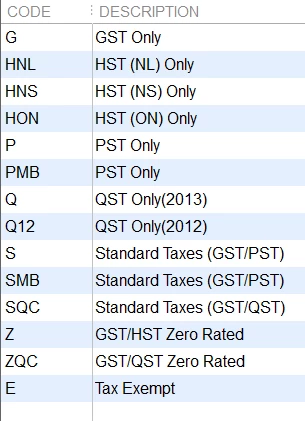
Hi, I am new to QB Canada. I have worked on QB US but never had to deal with sales tax. We have s small office in Ontario with customers and vendors from different regions of the Canada. I am going through each customer and vendor to make sure there is a sales tax code for each province the customers/vendors are in.  I am trying to enter the sales tax code for NB but keep getting: You have duplicate sales tax item, account, agency, or code. What did I do wrong?  The sales tax codes I have are: 
1 reply

September 4, 2020

Hi Novice338,


Having the correct sales tax codes for each province is an integral part of filing your taxes to the government. I can help you get your sales tax set up.


One of the great parts of QuickBooks Desktop is how easy it is to set up your sales tax item and agencies as it is all programmed in already. In order to set up your sales tax by province just go to: Sales Tax>Manage Sales Tax>Change Tax Setup. From there you just need to select add the Provincial sales tax for a different province and then just check the provinces you do business in. If you receive an error I suggest deleting any sales tax codes you have made on your own before hand.Once done you just need to select the right sales tax code on any invoice and it'll assign the taxes to the correct sales tax agency.


You can also file your sales tax when its due by going to: Sales Tax>File Sales Tax. Just select the agency you wish to file for and it'll populate all the sales tax owed and any credits you have. Then just click the file return at the bottom and follow the prompts.


Have a great one!