June 16, 2021
Solved

Am I able to produce a client statement of account? To send to a client detailing amount of outstanding invoices.

  • June 16, 2021
  • 1 reply
  • 0 views
Original commenter did not share additional details

Best answer by ShiellaGraceA

Thanks for coming by, @michael-jones-ad.


I have some information about producing a client's statement. While this option isn't available in QBSE, you'll want to filter your customer name and then print the invoice page. Let me guide you how.
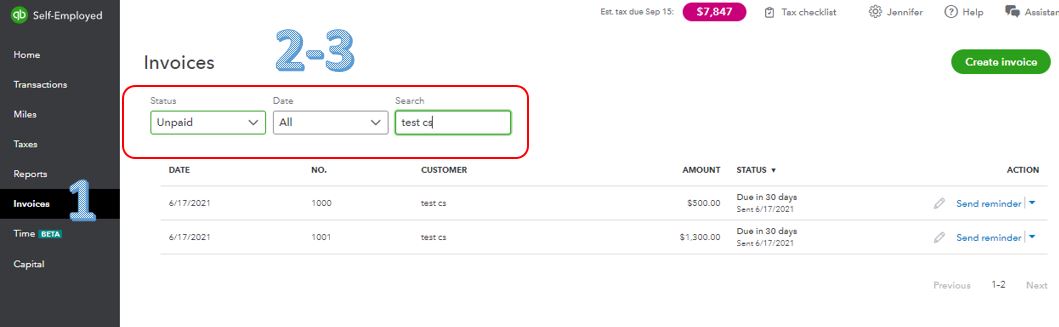
 

  1. Go to Invoices.
  2. Change the Status drop-down to Overdue or Unpaid.
  3. In the Search field, type in your customer name.
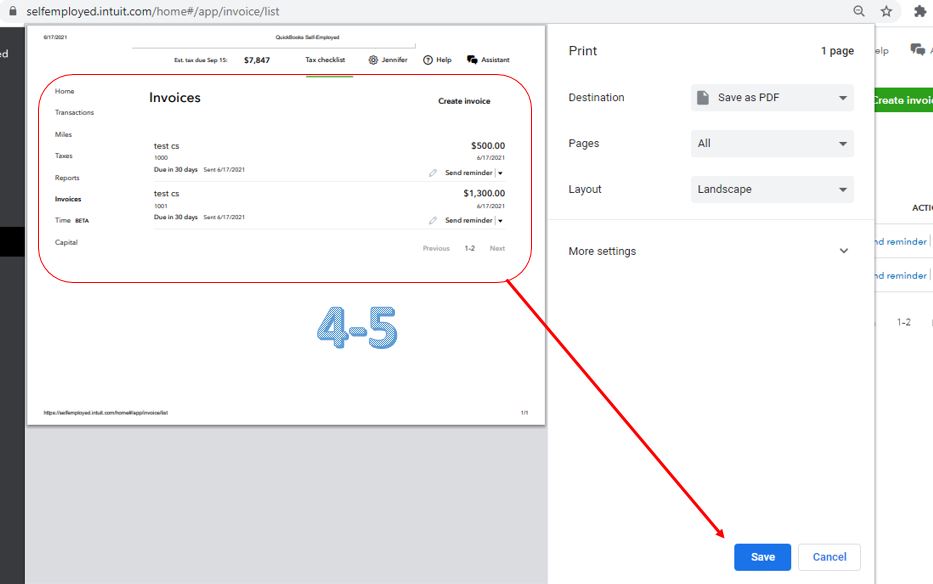
  4. On your keyboard, press CTRL+P.
  5. Click Save and then save the file. See the image below.


With the above steps, you're able to print the saved PDF invoices list and attach it to your email.


I've added this link here in case you need help with other tasks in QBSE. Just look for topics that fit your concern.


Drop a reply anytime if you have follow-up questions or concerns. I'll be here for you. Take care and have a wonderful day ahead.

1 reply

June 16, 2021

Thanks for coming by, @michael-jones-ad.


I have some information about producing a client's statement. While this option isn't available in QBSE, you'll want to filter your customer name and then print the invoice page. Let me guide you how.


  1. Go to Invoices.
  2. Change the Status drop-down to Overdue or Unpaid.
  3. In the Search field, type in your customer name.
  4. On your keyboard, press CTRL+P.
  5. Click Save and then save the file. See the image below.


With the above steps, you're able to print the saved PDF invoices list and attach it to your email.


I've added this link here in case you need help with other tasks in QBSE. Just look for topics that fit your concern.


Drop a reply anytime if you have follow-up questions or concerns. I'll be here for you. Take care and have a wonderful day ahead.
