Thank you for visiting the QuickBooks Community, @Kevloic. I’m here to help you clear up things about your transactions.
Your Retained Earnings represent the total of your annual profits or losses from your Income Statement. QuickBooks automatically transfers these entries from your Income Statement to your Balance & Sheet when a new fiscal year starts. That’s why these transactions are still posted on your RE.
For the best advice of correcting your transactions from Retained earnings to Drawing, I recommend reaching out to your accountant. They’re able to provide an expert’s advice so we can to ensure your books are accurate. This is because deleting a transaction might affect your financial data and may cause discrepancies in the future.
You’ll want to view your Profit and Loss report to review what makes up your Retained Earnings. If there are slight differences with your P&L and RE, you can also review the Retained Earnings account Quick Report.
Regarding the Undeposited Funds, it’s a special temporary account that holds invoice payments and sales receipt. It's comparable to a drawer where we retain payments before taking them to the bank to be deposited. It's not an actual bank accounts which is why there's no option to reconcile it in QBO.
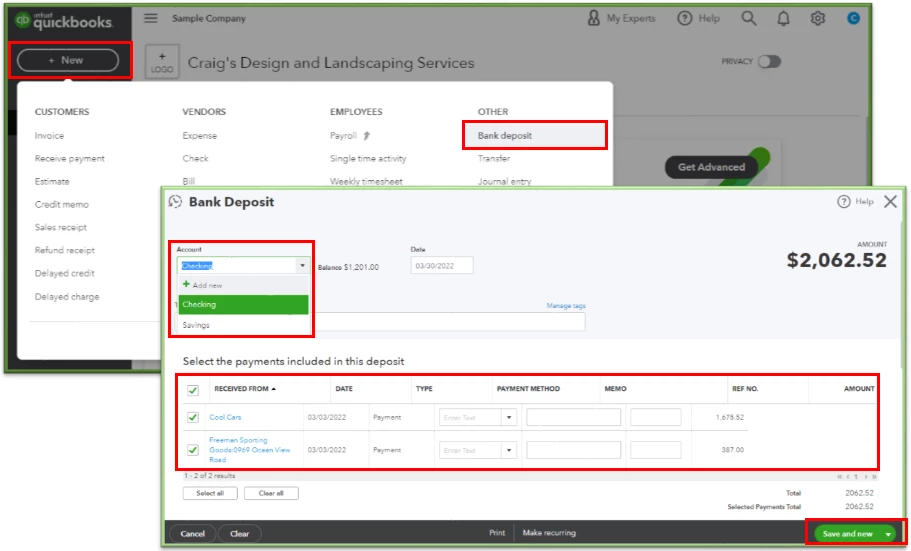
In order to resolve this, you’ll need to combine the deposit or deposit them by group. This is so QuickBooks will recognize your payments if your real life bank acknowledge it as a single deposit. Then, we can deposit them to their relevant bank accounts first. From there, we can reconcile the bank where we deposited the funds to.
Here’s how:
- Tap the New menu in the upper left to select Bank Deposit under Other.
- Click the Account drop-down to select the correct bank.
- In the Select the payments included in this deposit section, tick the boxes for the transactions you’re going to deposit.
- Hit Save and close to keep the changes.
Let me share these articles with you for more details about Undeposited Funds:
I'd also like to give you these articles for additional guidance and reference about using the Undeposited Funds account in QBO:
I've attached this link that will help us clearing the undeposited funds and the reconciliation workflow.
Just tap me on my shoulder if you have more something to ask about correcting your transactions and clearing your undeposited account. I'll be here to assist and provide you more details of your query. Keep safe.

