August 14, 2021
Solved

As new self employed photographer, how and as what expense should I record Equipment purchases? Camera, lens, lighting.

  • August 14, 2021
  • 1 reply
  • 0 views

As new self employed photographer, how and as what expense should I record Equipment purchases? Nikon Camera, lens, lighting equipment? There isn't any Equipment category. Also is this kind of equipment valid as expense?
I'm recording this as Other Expenses for now.

How About books I bought to learn Photoshop/Lightroom etc. Does this count as training? 

Help :) I do not want to get in trouble with HRMC

Best answer by Rasa-LilaM

I’m glad to see you in the Community, JDPIXUK.


Let me guide you in the right direction on how to track your equipment purchases.


Based on the details shared, you can consider classifying the transactions under Office Expenses. This category is used to track the following: Telephone and fax running costs, postage, stationery, printing, and small office equipment and software costs.


If you wish to change the category, let me share the steps on how to do this in QuickBooks Self-Employed (QBSE). We’ll have to go to the Transactions page to accomplish this task.


  1. In your company, tap the Transactions menu to view all entries.
  2. Choose the transaction you’re working on and click the arrow to the right to edit it.
  3. Then click the Other expenses link to show the list of categories.
  4. Choose Office Expense from the list of categories.
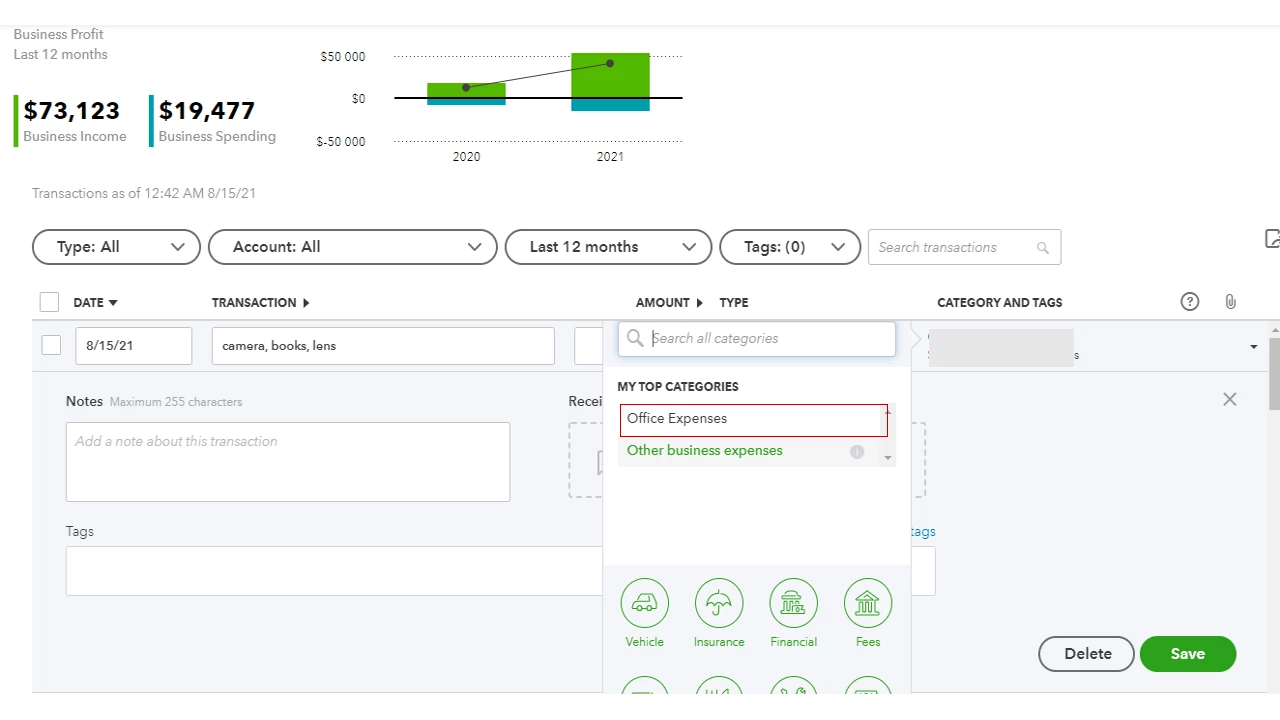
  5. Press Save to keep the changes.


As always, I suggest consulting with an accountant for further assistance. They can recommend which SA103F Categories are used to track your equipment and books. This also ensures your taxes and forms have the correct information.


To get acclimated to the deduction categories, tap here to view the complete list. From there, you’ll see which box your expense is reported in.


Additionally, this link contains articles that will guide you on how to perform any tasks in QBSE: Self-help resources. It includes topics about banking, account management, mileage tracking, self-assessment tax return, etc.


If you have any other questions or concerns about categorizing transactions, click the Reply button and add a comment. I'll be right here to answer them for you. Have a nice day!


1 reply

August 14, 2021

I’m glad to see you in the Community, JDPIXUK.


Let me guide you in the right direction on how to track your equipment purchases.


Based on the details shared, you can consider classifying the transactions under Office Expenses. This category is used to track the following: Telephone and fax running costs, postage, stationery, printing, and small office equipment and software costs.


If you wish to change the category, let me share the steps on how to do this in QuickBooks Self-Employed (QBSE). We’ll have to go to the Transactions page to accomplish this task.


  1. In your company, tap the Transactions menu to view all entries.
  2. Choose the transaction you’re working on and click the arrow to the right to edit it.
  3. Then click the Other expenses link to show the list of categories.
  4. Choose Office Expense from the list of categories.
  5. Press Save to keep the changes.


As always, I suggest consulting with an accountant for further assistance. They can recommend which SA103F Categories are used to track your equipment and books. This also ensures your taxes and forms have the correct information.


To get acclimated to the deduction categories, tap here to view the complete list. From there, you’ll see which box your expense is reported in.


Additionally, this link contains articles that will guide you on how to perform any tasks in QBSE: Self-help resources. It includes topics about banking, account management, mileage tracking, self-assessment tax return, etc.


If you have any other questions or concerns about categorizing transactions, click the Reply button and add a comment. I'll be right here to answer them for you. Have a nice day!