February 28, 2020
Solved

Can I create and send invoices without the amount appearing as a credit until the invoices are actually paid as some customers are slow to pay

  • February 28, 2020
  • 2 replies
  • 0 views
Original commenter did not share additional details
Best answer by JaneD

Hi info797,


You can remove any credits applied on the invoice before sending it your customer. I'll show you how.


  1. Open the invoice.
  2. Click on the 1 payment link under Receive payment.
  3. Click on the date link to open the credit note.
  4. Remove the checkmark next to the credit note transaction.
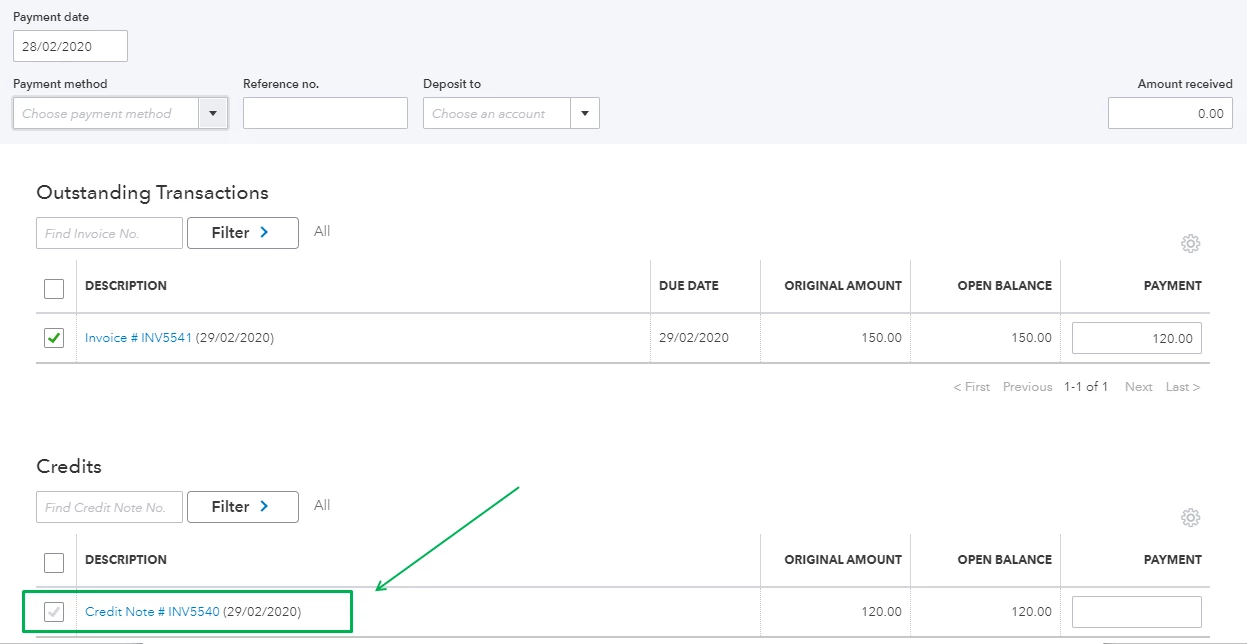
  5. Click on Save and close and choose Yes to confirm.
  6. Then, send the invoice to your customer.

You might want to disable the Automatically apply credits feature in your company settings. Most companies disabled this feature that requires security deposits on invoices.


  1. Click on the Gear icon and choose Account and Settings.
  2. Go to Advanced.
  3. Click on the pencil icon to edit the Automation section.
  4. Uncheck the Automatically apply credits box.

I'm linking an article in case you want to enter and apply credit notes and delayed credits in QuickBooks Online (QBO).


We'll be around if you have any other concerns. We're here to help. 

2 replies

JaneD
JaneDAnswer
February 28, 2020

Hi info797,


You can remove any credits applied on the invoice before sending it your customer. I'll show you how.


  1. Open the invoice.
  2. Click on the 1 payment link under Receive payment.
  3. Click on the date link to open the credit note.
  4. Remove the checkmark next to the credit note transaction.
  5. Click on Save and close and choose Yes to confirm.
  6. Then, send the invoice to your customer.

You might want to disable the Automatically apply credits feature in your company settings. Most companies disabled this feature that requires security deposits on invoices.


  1. Click on the Gear icon and choose Account and Settings.
  2. Go to Advanced.
  3. Click on the pencil icon to edit the Automation section.
  4. Uncheck the Automatically apply credits box.

I'm linking an article in case you want to enter and apply credit notes and delayed credits in QuickBooks Online (QBO).


We'll be around if you have any other concerns. We're here to help. 

paul72
February 29, 2020

Hi @info797 

Your question is rather vague.  Is it VAT you're concerned about?

Posting an invoice today (VAT becomes payable) but you don't receive customer's payment for a month or two?


Unfortunately, this is one of the joys of business & Accrual VAT.


If this is the main issue, you can apply to HMRC to join Cash VAT Scheme (https://www.gov.uk/vat-cash-accounting-scheme).

You can then (& only once you have joined the scheme) set QBO to Cash VAT Tracking & it will accrue VAT owed on payment date rather than invoice date.


Hope this helps.