
January 12, 2020
Solved

Can I list all transactions by date orderwith the most recent entry at the top?

  • January 12, 2020
  • 1 reply
  • 0 views
Original commenter did not share additional details

Best answer by JasroV

Yes, you can, @williambetteridg.


You can toggle the Date to arrange the transactions by most recent entry. Here's how.


In your QuickBooks Online (QBO):
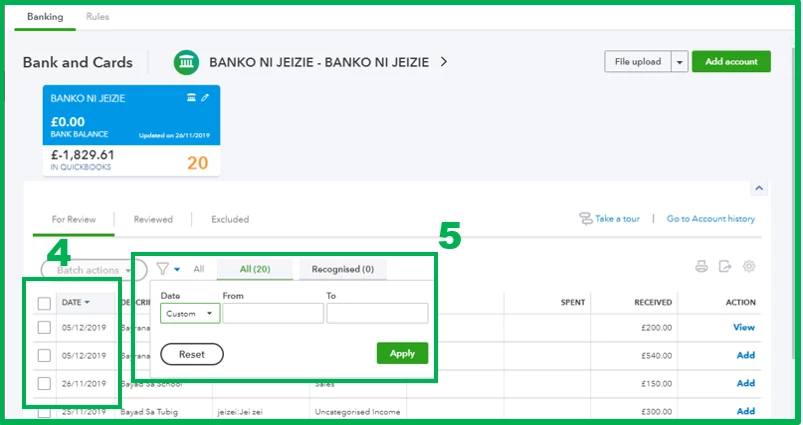
  1. Go to the Banking menu and select the Banking tab.
  2. Choose your preferred bank.
  3. Under the For Review tab.
  4. Toggle the Date column and ensure the arrow is facing down.
  5. You can also click the Filter icon and adjust it to your desired date. 
  6. Once done, click Apply.

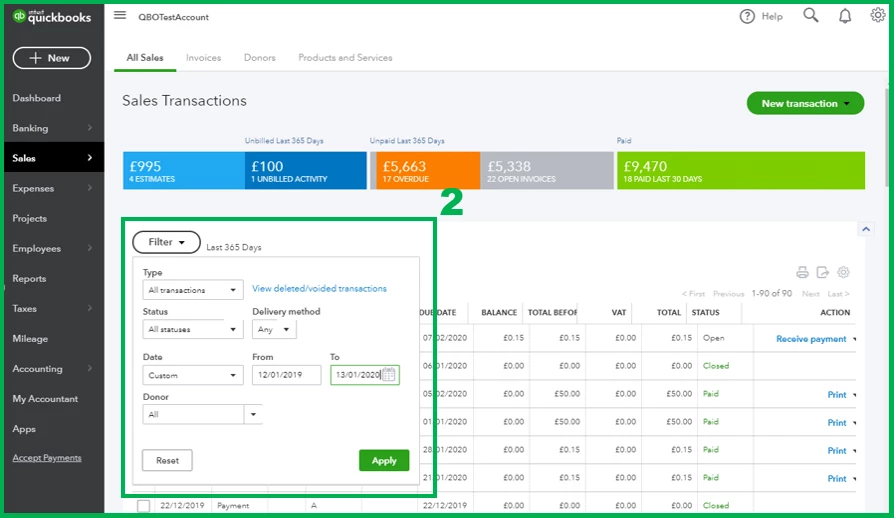
However, if you're referring to your sales transactions, you can go to the Sales menu and select the All Sales tab. From there:
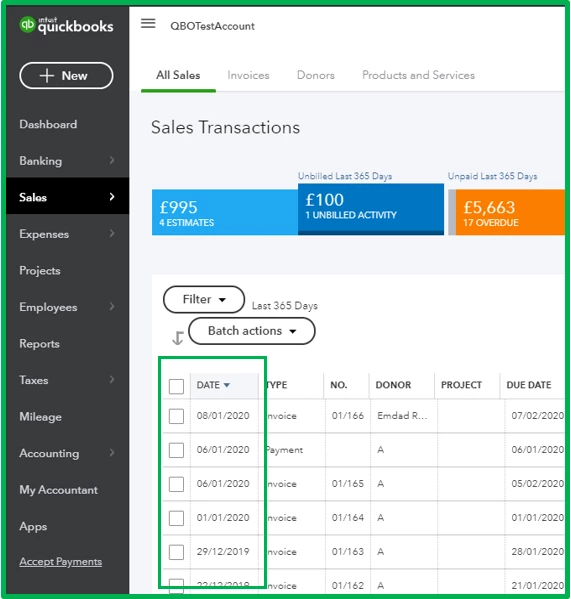
  1. Toggle the Date column and ensure the arrow is facing down. 
  2. You can also select Filter and adjust it to your preferred date.
  3. Click Apply. 

In case you want to learn some tips or tricks on managing your QBO account, you can always visit our Help articles page for reference.


Don't hesitate to get in touch with us if you have other concerns or questions. I'd be happy to help. Take care!


1 reply

JasroV
JasroVAnswer
January 12, 2020

Yes, you can, @williambetteridg.


You can toggle the Date to arrange the transactions by most recent entry. Here's how.


In your QuickBooks Online (QBO):

  1. Go to the Banking menu and select the Banking tab.
  2. Choose your preferred bank.
  3. Under the For Review tab.
  4. Toggle the Date column and ensure the arrow is facing down.
  5. You can also click the Filter icon and adjust it to your desired date. 
  6. Once done, click Apply.

However, if you're referring to your sales transactions, you can go to the Sales menu and select the All Sales tab. From there:

  1. Toggle the Date column and ensure the arrow is facing down. 
  2. You can also select Filter and adjust it to your preferred date.
  3. Click Apply. 

In case you want to learn some tips or tricks on managing your QBO account, you can always visit our Help articles page for reference.


Don't hesitate to get in touch with us if you have other concerns or questions. I'd be happy to help. Take care!
