May 13, 2020
Solved

Can someone explain why my customer sales invoices appear under Accrued Income in the Trial Balance instead of Trade Debtors. Thanks

  • May 13, 2020
  • 1 reply
  • 0 views
Original commenter did not share additional details
Best answer by MaryLandT

Hi there, email7,


The invoice may have been posted to the Accrued Income account. That's why it's not showing under Trade Debtors.


You'll want to open the invoice and change the posting account from there. Make sure to select the correct account so you have accurate records in your books.


Let me show you how:

  1. On the Invoice page, click More, then pick Transaction journal.
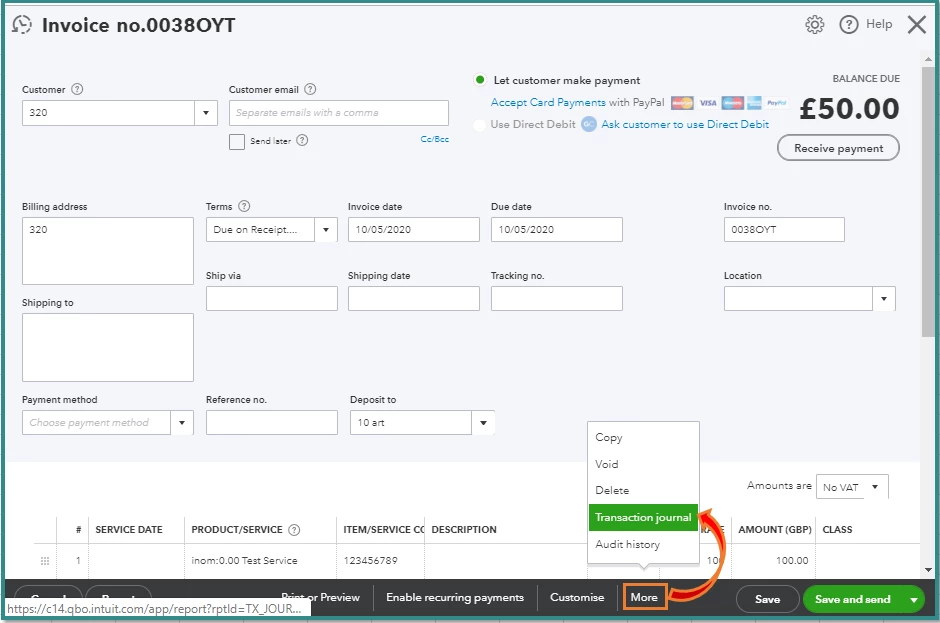
  2. Under the Account column, you'll the account used to track the sales.
  3. You can select the correct category for the item on the Invoice page.

I've added the Understand the chart of accounts for the list of accounts and balances in QuickBooks Online.


Keep me posted if there's anything else you need. I'm always around to help.


Thank you and stay safe!

1 reply

MaryLandT
MaryLandTAnswer
May 13, 2020

Hi there, email7,


The invoice may have been posted to the Accrued Income account. That's why it's not showing under Trade Debtors.


You'll want to open the invoice and change the posting account from there. Make sure to select the correct account so you have accurate records in your books.


Let me show you how:

  1. On the Invoice page, click More, then pick Transaction journal.
  2. Under the Account column, you'll the account used to track the sales.
  3. You can select the correct category for the item on the Invoice page.

I've added the Understand the chart of accounts for the list of accounts and balances in QuickBooks Online.


Keep me posted if there's anything else you need. I'm always around to help.


Thank you and stay safe!

