May 10, 2022
Solved

Can you unvoid a invoice?

  • May 10, 2022
  • 1 reply
  • 0 views
Original commenter did not share additional details

Best answer by Kurt_M

Thanks for taking the time to post this here in the Community, @Johnvcd. I'll share some information about your invoice concern in QuickBooks Online (QBO).


If an invoice is voided, you'll need to recreate it so you can proceed to record it back. You can utilize the Audit Log feature to get the exact information that was on the invoice. Here's how:


  1. Go to the Settings :gear: menu.
  2. Choose Audit Log.
  3. Click the Filter button.
  4. Use the fields on the Filter panel to choose the appropriate User, Date, or Events filter to narrow the results.
  5. Click Apply.


You can refer on the screenshot that I've added below for visual reference.
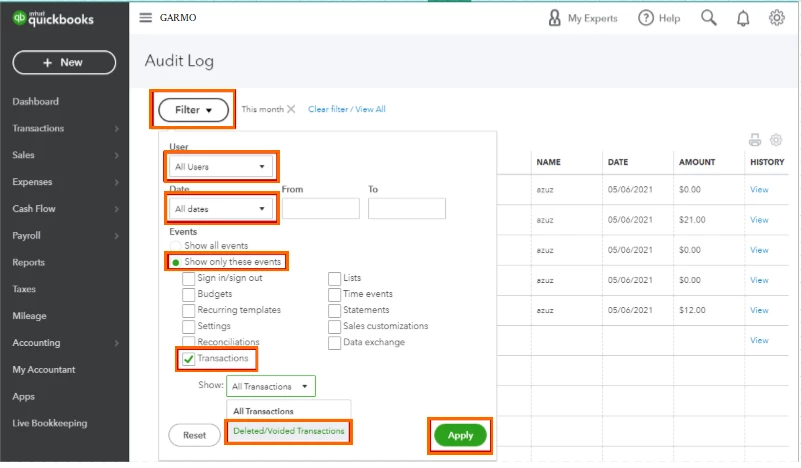


After performing the steps above, you’re now ready to manually re-enter the invoice. For further details, please see this resource: How to create an invoice.


I've also got you these handy articles to help you in the future:


You can also count on us if you need help performing QuickBooks-related tasks. Let us know by leaving a comment down below. Rest assured, we'll be there to help you. Take care!
 

1 reply

Kurt_MAnswer
May 10, 2022

Thanks for taking the time to post this here in the Community, @Johnvcd. I'll share some information about your invoice concern in QuickBooks Online (QBO).


If an invoice is voided, you'll need to recreate it so you can proceed to record it back. You can utilize the Audit Log feature to get the exact information that was on the invoice. Here's how:


  1. Go to the Settings :gear: menu.
  2. Choose Audit Log.
  3. Click the Filter button.
  4. Use the fields on the Filter panel to choose the appropriate User, Date, or Events filter to narrow the results.
  5. Click Apply.


You can refer on the screenshot that I've added below for visual reference.


After performing the steps above, you’re now ready to manually re-enter the invoice. For further details, please see this resource: How to create an invoice.


I've also got you these handy articles to help you in the future:


You can also count on us if you need help performing QuickBooks-related tasks. Let us know by leaving a comment down below. Rest assured, we'll be there to help you. Take care!
