It’s completely understandable to feel a bit overwhelmed with managing transactions, oshea. I'm here to guide you through every step of the process to remove any discrepancies.
There’s no need to create a new account. You can either manually exclude the bank transactions with discrepancies or delete the bank account to permanently remove all of its historical transactions and data. However, please note that deleting the account will impact your tax information, reports, charts, and other data throughout the app.
Here's how:
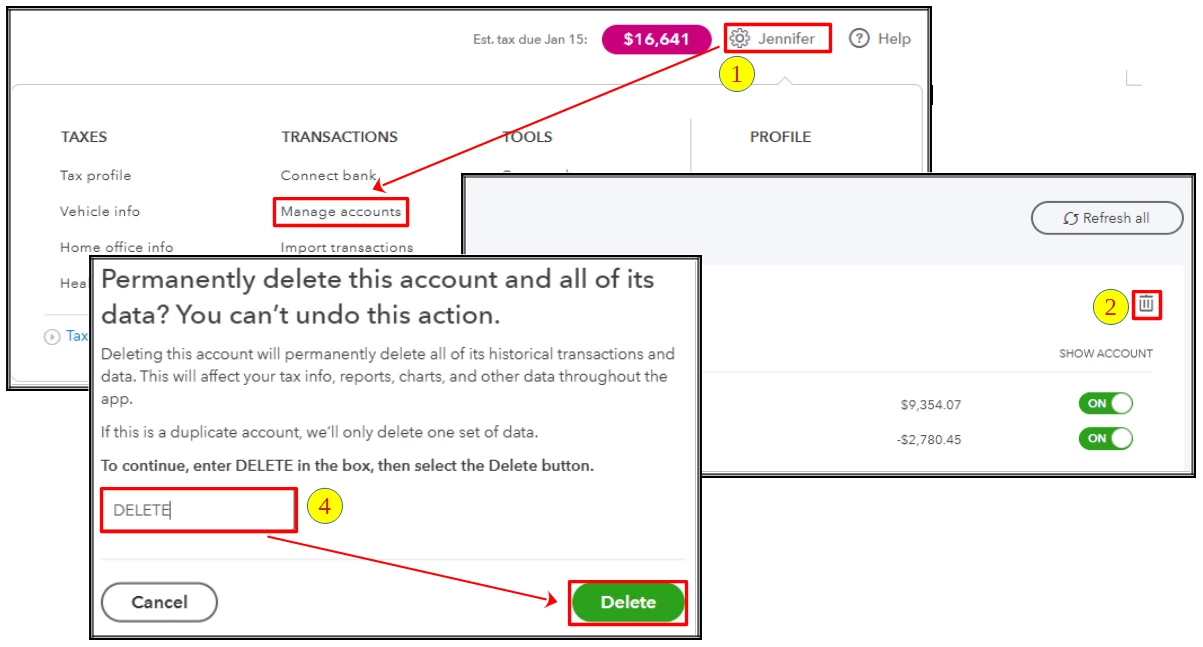
- Go to the Gear icon and select Manage accounts.
- Navigate to your bank and click the Trash Can icon.
- A prompt will appear. Please read it carefully.
- To proceed, enter DELETE in the designated field and click the Delete button.
- Then, manually import the transactions again.
Additionally, you can refer to this article for guidance about organizing your transactions: Categorise transactions in QuickBooks Self-Employed.
Please don't hesitate to reach out if you need further assistance with the deletion process, oshea. We're always here to help you in any way we can.

