Thank you for visiting the Community today, Je1640.
It’s my priority that you can email all your customer’s invoices smoothly. Let’s clear and re-enter your email address to refresh the delivery option.
Before proceeding, you may want to ask your customer to check their junk mail and spam folders. If the emailed invoices are not there, remove and re-enter your email address. I’m here to help and show you the steps.
Here’s how:
- Open your company and head to the Gear icon in the upper right to select Account and settings under Your Company.
- Tap the Company menu on the left panel and click the Pencil icon for Contact info to update the information.
- In the Company email field, clear the email address and enter the desired address as is, even if it appears correct.
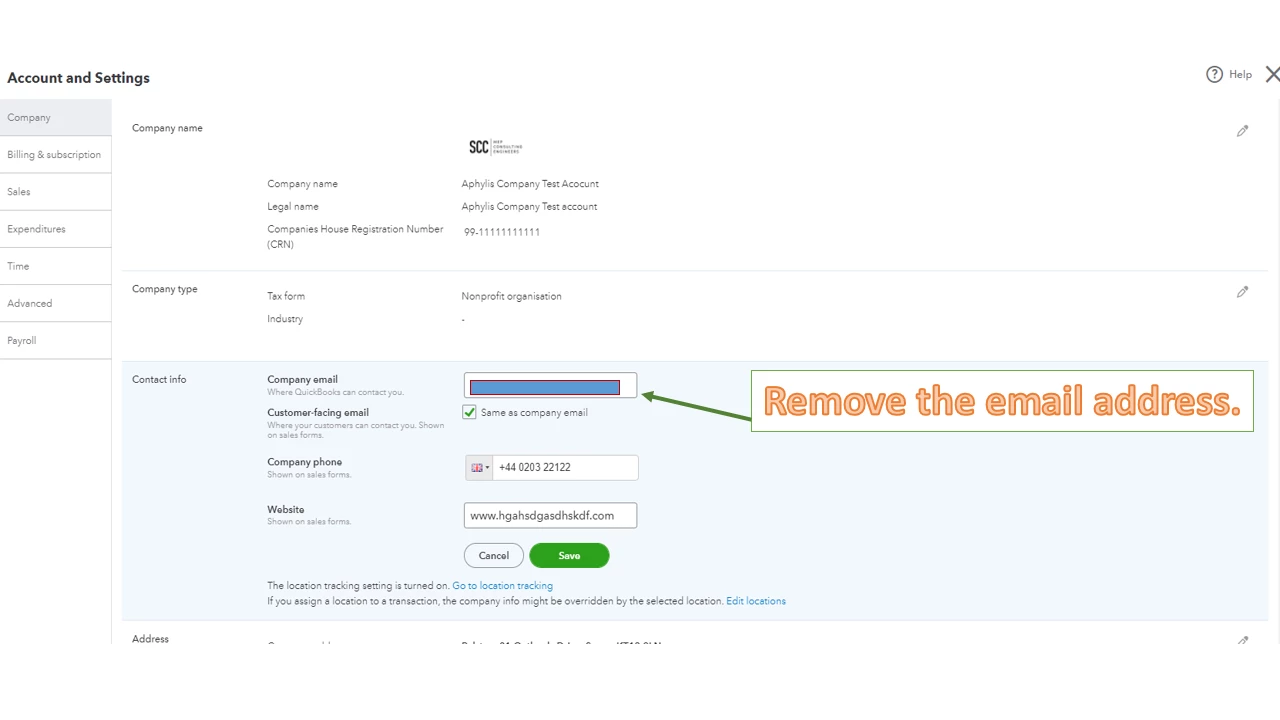
- Make sure not to use any extra characters or spaces before, within, or after the address you enter.
- Click Save and Done.
Then, send a test email. If you continue to get the same result, use another email with a different domain.
If none of these suggestions work, configure the server to accept QuickBooks Online mail server hostnames and IP addresses. Follow the steps in this article: 3 solutions for you when customers aren't receiving your emails. Then proceed to Solution 3.
Also, this reference contains solutions to help resolve when you’re having issues sending invoices or estimates to your customers: Delivery Errors when trying to email a sales form. From there, you’ll see the supported size for attachments, ways to remove special characters from documents, and so on.
You can bookmark this link in your browser for future reference: How to view list of bounced emails with delivery errors. It’s from another region, but the steps still apply in the UK version. The article outlines the steps on how to view the list of bounced emails as well as troubleshooting tips about sales forms not received by customers.
Reach out to me again if you have other questions or concerns about emailing sales forms. I’m always here ready to assist further. Have a good one.

