February 23, 2021
Solved

Hi, how do I show the gross on a labour invoice when the tax is set to inclusive?

  • February 23, 2021
  • 2 replies
  • 0 views
Original commenter did not share additional details

Best answer by jamespaul

Hello, lukeejh86.


Good to have you back! I hope you're doing well. I'll take it from here and give some details about the reflected amounts on an invoice.


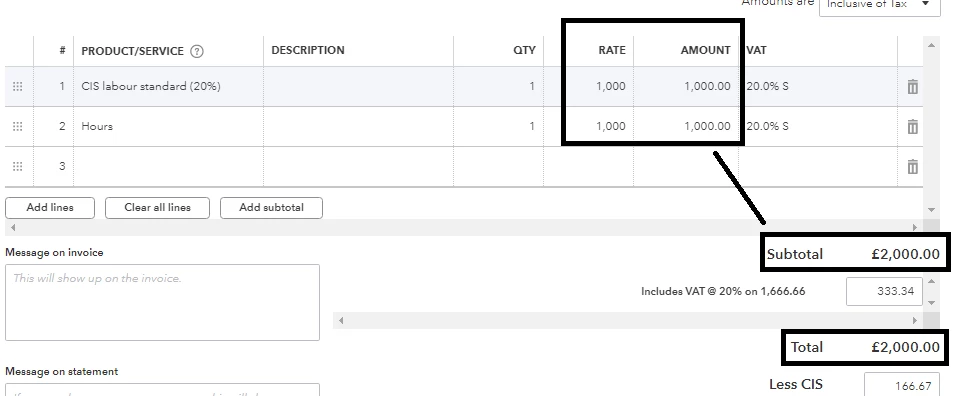
The gross amount on an invoice (the amount under the RATE or AMOUNT column) will show beside the Subtotal and Total sections.


When previewed or printed, the amount will show under the Total section instead. Here's a visual representation: 


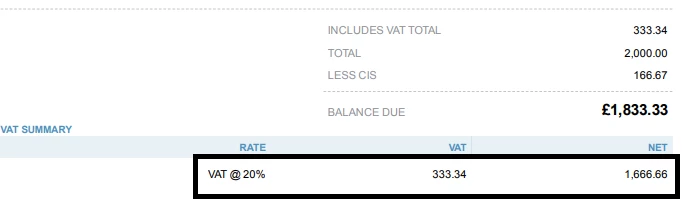
Also if you're looking to find the gross amount less the VAT, you can locate it beside the Includes VAT section. On the printed side, this will be shown on the VAT Summary section. 


If you need help printing an invoice, this article can point you in the right direction: How to email or print an invoice


Ready to file your CIS? This help article can guide you through the process: Filing CIS in QuickBooks Online


You can count on me again if you have more questions on QuickBooks Online. Reply here and I'll get back to you as soon as possible. 

2 replies

February 23, 2021

Hi lukeejh86 We'd be grateful if you can clarify your question please.🙏🏻 Are you attempting to create an invoice relating to CIS and wanting to allocate VAT to the gross amount?🤔

lukeejh86Author
February 23, 2021

hi John.


can I show the gross on a labour invoice with the tax set to inclusive with 20% vat? when I write out the invoice it shows the amount then takes away the 20% tax (cis) and adds the 20%vat. just wondering if I can show the gross on it also. thanks 

jamespaulAnswer
February 23, 2021

Hello, lukeejh86.


Good to have you back! I hope you're doing well. I'll take it from here and give some details about the reflected amounts on an invoice.


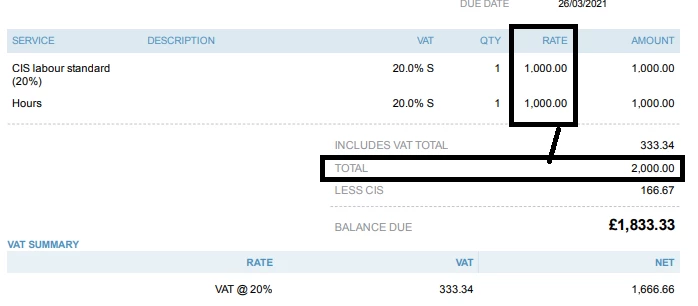
The gross amount on an invoice (the amount under the RATE or AMOUNT column) will show beside the Subtotal and Total sections.


When previewed or printed, the amount will show under the Total section instead. Here's a visual representation: 


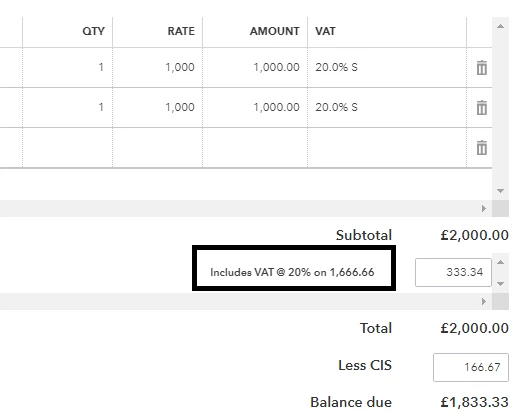
Also if you're looking to find the gross amount less the VAT, you can locate it beside the Includes VAT section. On the printed side, this will be shown on the VAT Summary section. 


If you need help printing an invoice, this article can point you in the right direction: How to email or print an invoice


Ready to file your CIS? This help article can guide you through the process: Filing CIS in QuickBooks Online


You can count on me again if you have more questions on QuickBooks Online. Reply here and I'll get back to you as soon as possible.