November 5, 2020
Solved

Hi, I am running the app on Android. I cannot see any activity on any invoices that are over a year old. Why is this?

  • November 5, 2020
  • 1 reply
  • 0 views
Original commenter did not share additional details

Best answer by MadelynC

Ok, thanks. So am I right in saying that this information can only be pulled up on desktop/browser and not through the Android app?? Bit pointless for me if I cant access it easily on my phone app...


I hear your sentiments, John.


Yes, you’re right. You’ll want to log in to your QuickBooks Online (QBO) account through a web browser to get data of your more-than-a-year activities.


No worries, the Community recognizes feedback and product suggestions to make the program better. You can send this idea through your QBO company file so our management and engineering teams can take action to help improve your experience. I’ll show you how:
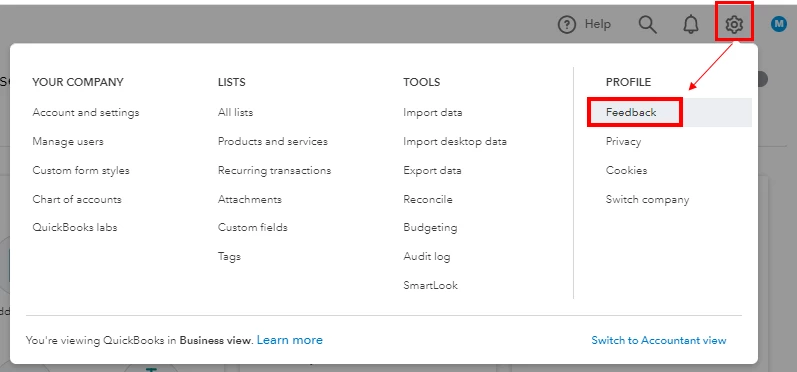
 

  1. Open your QuickBooks account in a browser.
  2. Go to the Gear icon, then select Feedback.
  3. Enter your suggestions, then select Next.
  4. You'll be provided a list of suggested Help articles related to your comment. You can select Skip and send message.
  5. From the drop-down, choose the appropriate category, then press Send message.


You can track feature requests through the QuickBooks Online Feature Requests website.


Our Support page contains resources, video tutorials, and tips to manage your company files. If you need more information, feel free to visit the site.


Let me know if you have any additional questions or concerns with your data. We'll be here to help.

1 reply

November 5, 2020

Good to see you here, johnthelocksmith.


All your invoice transactions will show up on both desktop and mobile apps. I recommend clearing your app's data to refresh the connection and fix data-related issues like missing invoices.


You can clear the data from the QuickBooks Online app by following these steps:

  1. From More Options ⋮, select on Settings.
  2. Tap on Refresh Data.
  3. Choose on Yes.

If you get the same thing, I suggest uninstalling and reinstalling the app.


Keep me posted on how this works. I'd be more glad to help. Take care!

November 5, 2020

I have tried both refreshing data and uninstalling the app then reinstalled, it doesn't solve the issue. If I run on ios there is no problem and I can see all previous activity going back to when I first started invoicing with quickbooks. On android anything over approximately a year disappears from the all activity which is very frustrating considering I'm paying £25 a month for not being able to see invoices for my historical customers
