Solved
Hi, I'm trying to send an EPS for CIS suffered. But not showing one to send. I added CIS after receiving payment from contractor on invoice. Can anyone help, please?
Original commenter did not share additional details


Hello, rapidcut.
I can definitely help you with the missing EPS submission for CIS Suffered.
An EPS submission will appear after running payroll. There are also a number of reasons why it won't show:
You can find more details about EPS here: Submit EPS to HMRC in QuickBooks Online Standard Payroll.
You'll want to check if you still have outstanding payrolls. If you need help completing them, you can check these articles:
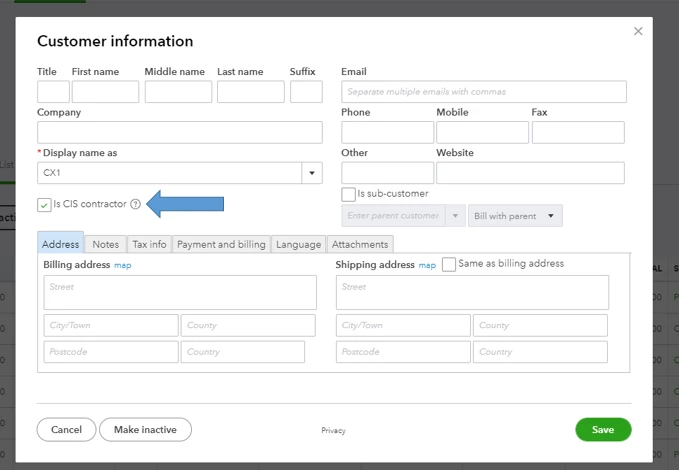
Next, you'll also want to check your CIS tracking settings. Let's make sure your customers are tagged as CIS contractor.
Go to Sales, then head over to the Customers tab. Open the customer's profile, then check to see if the Is CIS contractor box is enabled.
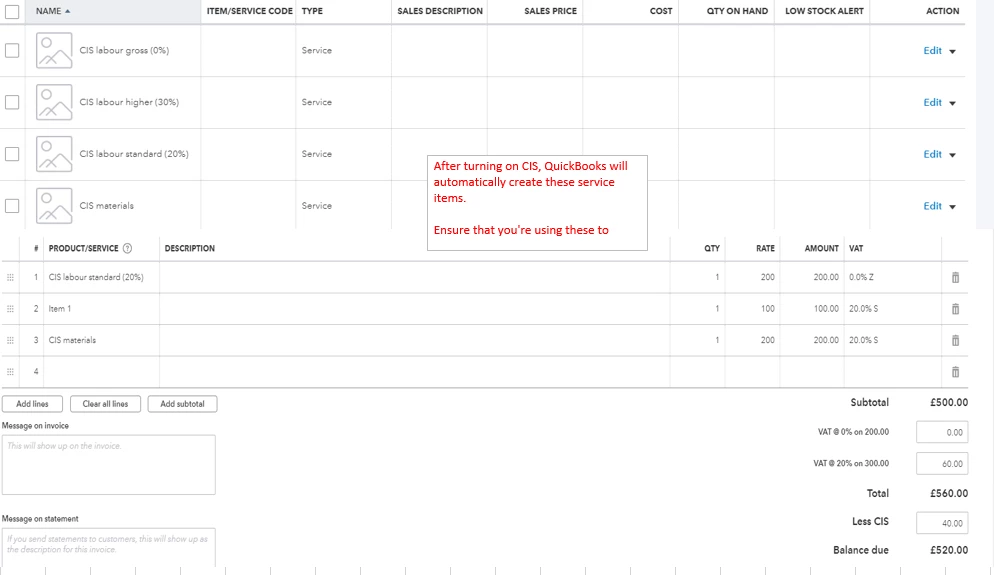
You'll also want to check to see if the invoice used the CIS-related service items. Simply open your invoice, then edit the line items. Adjust the payment received if necessary.
Supplementary details can be found here: CIS in QuickBooks Online.
When you finally see the EPS filing, you can submit it to the HMRC. You can follow the steps in the first article.
If you need more help in QuickBooks Online, I'd recommend browsing our articles. You can go to our general support page to find them.
I can help you with other future concerns regarding QuickBooks Online. Just post them here. You can also add any other follow-up questions about EPS or CIS topics.
Enter your E-mail address. We'll send you an e-mail with instructions to reset your password.