June 8, 2019
Solved

How can I put a job description on a invoice I want to put it under the customers adress

  • June 8, 2019
  • 1 reply
  • 0 views
Original commenter did not share additional details

Best answer by

I'm excited to help you, lambertrs.


By editing the invoice, you can enter the job description under the customer address. Here's how:

  1. Open the invoice.
  2. Click on the customer address and enter the job description.
  3. Click on Save and close.


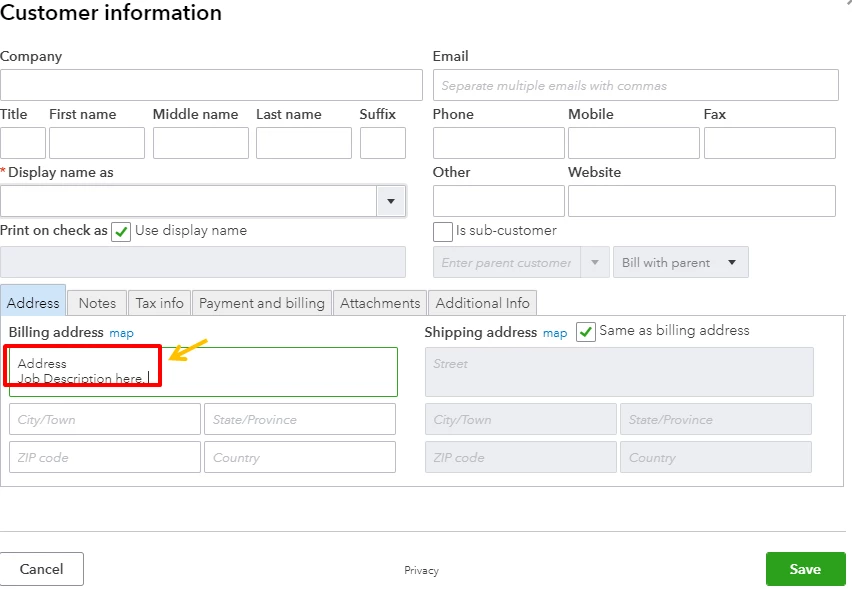
If you'd like to permanently show this description, go to the customer's profile and edit the address. 

Throw some more questions about QuickBooks, and we'll be right here to help. Have a good day!

1 reply

Answer
June 8, 2019

I'm excited to help you, lambertrs.


By editing the invoice, you can enter the job description under the customer address. Here's how:

  1. Open the invoice.
  2. Click on the customer address and enter the job description.
  3. Click on Save and close.


If you'd like to permanently show this description, go to the customer's profile and edit the address. 

Throw some more questions about QuickBooks, and we'll be right here to help. Have a good day!