December 17, 2019
Solved

How do I customise the "Estimates and Progress Invoicing Summary" Report so that is does not include closed or rejected estimates within the balance total?

  • December 17, 2019
  • 4 replies
  • 0 views
Original commenter did not share additional details

Best answer by ReymondO

Hi @lou8.


Right now, the option to exclude closed or rejected estimates within the balance total is unavailable in QuickBooks Online. However, you can export them to your excel and manually remove the transactions from there.


Here's how:
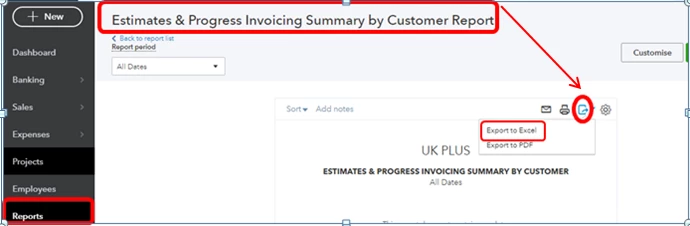
 

  1. Go to Reports and select Estimates & Progress Invoicing Summary by Customer Report.
  2. Click the Export icon.
  3. Select Export to Excel.
  4. From there, you can now delete the closed or rejected estimates transactions.


I know the importance of having this option in running your business. Allow me to send feedback to our developers and see if they can take a look at this. 


Please let me know if you have other concerns. I'm always happy to help!

4 replies

ReymondOAnswer
December 17, 2019

Hi @lou8.


Right now, the option to exclude closed or rejected estimates within the balance total is unavailable in QuickBooks Online. However, you can export them to your excel and manually remove the transactions from there.


Here's how:


  1. Go to Reports and select Estimates & Progress Invoicing Summary by Customer Report.
  2. Click the Export icon.
  3. Select Export to Excel.
  4. From there, you can now delete the closed or rejected estimates transactions.


I know the importance of having this option in running your business. Allow me to send feedback to our developers and see if they can take a look at this. 


Please let me know if you have other concerns. I'm always happy to help!

lou8Author
December 18, 2019

Hi there,


Thanks for the work around (it's less than ideal however as in order to revise the new total on the spreadsheet, it's necessary to individually add up the sub total cells, so a bit of a pain!).


It would be great to request this option to filter out closed/rejected estimates from this report, from a business point of view.


Thanks!

August 31, 2020

Absolutely agree with OP.


I know Intuit is working hard to add new features to QBO - however, the only point of entering the data is so that we can retrieve it in meaningful reports.


We really need to be able to filter this report by quote status. 


Can we get an update on this please?


August 11, 2022

Thanks for joining us here in the thread, @kris-.


Due to the high volume of feature requests, Our Product Development Team may have overlooked the request to be able to customise the Estimates and Progress Invoicing Summary report and filter it to show specific data in QuickBooks.


You can send feedback to our Engineers if you haven't yet sent your request. I'll input the steps below so you can proceed. To begin, here's how:


  1. Access your QuickBooks Online company.
  2. In the upper-right corner, click the Gear icon and then select Feedback.
  3. Enter a brief description of your product suggestion, and then click Next.
  4. Type your email address.
  5. Once done, click Send Message.


In addition, I've got you this article in case you'd like to share your reports with your team: Share custom reports.


Feel free to post here again if you have any additional QuickBooks-related concerns. Rest assured, Our team of product experts is always around to assist you. Take care!

December 29, 2022

An estimates and invoicing summary that includes closed or rejected estimates is only useful for understanding proposal generation volume but it is pretty useless for understanding backlog.    Please add the ability for the user to filter out rejected and closed estimates.  Or, give is the ability to permanently remove estimates when there is no linked invoicing activity.

May 3, 2023

Filtering estimates by status has been a need for too long! This report is nearly useless without additional filtering. Adding a filter for estimate status could be added by a 3rd grader.

The whole QB online report system sucks compared to the desktop version.

We need more filter control in all reports but this one is a must!!!!

The online version of QB requires me to use a calculator to figure out items that should come out of the report.

I spend hours more using the online version compared to desktop version just doing billing due to reports and how invoicing doesn't show previous invoiced amounts. But that is another thread I need to complain on.

March 16, 2025

I can't believe this still has not been added, seems so easy! Sure makes all these price increases seem worth it! Can't wait until we get the QBO version of FreeTaxUSA and Intuit goes bye bye!
