April 29, 2020
Solved

How to handle my returned bank payment

  • April 29, 2020
  • 1 reply
  • 0 views

Hello.


How do I handle my returned bank transfer?


Had 2 incidences:

1. Overseas supplier forgot to inform me that they have changed bank, so my bank transfer was returned minus some bank charge - so the outgoing and returning payments differ by 13 USD.

2. Bank transfer in UK from me to a shipping firm - returned for no discernible reason whatsoever. 


Transactions were manually imported.

Best answer by Rubielyn_J

Hello there, @SGI.


Let's make sure you'll be able to manage your returned bank payment. We can create a deposit with the same amount as the payment you made, then enter the charge as negative to deduct the total payment. I'll guide you how:

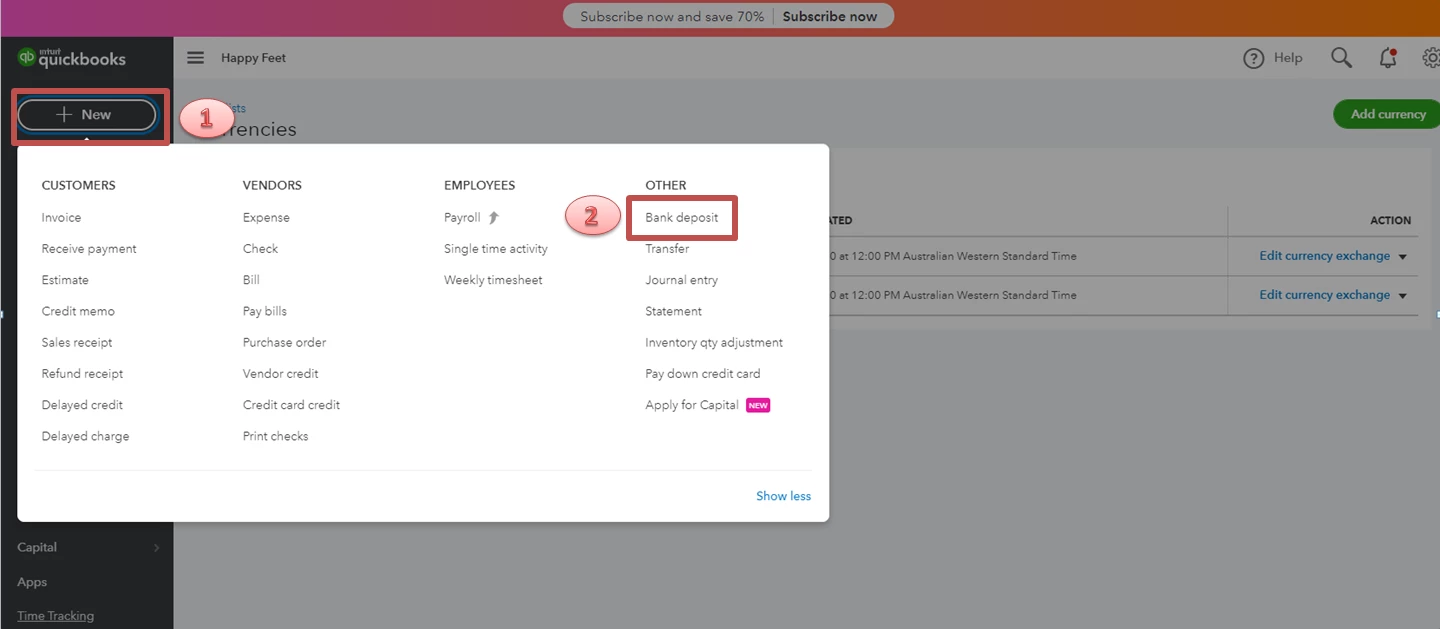
  1. In your QuickBooks account, select the + New button.
  2. Choose the Bank deposit
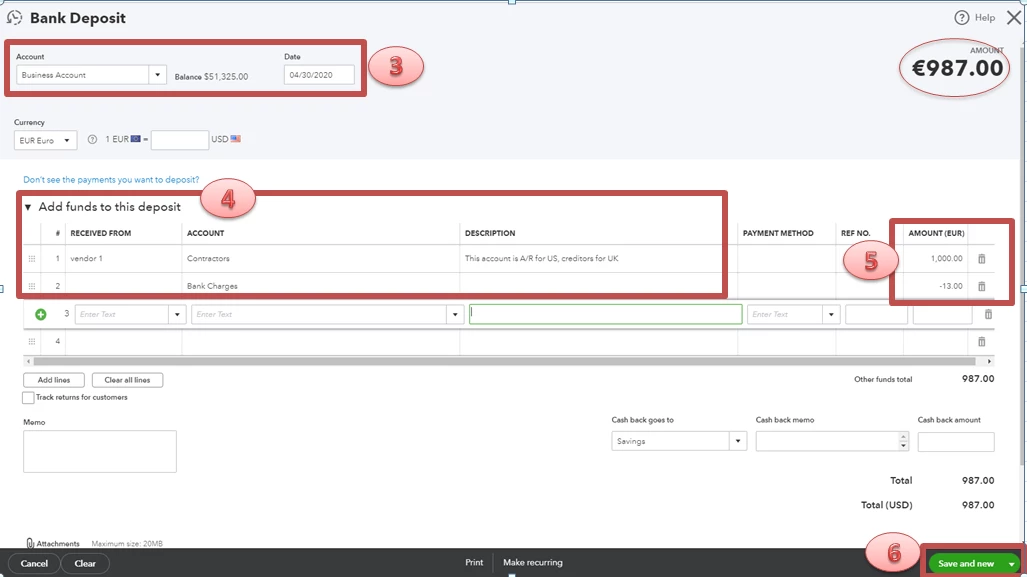
  3. Choose the Account and enter the Date.
  4. In the Add funds to this deposit section, select an Expense account.
  5. In the amount, use a negative value for those different payments that happened.
  6. Once done, click Save and new

The deposit will be lower than the payment made because of the negative amounts added to it.


For additional reference, you can refer to this article: Record and make Bank Deposits in QuickBooks Online.


Let me know if you have additional queries. I'm here to help. Have a great day!

1 reply

Rubielyn_J
April 29, 2020

Hello there, @SGI.


Let's make sure you'll be able to manage your returned bank payment. We can create a deposit with the same amount as the payment you made, then enter the charge as negative to deduct the total payment. I'll guide you how:

  1. In your QuickBooks account, select the + New button.
  2. Choose the Bank deposit
  3. Choose the Account and enter the Date.
  4. In the Add funds to this deposit section, select an Expense account.
  5. In the amount, use a negative value for those different payments that happened.
  6. Once done, click Save and new

The deposit will be lower than the payment made because of the negative amounts added to it.


For additional reference, you can refer to this article: Record and make Bank Deposits in QuickBooks Online.


Let me know if you have additional queries. I'm here to help. Have a great day!