Solved
I have added a credit note to a supplier however the invoice this credit note relates to still shows that value of the credit note needs to be paid. How do I match these?
Original commenter did not share additional details


Any solution please? I have the same issue regarding supplier credits.
previous supplier payments were recorded as expenses, therefore no outstanding value to be paid.
then we received a refund from supplier, how to record this transaction correctly>???
I added a supplier credit, then on banking, added a deposit for this supplier credit thinking they should be matched and recognized. However this supplier shows the credits are due to be received.
How to match them off?? plz give step by step instructions in terms of how to input supplier refunds. thx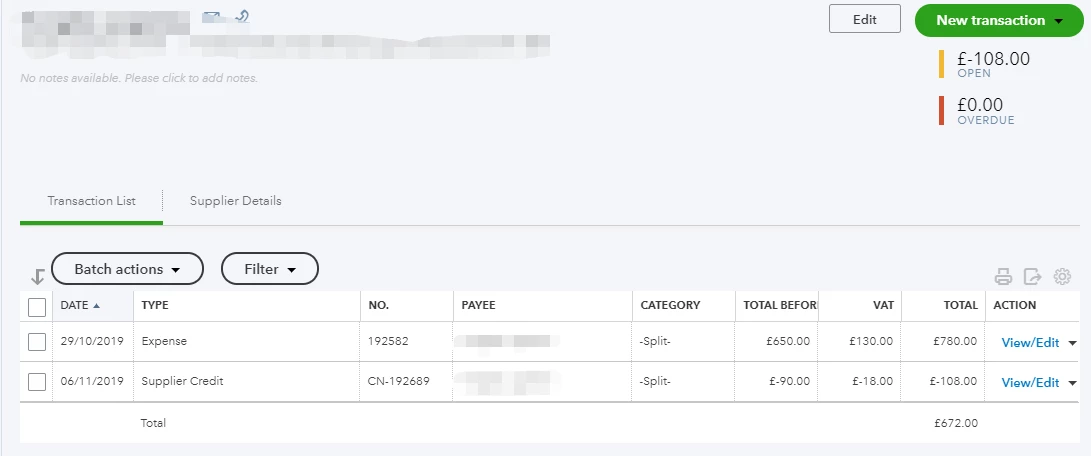
Hi RTT account
You will have to allocate the deposit to the suppliers/creditors account shown in your screenshot by selecting the supplier in the received from column and creditors/accounts payable in the account column in the adds funds to this deposit section. Although the open and overdue will be zero you will have to link the deposit and supplier credit together by creating a cheque payment > enter the suppliers name in the Payee box > the deposit and supplier credit will appear on the right hand side select add on both > save and close.
Enter your E-mail address. We'll send you an e-mail with instructions to reset your password.