Solved
I just tried to send an invoice on the QB app and it will not send. this is the first time its ever happened. does anyone know why this has happened?
the email details are correct


Look no further, @userymgray7.
Let's work together to ensure you'll be able to send invoices using your QuickBooks Online (QBO) mobile app.
When you're experiencing trouble using your QBO app, clearing the cache can do the trick. This process will eliminate historical data and provide you with a clean slate. Here's how:
For Android
For iOS
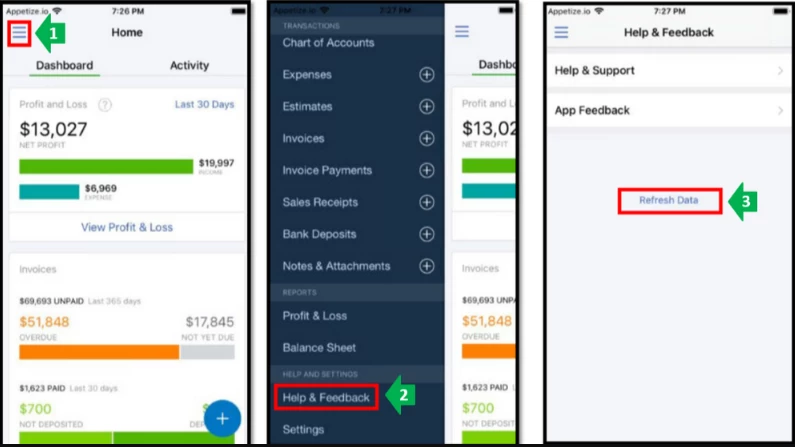
You can also do this on your phone settings. I'll guide you on how:
Android device
iOS device
Once done, attempt to send the invoice again. If the same happens, I recommend uninstalling and reinstalling the app.
Additionally, here's a helpful source that can provide you with more information on how the QBO app works as well as those features available:
If you get the same issue can we ask you to try on a browser on your device logging in and sending the invoice that way so we can isolate if this is only happening in the app for you.
I'm just around the corner if you have any other concerns about using your app. Thanks for dropping by. Have a good one.
Enter your E-mail address. We'll send you an e-mail with instructions to reset your password.