lapin
Jan 8, 2020 6:06 PM UTC
Solved

Is there a way to do this in Quickbooks?I'm trying to create a deposit invoice which shows the total cost of a project, but bills only 30% upfront. (payment by transfer)

Original commenter did not share additional details
JenoP
JenoPAnswer
Jan 8, 2020 7:16 PM UTC

Let me help you create the transaction within the Projects section and create a deposit as well, lapin.


First, create an invoice for the total cost in the Project Center. Here's how:


  1. Go to the Projects menu and click the name of the project.
  2. Click Add to project in the upper-right hand corner.
  3. Select Invoice.
  4. Enter all the details in the invoice including the total amount. 
  5. Click Save and close.

Second, proceed to receiving the payment and enter the amount that equals to the 30% deposit. Please follow these steps: 


  1. Open the invoice and click Receive Payment. 
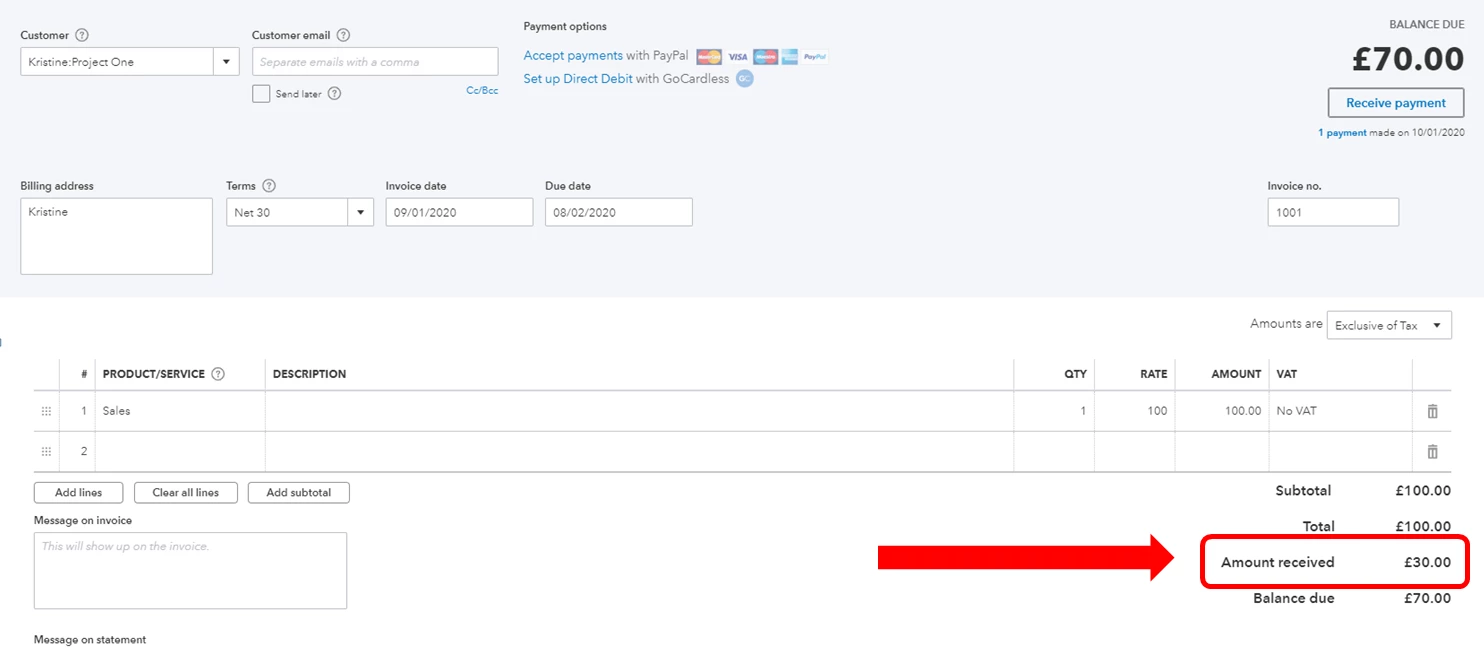
  2. Enter the amount in the Amount received field.
  3. Click Save and close. 

Then, follow these steps to check how much of the payment has been deposited:


  1. Go to the Transactions tab.
  2. Look for the invoice and click on it.
  3. Go to the Amount received section. 

You can also use these articles to get more details on how the Projects feature works:


I'll be around if you need additional help when adding invoices and receiving deposits. 


3 replies

JenoP
JenoPAnswer
Jan 8, 2020 7:16 PM UTC

Let me help you create the transaction within the Projects section and create a deposit as well, lapin.


First, create an invoice for the total cost in the Project Center. Here's how:


  1. Go to the Projects menu and click the name of the project.
  2. Click Add to project in the upper-right hand corner.
  3. Select Invoice.
  4. Enter all the details in the invoice including the total amount. 
  5. Click Save and close.

Second, proceed to receiving the payment and enter the amount that equals to the 30% deposit. Please follow these steps: 


  1. Open the invoice and click Receive Payment. 
  2. Enter the amount in the Amount received field.
  3. Click Save and close. 

Then, follow these steps to check how much of the payment has been deposited:


  1. Go to the Transactions tab.
  2. Look for the invoice and click on it.
  3. Go to the Amount received section. 

You can also use these articles to get more details on how the Projects feature works:


I'll be around if you need additional help when adding invoices and receiving deposits. 



lapin
lapinAuthor
Jan 11, 2020 5:26 PM UTC

Thanks for your super quick answer. Unfortunately for me, my subscription doesn't include the projects. I'll find another way to do it.

Angelyn_T
Jan 11, 2020 6:09 PM UTC

Thank you for the clarification, @lapin.


Another way of recording the transaction is through an invoice. This can be done by adding the upfront deposit on the line item under the Product/Service.


Before that, create a retainer item and use the item when recording an invoice. You can read this article as your guide: Record a retainer or deposit.


Let me know if you have any other questions. I'm a few clicks away to help. Have a good day!