February 5, 2020
Solved

Looks like there’s been an updateBut where has the banking section gone now ?

  • February 5, 2020
  • 2 replies
  • 0 views
Original commenter did not share additional details

Best answer by MirriamM

Hi,

I am using Quickbooks online.


Hello there, @Nuwil Engineering.


Thanks for getting back and providing a screenshot.


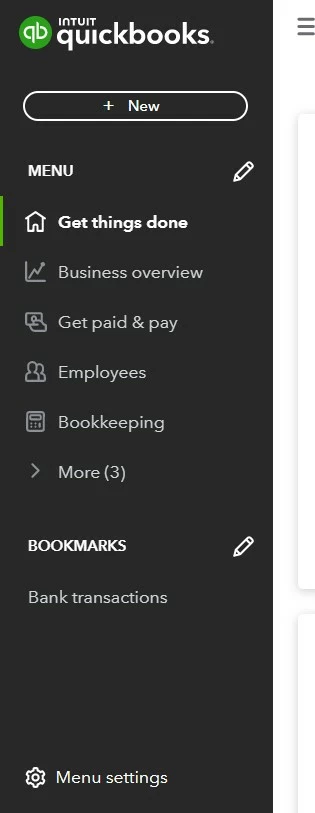
The page you have is the new interface once you subscribe to QuickBooks Online (QBO). For now, you can customise how you want the menu to look. 


Here's how:


  1. Choose the Menu settings at the bottom.
  2. Click Customise this menu.
  3. Select Bookmarks.
  4. From there, choose and reorder pages to bookmark.
  5. Click Save.


I understand that you wanted to bring back the old interface. The Community recognises feedback and suggestions from customers like you that can help us improve our product and services to our customers' delight. I suggest sending feedback while this feature is not an option.


To send feedback, follow the below steps:


  1. Go to the Gear icon at the top.
  2. Select Feedback.
  3. Enter your comments or product suggestions. 
  4. Then select Next to submit feedback.


I've also included this link to help you effectively manage your account for future reference: Learn about QuickBooks Online with how-to videos.


Please don't hesitate to leave a comment below if you have other concerns. I'm here to help. Keep safe always, @Nuwil Engineering.

2 replies

JasroV
February 5, 2020

Hello there, @lee26.


The Banking menu is still located on the left section of your QuickBooks Online (QBO) account. 

If you're unable to see it on your screen, you'll want to access your QBO account via a private or incognito window. This way, we can check if this issue is due to stored data from the browser.


Data that is stored for a period of time can cause unusual behavior to the browser. To start, here are the keyboard shortcuts to open a private or incognito window:

  • For Google Chrome: Ctrl + Shift + N
  • For Internet Explorer and Mozilla Firefox: Ctrl + Shift + P
  • For Safari: Command + Option + P 

If you're able to locate the Banking section via a private or incognito window, then we'll need to clear your regular browser cache.


However, if the issue persists, I recommend using another supported browser. That way, we can check if the issue is within the browser.


You can also visit our Banking page for reference to learn some tips and tricks on managing your bank feeds in QBO.


Should you have other concerns or queries with your QBO account, you can always get back to us anytime. The Community is always here whenever you need help. 

February 16, 2020

I'm using the mobile app and the banking menu is no longer showing.

I travel a lot and don't want to be getting my laptop out in every layby to see if invoices have been paid.

How do I find the banking menu please?

February 16, 2020

Hi there, Giles Coates.


Performance issues in QuickBooks Mobile App can be resolved by doing basic troubleshooting steps. Let's start by resetting the app data to clear the cache and refresh it into its default state. This way, you'll be able to find the Banking menu at left panel.


Here's how to reset the app:


  1. Click Help menu.
  2. Click Reset App Data.
  3. Close the app when the process completed.
  4. Be sure to right-click the app and Run as Administrator when re-opening.


If the issue persists, I suggest uninstalling/reinstalling the app to refresh it's connection.


For more insights about the QuickBooks Mobile App and which QBO mobile app features are supported on mobile devices, check out these articles:


Please let me know if you have any other questions related with QuickBooks. I'm always here to help you.

April 14, 2021

The 'SALES' link has disappeared from the left side menu on QB online.  Is this an update that removed this for good or is there a way to get that back?  Please help

April 14, 2021

Hello Wgoss44, Do you mean on the left hand side menu where it now says invoicing instead of sales, that has changed in wording but the section should be the same once clicked on?If you click on invoicing within there is the all sales option, if that is not what you mean just let us know