

December 3, 2022
Question

Matching Square payout direct to my bank and invoice

  • December 3, 2022
  • 1 reply
  • 0 views

Hi,

I just want to check to make sure this is correct way.


My setup is:

I take Square card payments by the terminal, I don't link it to QBO at all as I don't need to.

Every customer will have an invoice and they may pay by card, once that payment is sent to my bank QBO will see it under bank transactions as one lump sum payment that can be for multi invoice or just one.

Due to the Square fee's I need to make adjustments, I use this example as a real life example...

Bank feed shows £134.99, I click it and select find match button, I get this after adjustments...
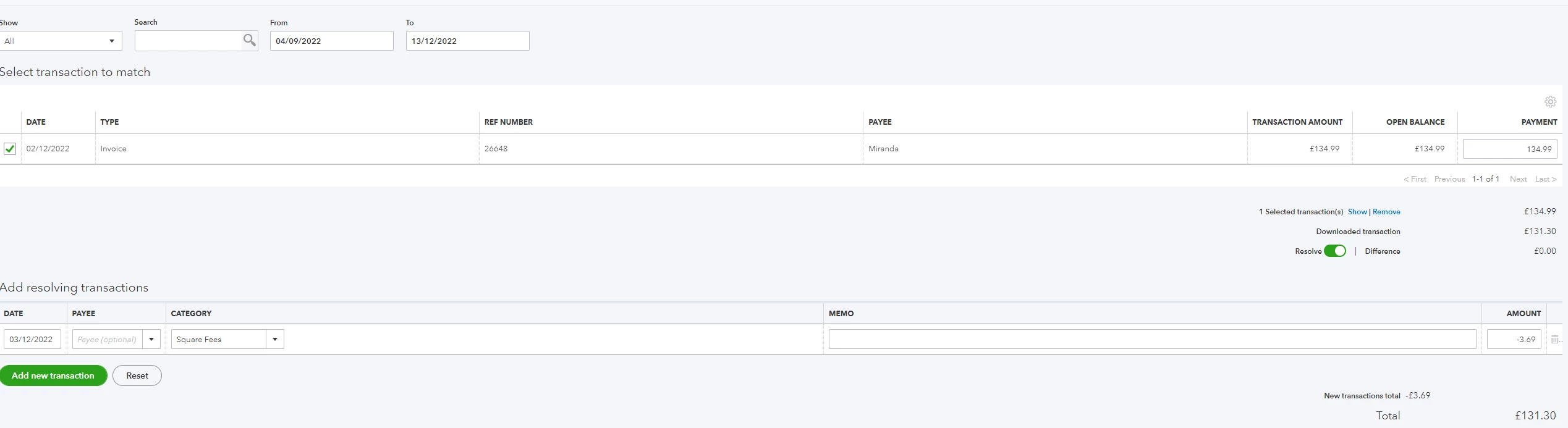
 

The invoice amount is £134.99, payment received £131.30 after fees.

Before I press resolve the top right on picture "Payment" shows £131.30 so I have to change to £134.99 although payment received was £131.30 which don't feel right to me.

The £3.69 Square Fees is linked to bank charges expense and is a minus figure.

Am I doing this the correct way? I don't want to integrate Square into QB as I don't need to (I have no products, services and customers on Square account, all done via QBO).

Thanks

1 reply

December 3, 2022

Hello there, accounts-2upc-co.


I appreciate the detailed information, especially the screenshot. This provides a clearer picture of the issue. 


You're on the right track, recording the transactions. Since the amount you received is less than the one shown on the invoice, enter £3.69 as an expense in the Add resolving transactions section to match it to the actual payment. This process will account for both the payment and the credit card fee.


You can add a service fee to new and existing invoices if you want to charge customers a fee for services related to the product or service they're purchasing. Here's an article that walks you through the entire process: Manually add service fees to invoices in QuickBooks Online. It includes instructions for matching sales transactions with bank feed fees.


Furthermore, the following reference addresses recording bank service fees from a third-party merchant service: Enter a bank service fee while using a third-party merchant service. It is from another region, but it applies to QuickBooks Online (QBO) UK as well.


You can bookmark the link to our online resources for future use: Self-help articles. From there, you'll find answers and topics to help you troubleshoot unexpected QBO issues, manage customer or vendor transactions, and perform other accounting-related tasks.


Feel free to visit the Community again if you have additional questions about recording charges or fees. I'm more than happy to help you. Enjoy your weekend.

December 3, 2022

Hi,

Thanks!

Am I correct putting a negative amount for fees and changing the top right amount on the payment box shown on my screenshot to the full original invoice amount as this shows as received amount which is after fee?


Thx


December 3, 2022

You’re getting there, accounts-2upc-co. I'll answer your questions one by one and suggest another way to handle invoice amount differences.


You’re right, you’ll need to enter the full amount to have it reduced by the bank fee. Since you enabled the Resolve Difference option, there’s no need to put a negative or minus (-) sign. This feature will handle the payment discrepancy to match your transactions.


I’ve added these guides in case you’re interested in other ways to process a service fee if you wish to charge customers and tracking bank service charges from third-party merchant services:


You can refer to these articles to categorise your transactions and assign them to the correct accounts in the future:


Tap the Reply button and post a comment below if you have other questions about dealing with your invoice amounts in QBO. I'll handle them for you as soon as I can.