April 14, 2019
Solved

On the invoices where is the box for me to add a customer purchase order number ?

  • April 14, 2019
  • 2 replies
  • 0 views
Original commenter did not share additional details

Best answer by Adrian_A

You can create a custom field to add your customer's purchase order number, louiselarkum.


If you want to add the field just for a certain customer, please follow the steps shared above. However, if this is for all your customers, then here's how to do it:


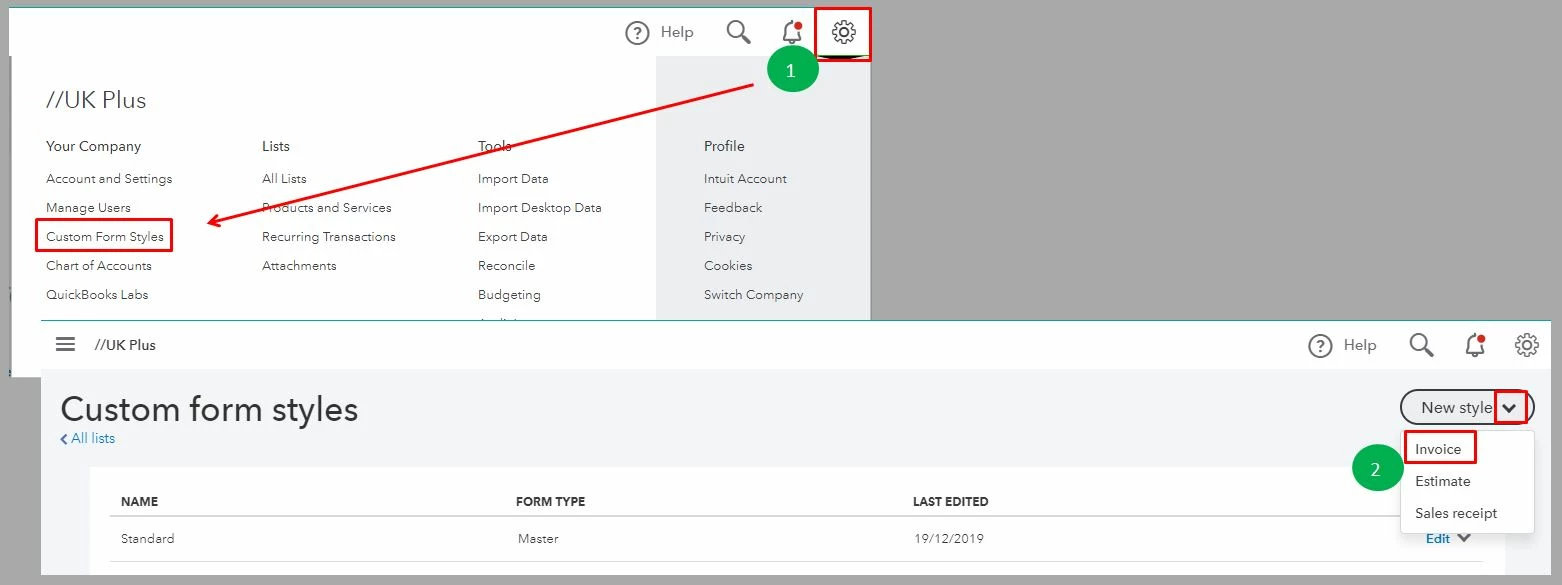
  1. Click the Gear icon, and then select Custom Form Styles.
  2. Select Invoice on the New style drop-down arrow.
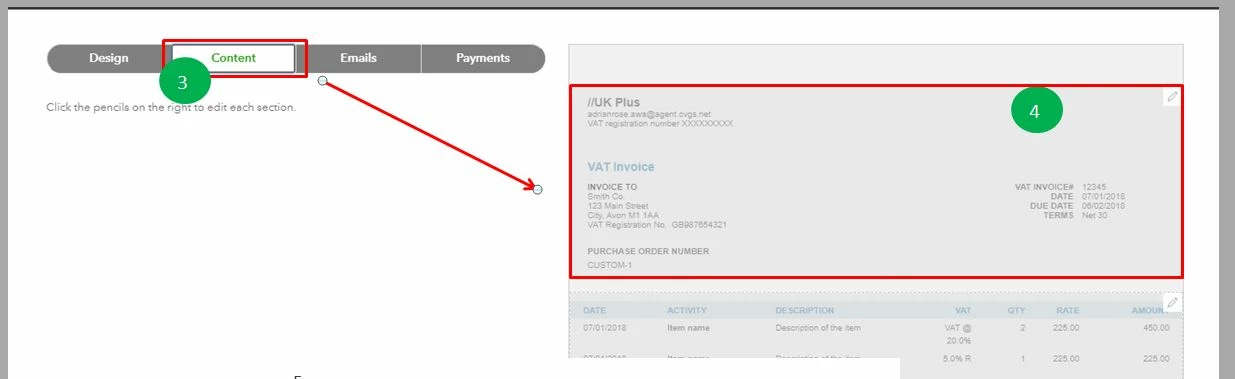
  3. Go to the Content tab.
  4. Click the header.
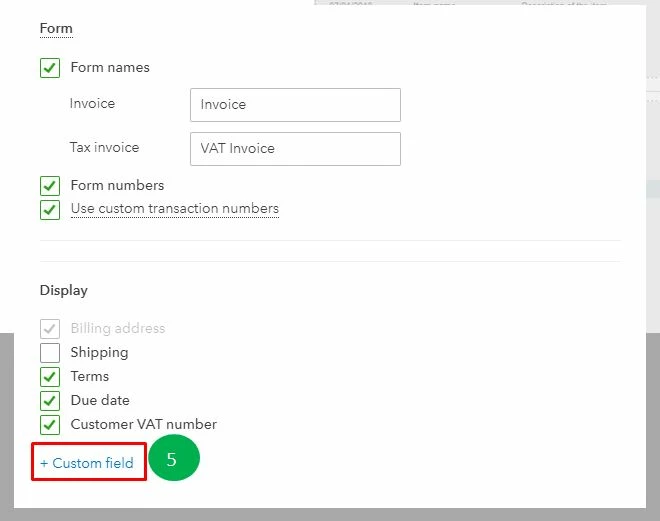
  5. Scroll down, and click the + Custom field link.
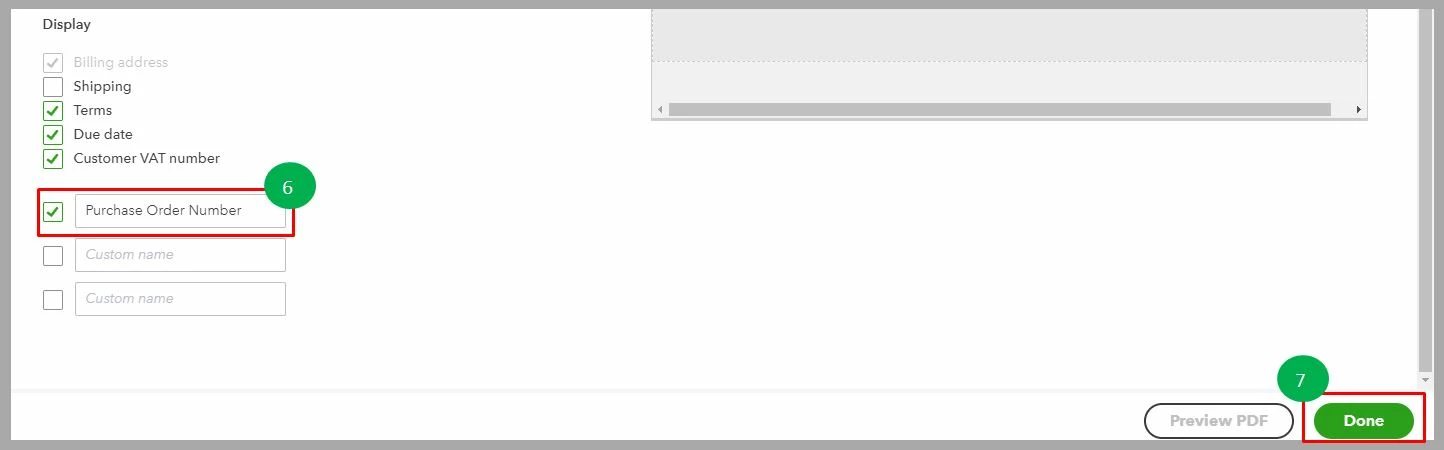
  6. Tick the first box, and enter Purchase Order Number.
  7. Click Done.

I'm adding these screenshots as you visual guide:


On the other hand, you can run a Purchase Order report if you want to view all the purchases. You can either select Open Purchase Order List or Open Purchase Order Detail.


You can also use the steps above if you want to add a different custom field.


There you have it. I'm sure you can now able to add a purchase order number.

2 replies

Rustler
April 14, 2019

There isn't one, in company settings, customize forms you will need to use a custom field for that

April 14, 2019

Hello, dave-gas1982.


You can add a box where you can enter the Customer purchase order number. Here’s how:

  1. Click the Plus icon at the top and select Invoice. 
  2.  Select Customise at the bottom. 
  3. Choose Edit current. 
  4. Go to the Content tab. 
  5. Click the header of the invoice. 
  6. Go to Display section and click +Custom field. 
  7. Put a check mark on the first box. 
  8. Enter your desired name for the field and click Done. 

I’ve attached some screenshots below for further illustration. 


Visit us again if you have further concerns. 


December 19, 2019

I don't have a plus option at the top of my invoice. I can't seem to add a purchase order number anywhere. Help please

Adrian_A
Adrian_AAnswer
December 19, 2019

You can create a custom field to add your customer's purchase order number, louiselarkum.


If you want to add the field just for a certain customer, please follow the steps shared above. However, if this is for all your customers, then here's how to do it:


  1. Click the Gear icon, and then select Custom Form Styles.
  2. Select Invoice on the New style drop-down arrow.
  3. Go to the Content tab.
  4. Click the header.
  5. Scroll down, and click the + Custom field link.
  6. Tick the first box, and enter Purchase Order Number.
  7. Click Done.

I'm adding these screenshots as you visual guide:


On the other hand, you can run a Purchase Order report if you want to view all the purchases. You can either select Open Purchase Order List or Open Purchase Order Detail.


You can also use the steps above if you want to add a different custom field.


There you have it. I'm sure you can now able to add a purchase order number.