March 21, 2022
Solved

Payments from Bank card through paypal double transactions

  • March 21, 2022
  • 1 reply
  • 0 views

Hi there, Pretty new to QBO and having an issue that any help would be appreciated!


So I am buying Shipping labels through PayPal but paying using my current account card, In QuickBooks, it is moving money from current to PayPal via the feed and I am putting the transactions through my PayPal account. But it is still leaving the money transactions in my QBO feed, I assumed this would want to be categorised as a transfer from current to PayPal, but the issue I'm facing is that when I do this, It is then moving more money from current to PayPal in QB and therefore moving the PayPal balance creating a duplicate transaction, How can i rectify this please.

Hope this make sense as I've tried to describe the issue I'm facing to the best of my knowledge.


Thank you for your answers in advance, Kyle.
Best answer by JamaicaA

Thank you for getting back to us in the Community,@MinMax. I'd be happy to guide you on how to exclude the duplicate transactions so you can rectify them successfully.


Your Paypal and bank accounts may be linked to QuickBooks Online, which could be the reason why you're seeing duplicate transactions.


You can omit the duplicate from your bank if the PayPal transaction itself matches to the record in your register. Conversely, if the downloads from PayPal match the one from your bank account, you can remove them from PayPal.


Here’s how:


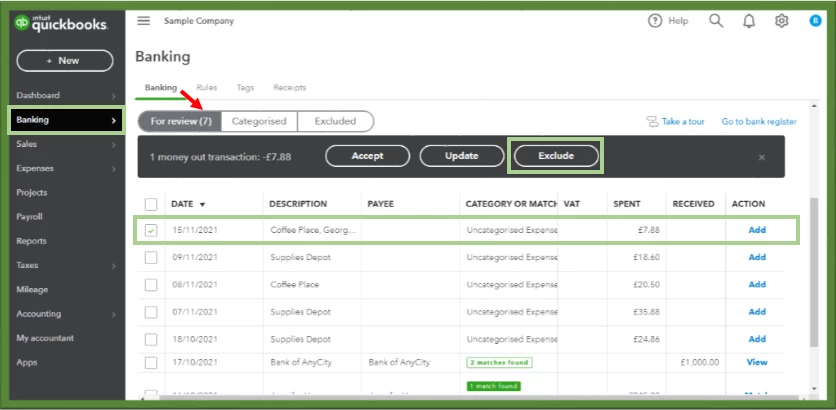
  1. On the left pane, go to the Banking menu, then click the Banking tab.
  2. Choose between PayPal or the bank where the transactions are duplicated.
  3. Go to the For Review tab.
  4. Select all transactions that you want to exclude, then tap Exclude.


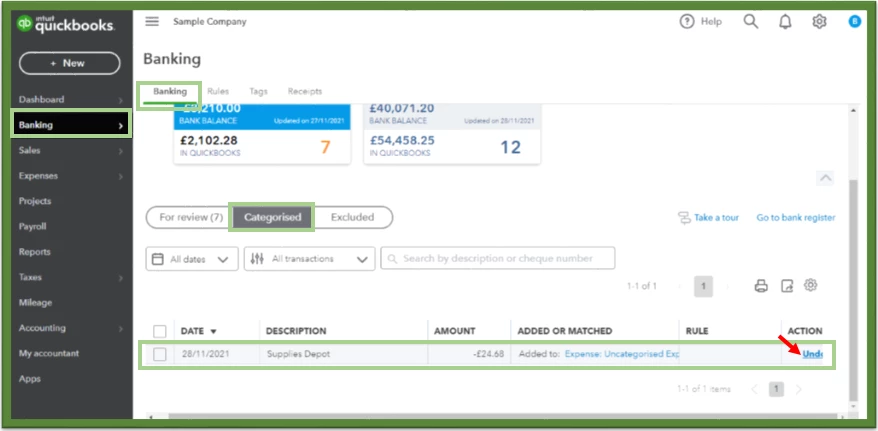
However, if these duplicate transactions has already moved into the QuickBooks system, you’ll need to UNDO them and manually exclude from the For Review tab.


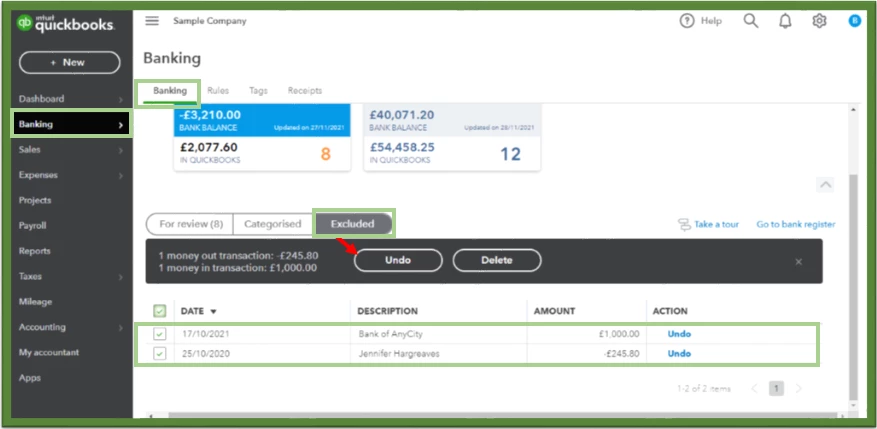
If you already have duplicate transactions in your bank register, you can delete them so that you can reconcile the account efficiently. I’ll show you how: 


  1. On the banking page, go to the Exclude tab.
  2. Select the transactions, then click Delete.


For more information about categorising and matching online bank transactions in QuickBooks Online, you can check out this link. It includes steps if you want to split transactions between multiple accounts.


I’m also sharing these articles for your guide when reconciling your transactions:


I'm just a post away if you have any other bank transaction concerns. I'll be around to assist you further. Have a great rest of your week.

1 reply

March 21, 2022

Hello Kyle, 


Welcome to the Community page, 


So what you need to do is just add the entries on your current account and not transfer it if the entry on paypal has already exsitied. So basically you catergorize the payments from paypal as normal transactions but when moving from paypal to QBO account you record them as bank transfers as the money should not be hitting the bank account as individual payments if you are supported to be through the paypal account only the bulk transfers should be showing up in the main bank account and should be recorded a bank transfer. 

MinMaxAuthor
March 21, 2022

Thank you for your reply, so just to clarify (sorry im new) the transactions are showing in both Bank account and PayPal account to be matched, as if i paid twice, and the money has been automatically moved from bank to PayPal, and when I match all of thee PayPal transactions it fully reconciles, but then I am left with all the exact same transactions to reconcile in my current account, So if i transfer from back to PayPal (which i thought it was a transfer) it moves balance from bank to PayPal and is not right, and if i put the transactions in my bank as the same as i did on PayPal, it would be duplicate transactions? 


Are you saying transfer the balance back to my current from PayPal after transferring it over?


I am terribly sorry if this sounds silly, I just really want to get this right now as it seems to be the only thing that is not adding up for me at the minute. Maybe if you could just elaborate on the process step by step that I should undertake to put this right that would be amazing.


Thanks, Kyle.

JamaicaAAnswer
March 21, 2022

Thank you for getting back to us in the Community,@MinMax. I'd be happy to guide you on how to exclude the duplicate transactions so you can rectify them successfully.


Your Paypal and bank accounts may be linked to QuickBooks Online, which could be the reason why you're seeing duplicate transactions.


You can omit the duplicate from your bank if the PayPal transaction itself matches to the record in your register. Conversely, if the downloads from PayPal match the one from your bank account, you can remove them from PayPal.


Here’s how:


  1. On the left pane, go to the Banking menu, then click the Banking tab.
  2. Choose between PayPal or the bank where the transactions are duplicated.
  3. Go to the For Review tab.
  4. Select all transactions that you want to exclude, then tap Exclude.


However, if these duplicate transactions has already moved into the QuickBooks system, you’ll need to UNDO them and manually exclude from the For Review tab.


If you already have duplicate transactions in your bank register, you can delete them so that you can reconcile the account efficiently. I’ll show you how: 


  1. On the banking page, go to the Exclude tab.
  2. Select the transactions, then click Delete.


For more information about categorising and matching online bank transactions in QuickBooks Online, you can check out this link. It includes steps if you want to split transactions between multiple accounts.


I’m also sharing these articles for your guide when reconciling your transactions:


I'm just a post away if you have any other bank transaction concerns. I'll be around to assist you further. Have a great rest of your week.