

December 31, 2022
Solved

Recording refunds from suppliers

  • December 31, 2022
  • 1 reply
  • 0 views

Hi there, I’m using QBO Simple Start. I made a business expense purchase with my business debit card at City Plumbing for the cost of £11.51. I have matched the transaction with an ‘expense’. But I had bought the wrong part, so I went back and returned it and City Plumbing refunded my £11.51 back in to my business account. How do I record this returns transaction please?
Best answer by Daniela_A

I'll be more than happy to assist you with your concern, @BC1207.


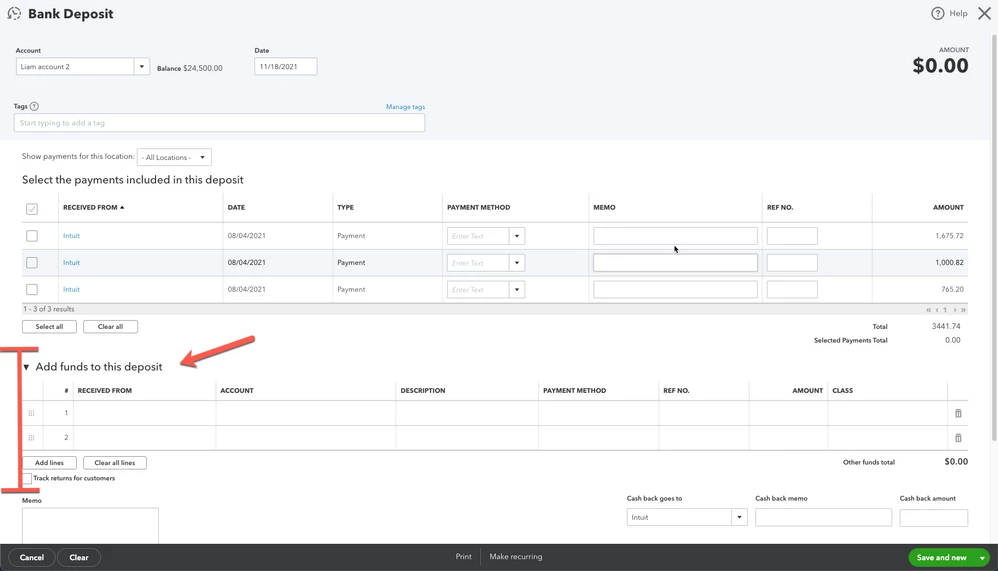
We can simply create a bank deposit in QuickBooks Online to account for the refund you received from your supplier. Here's how to do it:


  1. Click the + New button.
  2. Choose Bank Deposit.
  3. Go to the Add funds to this deposit section.
  4. Enter the reimbursed amount and choose the appropriate account.
  5. Add a memo as needed, then click Save and close.


Once done, you can reconcile your account to make sure they match your bank statement. 


If you need more help in accomplishing your other tasks, please let me know by adding a comment below. I'll always have your back. Happy Holidays!

1 reply

Daniela_A
Daniela_AAnswer
December 31, 2022

I'll be more than happy to assist you with your concern, @BC1207.


We can simply create a bank deposit in QuickBooks Online to account for the refund you received from your supplier. Here's how to do it:


  1. Click the + New button.
  2. Choose Bank Deposit.
  3. Go to the Add funds to this deposit section.
  4. Enter the reimbursed amount and choose the appropriate account.
  5. Add a memo as needed, then click Save and close.


Once done, you can reconcile your account to make sure they match your bank statement. 


If you need more help in accomplishing your other tasks, please let me know by adding a comment below. I'll always have your back. Happy Holidays!