Hi @IamjuViel
Thanks for your reply.
This was exporting data from QuickBooks Online and importing it in to QuickBooks Accountant Online.
I have just checked one as an example and the Expense/Bill total excluding VAT matches but the VAT amount is 1p more in QBAO than it is in QBO. I have checked the data in the csv file and the csv doesn't have the VAT amount, it just has the line total excluding VAT and the VAT rate, so the QBAO is calculating the VAT amount when it is being imported.
Original VAT: £13.09
New VAT: £13.10
The actual true value should be £13.13! But IF in excel, I tell each line item to round down (which I believe is what QB does) then I get to £13.09, as per the original QBO amount. So it seems to be pointing to something not quite right in QBAO.
IF I just round (true rounding where it rounds up if over 5) does come to £13.10. So it would seem that QBO rounds down regardless whereas QBAO rounds normal (down when less than 5 and up when 5 or more).
That explains why the discrepancy but doesn't really help when I now have 4 Bills dating back 2 years now suddenly with balances owing of between 1p and 4p.
And the main frustrating part is that QB tells me I cannot change this now for something that has been submitted, yet the VAT amounts submitted was actually for the amount that I am trying to change it to, so there would be no difference anyway.
I think there should be a way to overrule QB especially when I know it has no affect whatsoever on the submitted VAT return.
Andrew
Thanks for providing in-depth details of your VAT concern, pezza.
I appreciate you for performing the recommended solutions provided by my colleague to resolve the rounding import issue.
The option to change the VAT amount that has been submitted is unavailable. QuickBooks Online (QBO) will add an exemption amount when processing VAT returns for the current period if you add a prior date from the filed VAT.
You'll see an Exception Amount column that provides you with transactions you have previously filed for but have been changed, deleted, or added. This is to ensure that no VAT collected (or credits earned) are missed or duplicated.
To change the amount when filing your return, just use the Adjust link to increase or decrease the amount.
For more details about this one, check out the VAT exceptions and reports article.
To come up with the actual true value of the VAT amount, I'd suggest contacting our Customer Support Team. They'll pull your account in a secure environment and further assist you with this one.
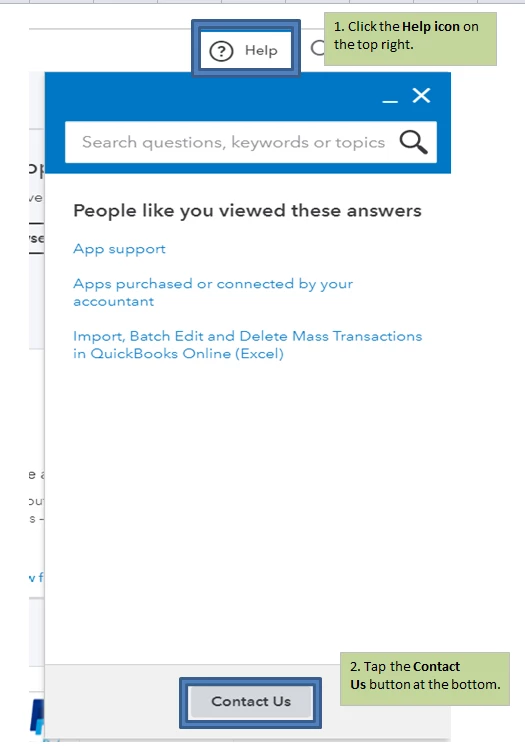
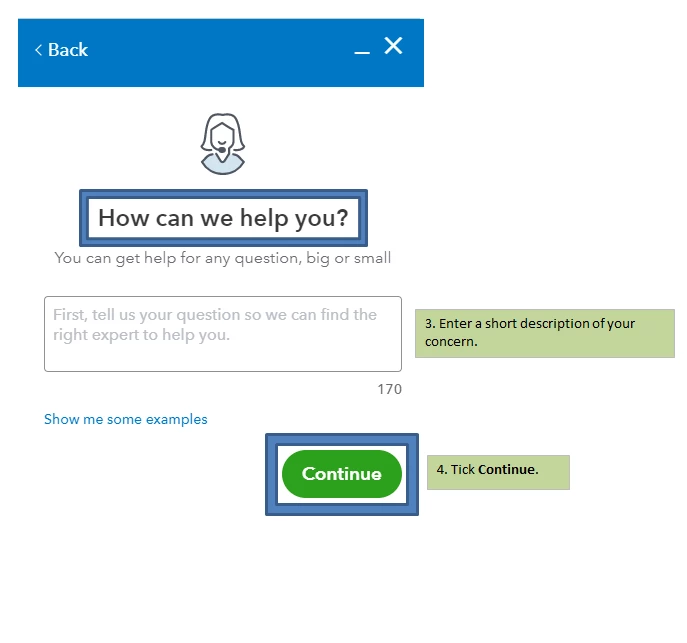
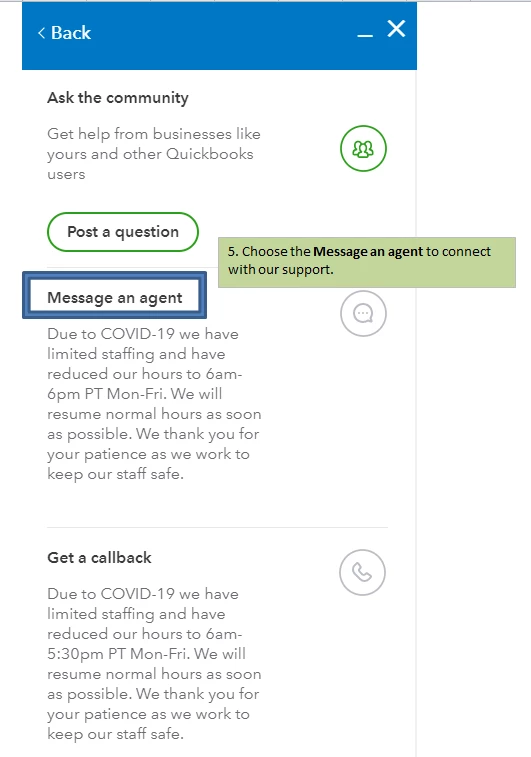
Here's how to reach them:
- Click the Help icon on the top right.
- Tap the Contact Us button at the bottom.
- Enter a short description of your concern.
- Tick Continue.
- Choose Message an agent to connect with our support.
I've got a link here that provides you with articles about managing VAT: https://quickbooks.intuit.com/learn-support/vat/misc/02/uk-vat?label=QuickBooks%20Online.
The Community always has your back if you need anything else in QBO. I'm always here to help. You have a good one.

