
March 6, 2019
Solved

We run several building projects at the same time and I am trying to find out if there is a way to separate the expenses, invoices and contractor costs for each project?

  • March 6, 2019
  • 1 reply
  • 0 views
Original commenter did not share additional details

Best answer by AlcaeusF

Hello there, propertyteamuk.


Thank you for posting here in the Community. Allow me to help you to separate the transactions for each project in QuickBooks Online.


I've checked here, and the only option you can use to separate each building projects are by using the Location Tracking feature. You can add the location in each transaction and run the Transaction List by Date report.


Here's how to enable the tracking of locations:


  1. Click the Gear icon.
  2. Select Account and Settings.
  3. Go to Advanced.
  4. Go to Categories.
  5. Put a check mark beside Track locations.
  6. Click Save.

To separate expenses, invoices and contractor costs, you can run three separate reports filtering to only one transaction type.


Here's how:
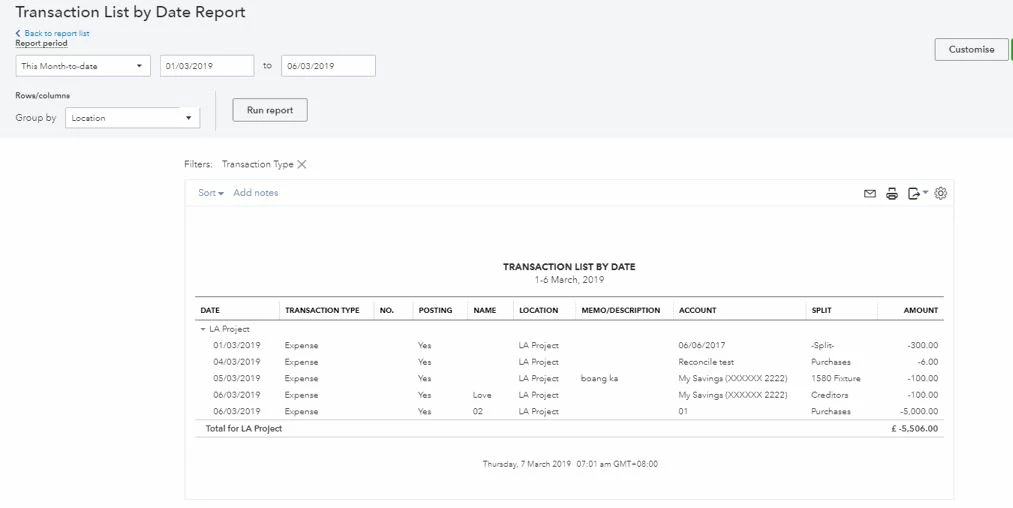
 

  1. On the left panel click Reports.
  2. In the search bar, type in Transaction and select Transaction List by Date.
  3. Choose a date range.
  4. Click Customize.
  5. Go to Filter.
  6. Put a check mark beside Transaction Type and select one transaction (ex. Expenses, Invoices or Bill).
  7. Click Run report.
  8. Next to Group by, select Location.


For the report to separate specific projects by location, the purpose of running a single transaction type. I'm adding the article I recommend for your future reference:


How to set up and use class and location tracking.


I'm here anytime you need additional assistance concerning the report. The Community has your back.

1 reply

AlcaeusF
AlcaeusFAnswer
March 6, 2019

Hello there, propertyteamuk.


Thank you for posting here in the Community. Allow me to help you to separate the transactions for each project in QuickBooks Online.


I've checked here, and the only option you can use to separate each building projects are by using the Location Tracking feature. You can add the location in each transaction and run the Transaction List by Date report.


Here's how to enable the tracking of locations:


  1. Click the Gear icon.
  2. Select Account and Settings.
  3. Go to Advanced.
  4. Go to Categories.
  5. Put a check mark beside Track locations.
  6. Click Save.

To separate expenses, invoices and contractor costs, you can run three separate reports filtering to only one transaction type.


Here's how:


  1. On the left panel click Reports.
  2. In the search bar, type in Transaction and select Transaction List by Date.
  3. Choose a date range.
  4. Click Customize.
  5. Go to Filter.
  6. Put a check mark beside Transaction Type and select one transaction (ex. Expenses, Invoices or Bill).
  7. Click Run report.
  8. Next to Group by, select Location.


For the report to separate specific projects by location, the purpose of running a single transaction type. I'm adding the article I recommend for your future reference:


How to set up and use class and location tracking.


I'm here anytime you need additional assistance concerning the report. The Community has your back.
