

October 20, 2024
Question

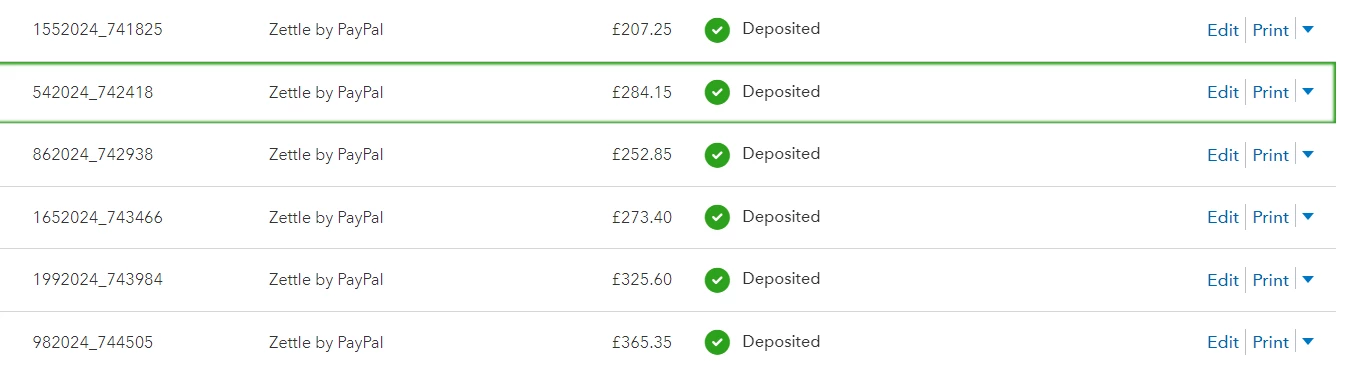
Zettle card payments showing as invoices on quickbooks

  • October 20, 2024
  • 1 reply
  • 0 views

My Zettle deposits are showing as sent invoices on the invoicing tab. When we go to send invoices out for private work, it is now not creating the correct invoice number and makes it harder to track our current invoices on that screen. Is there anyway I can stop this from happening?


I have attached a screenshot if it isn't clear what I am talking about!
 

Thanks

1 reply

October 20, 2024

You've come to the right place, Florencos. Let me help you connect you to the appropriate channel that can assist you in correcting your invoice number accordingly.


QuickBooks integrates with Zettle to provide transaction data for efficient tracking. You can contact their technical support to determine why the invoice numbers aren't generating correctly.


In the meantime, you can enhance your workflow by manually editing invoice numbers before sending them out. Use custom transaction numbers to tailor your numbering preferences, providing greater control and accuracy.


If you have free time, you may also read this article in case you want to personalize and add specific info to your sales forms: Customize invoices, estimates, and sales receipts in QuickBooks Online.


Know that you can always reach back if you have any other questions about invoices. The Community is always here to lend a hand. Take care.