December 6, 2019
Solved

Can I reopen a closed VAT period and close the correct period becauseI prepared the VAT return for 1/8/19 to 31/10/19 and I inadvertently closed the current period?

  • December 6, 2019
  • 1 reply
  • 0 views
Original commenter did not share additional details

Best answer by Adrian_A

Yes, you can, DCR.


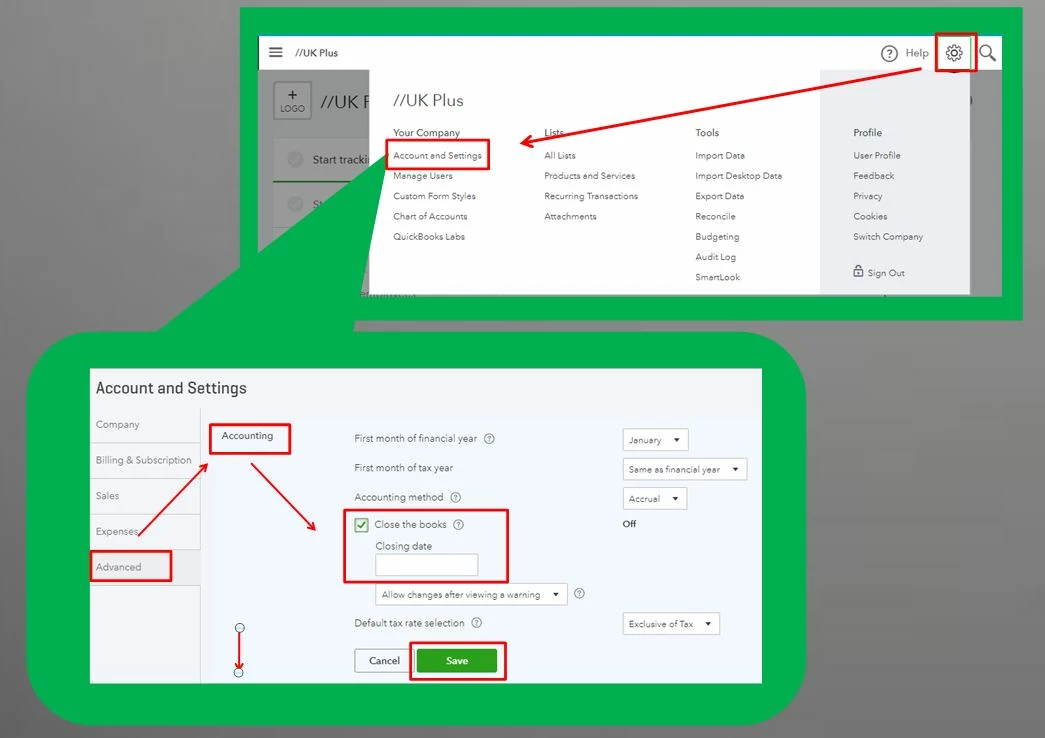
You can always change the closing date when needed. I've got the steps here on how we can do it:


  1. Click the Gear icon, and then select Account and Settings.
  2. Go to the Advanced tab.
  3. Click the pencil (edit) icon on the Accounting section.
  4. Modify the closing date under the Close the books field.
  5. Click Save.
  6. Click Done.

You can also use these screenshots as your visual guide:
 

Afterward, you can review your closed books. You can use this article to guide you: Year-end guide and checklist.


You got me if you need more help in reviewing or editing your books or if you have already filed that VAT period and we can advice on next steps.

1 reply

Adrian_A
Adrian_AAnswer
December 6, 2019

Yes, you can, DCR.


You can always change the closing date when needed. I've got the steps here on how we can do it:


  1. Click the Gear icon, and then select Account and Settings.
  2. Go to the Advanced tab.
  3. Click the pencil (edit) icon on the Accounting section.
  4. Modify the closing date under the Close the books field.
  5. Click Save.
  6. Click Done.

You can also use these screenshots as your visual guide:


Afterward, you can review your closed books. You can use this article to guide you: Year-end guide and checklist.


You got me if you need more help in reviewing or editing your books or if you have already filed that VAT period and we can advice on next steps.
