Solved
Does anyone know how to account for a tax rebate in the bank feed?
Original commenter did not share additional details


I can guide you on how to handle tax rebate in the bank feed, ezrasweet.
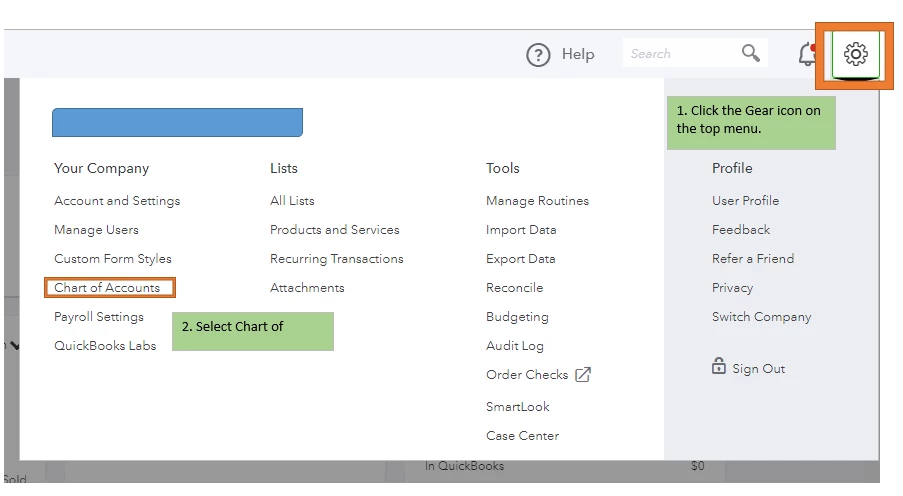
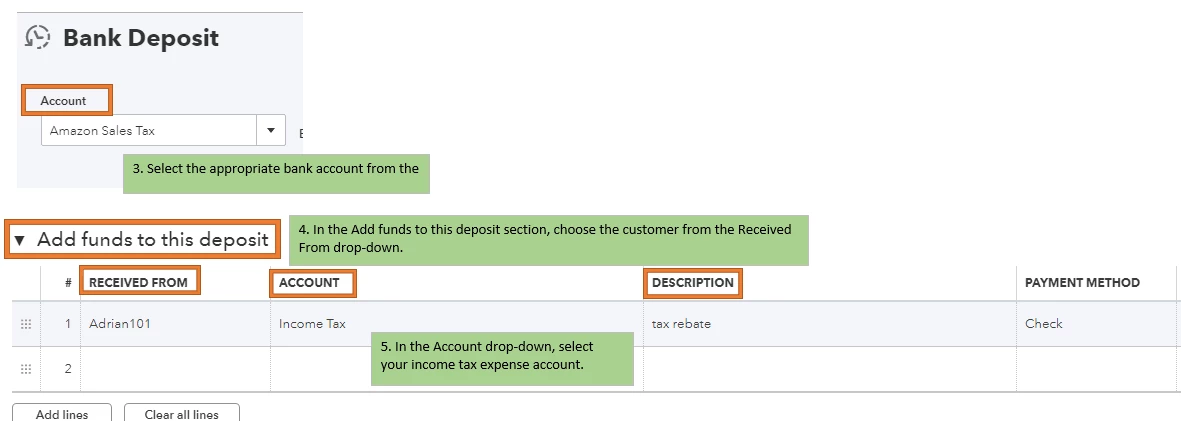
You can record the tax rebate as a deposit and post it to your income tax expense account since it is a refund of your overpayment.
Here's how:
You can also reach out to your accountant on what posting account you'll need to use when recording the deposit.
I've got you an article for more details: Record and Make Bank Deposits in QuickBooks Online.
Once done, match the entered deposit in the downloaded bank transactions. You can check out this article for the steps and details: Download, match, and categorise your bank transactions in QuickBooks Online.
I'm just a reply away if you need anything else with managing downloaded bank transactions. I'm always here to help.
Enter your E-mail address. We'll send you an e-mail with instructions to reset your password.