

February 25, 2022
Solved

Entering Duty/VAT/Deferment Processing Fee Invoice

  • February 25, 2022
  • 1 reply
  • 0 views

Hi Everyone, I wasn't able to find any thread that neatly explains the best way to enter a Duty/VAT/Deferment Processing Fee Invoice onto QBO. I scratched my head for a few minutes and came up with this:
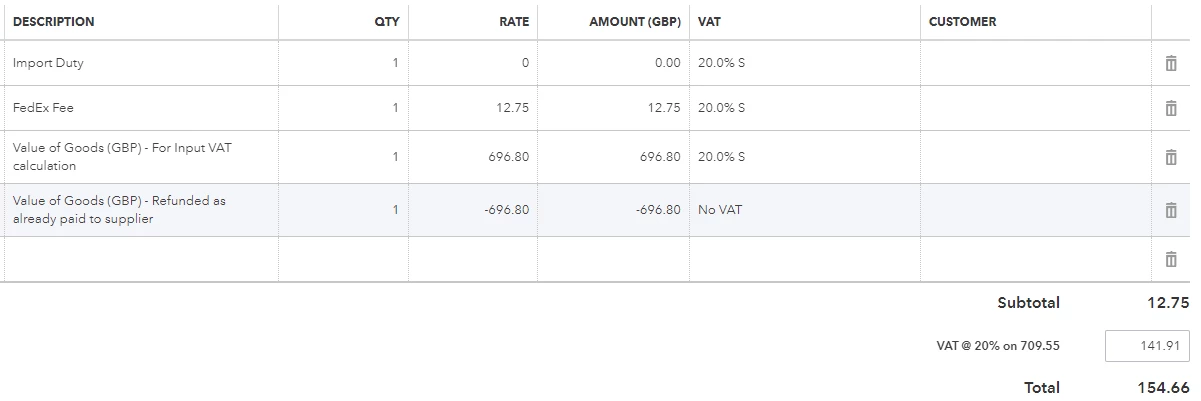
It seems to work correctly but before I enter all of my FedEx/TNT invoices like this can anyone see any issues?


Thanks


Nick

Best answer by EmmaM

Hello UKMaster Thanks for your query about entering a duty/VAT invoice and for the screenshot t. In this case, what you would need to do for any purely VAT/100% VAT bills is to do a 100% vat transaction which we have provided a link on how to do here (use method one)  and then any other charges just add on as normal. You can always confirm with your accountant that they are happy with that once done.

1 reply

EmmaMAnswer
February 25, 2022

Hello UKMaster Thanks for your query about entering a duty/VAT invoice and for the screenshot t. In this case, what you would need to do for any purely VAT/100% VAT bills is to do a 100% vat transaction which we have provided a link on how to do here (use method one)  and then any other charges just add on as normal. You can always confirm with your accountant that they are happy with that once done.

UKMasterAuthor
February 25, 2022

Thank you for your reply. So I think my solution is basically right but I should have selected Exempt rather than No VAT. :)

UKMasterAuthor
March 15, 2022

I've been thinking about this more and actually I think I was right the first time...


When importing goods from either the EU or the rest of the World the courier will either account for the import VAT on their bill to us or they will defer it thanks to PVA (if they have our VAT and EORI number).


Our courier bill includes the VAT so actually what should happen is:


Supplier invoice goes onto QBO with "No VAT". This means no figures are shown on the VAT return. (Reason explained at the end of post.)

Courier invoice goes onto QBO as follows:

Import Duty..........................  20.0% S

Courier Fee.........................  20.0% S

Value of Goods...................  20.0% S

Negative Value of Goods...  No VAT 


This means that the value of the goods will appear on the VAT return but thanks to the negative value of goods being set to "No VAT", this will keep the courier invoice correct by cancelling out the value of the goods on the invoice without cancelling the VAT. The net purchase figure in Box 7 of the VAT return is then set correctly.

If you use "Exempt" on both the supplier and courier invoice the net purchase figure posted in Box 7 would equal the supplier invoice amount. This may cause a correlation problem if the courier used a different figure to calculate VAT (due to exchange rate differences, etc).


This is my understanding but I'm happy to be corrected.