July 29, 2020
Solved

FRS

  • July 29, 2020
  • 1 reply
  • 0 views

My FRS VAT % has reduced from 12.5% to 4.5% from 15/07/2020. My quarterly VAT100 is from 01/05/2020 to 31/07/2020. If change the VAT % to 4.5% in the setting, will the whole quarter turnover VAT tax be charged by 4.5%? Need help.


Best answer by AlcaeusF

Hi,


I am now in the same situation - has the QB team come up with a solution yet?


Hello @CoastersCoffee,


Thank you for posting here in the Community. I can share some details about how to handle changes with the flat rates in QuickBooks.


Currently, the investigation regarding the flat rate is still ongoing. For now, you can follow the workaround confirmed by HMRC.


For hospitality reduction (between 15/7/20 and 15/1/21), you can reduce the rate for the VAT period that 1/8/20 falls in and increase it for the period that 1/2/21 falls in. Effectively deferring the start and end of the reduction by half a month.


To change the rate:
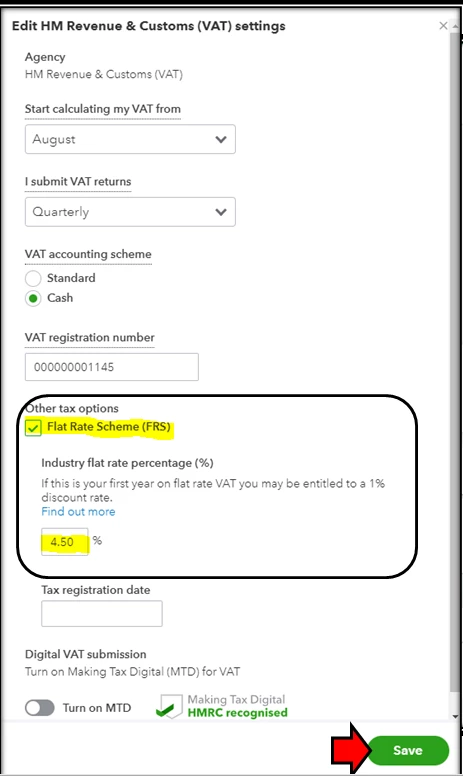
 

  1. Click Taxes in the left panel.
  2. From the Edit VAT drop-down list, choose Edit settings.
  3. Under the Flat Rate Scheme (FRS), enter the new percentage of 4.5%.
  4. Then, hit the Save button.

Our team has not declared a specific time-frame yet for the complete fix. They are still working on it and conducting a further investigation because of the changes to the flat rates.


But rest assured, we take cases like this with urgency and high regard. Also, I recommend contacting support to be part of the notification list.


This way, you'll be able to get updates about it via email. To contact them, you can follow these steps:


  1. Sign in to your QuickBooks account.
  2. Click the Help option in the upper-right corner.
  3. Select Contact Us.

You can also check the articles for more details about the flat rate scheme in QuickBooks: UK Flat Rate Scheme: How does it work?.


Please know that I'm just a post away if you have any other questions. Take care.

1 reply

Jen_D
July 29, 2020

Thanks for your interest about how the VAT system in QBO works for updated FRS rates, UK190501,


That's correct. When you update the FRS rate in the VAT Settings, the new percentage will apply when you submit the return. This is because the system only uses one FRS rate at a time. See this:


If you are required to file a return using the two FRS rates, I would recommend contacting HMRC to get further help with this. They can provide a proper advise on how to record and file your return with the correct rates applied.


If they allow manually filing from their website, you can just manually mark the return as filed after. You will see this option when you click the drop-down beside Submit ti HMRC.


For your reference with VAT processing in QBO, check our Resource page through this link: VAT for QBO United Kingdom


Let me know if you have additional questions or clarifications. I'll be right here to help whenever you needed it. Have a lovely day!

UK190501Author
July 30, 2020

Thanks for suggestion. I trust it is not just my problem whom using QBO to submit the FRS VAT 100 Reports. Due to COVID-19, FRS rates has been reduced for some type of business, e.g. catering services including restaurant & takeaway reduce from 12.5% to 4.5% for period from 15/07/2020 to 12/01/2021.  Because my client has already signed up for MTD for VAT of which must use commercial software to submit and cannot use VAT online to submit. I believe it is the responsibility of QB as a software provider to solve the changes instead of the end users asking help directly from HMRC.      

MaryLandT
July 30, 2020

Thank you for the feedback about the VAT set up, UK190501.


I'll take note of your concern and pass it along to our Product Team. We stay compliant with the Government's regulations when it comes to paying taxes and filing returns.


For now, you can follow the information provided by my colleague above. This is to ensure you have accurate VAT records on your books.


I've added this page to keep you updated with what's new and coming in QuickBooks Online: Firm of the Future Team.


Don't hesitate to post again if there's anything else you need. The Community is always here to answer your concerns.