

September 29, 2020
Solved

Help! FRS Charity: Vat Amount Query

  • September 29, 2020
  • 1 reply
  • 0 views

Hi


We are a small charity with 15% revenue created from trading services, so 15% of our income has VAT applied, rest is exempt ie all Donations or Grants.


We had to register for VAT and opted for a FRS scheme. Rate we are on is 6.5%


At the moment when I do the vat return QBs Vat's section multiplies this 6.5% rate to most of our Income rather than only the traded income.. can  anyone help with this query?.. so say last quarter we collected £250 in Vat yet our VAT bill was £9.5k.


Does anyone know what is going on?


Any help will be great.


Jay


Best answer by MiH

Thanks for getting back here, @MiH.


I've got steps to help you fix your VAT return. You can delete and then recreate the transaction number 2 (Crowdfunding income - £5000 No Vat/Exempt). As it's No VAT it should not be reported to any VAT return. If this still shows, I recommend reaching out to our QuickBooks Online care team to further investigate the root cause of the issue. 


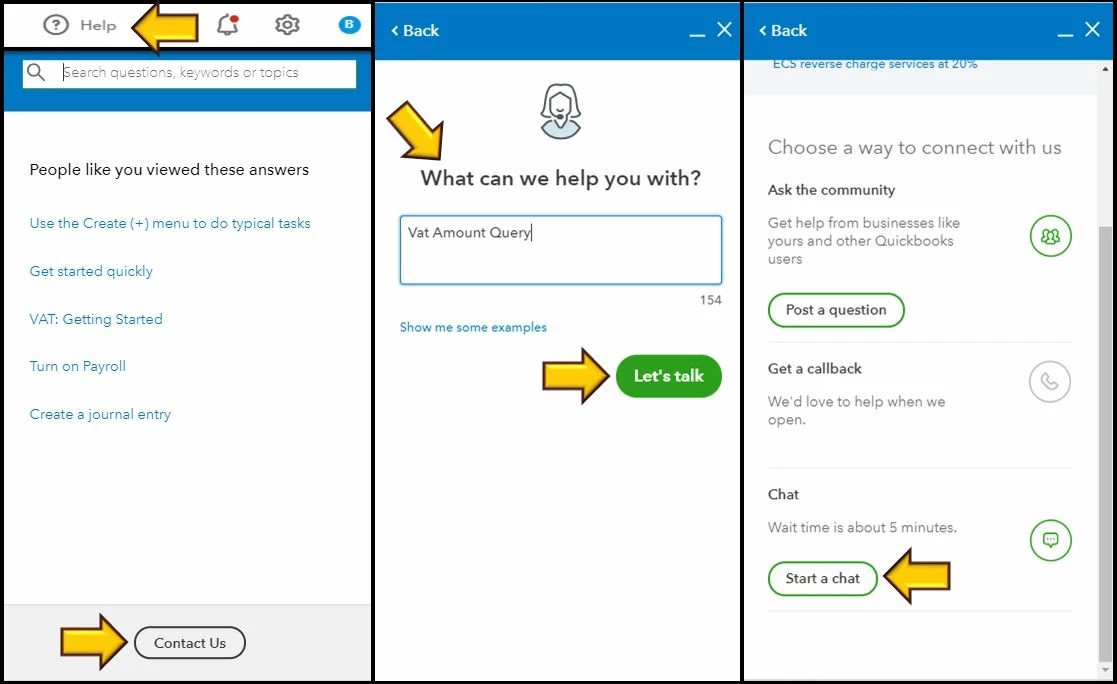
Let me walk you through the steps:


  1. Go to the Help icon.
  2. Click Contact us.
  3. From the What can we help you with? box, enter VAT amount query.
  4. Hit Let's talk.
  5. Choose Start a chat


Here's a helpful article that you can check out just in case you want to edit VAT settings, codes, and rates: Set up VAT.


Please keep in touch if you need any more assistance with VAT return or any QuickBooks-related issues. I've got your back. Have a good day and keep safe.


Hi


I have worked this out... If I select "No Vat" next to the transactions rather than "Exempt" or "Zero Rate" then the VAT amount is correct..... 


MiH

1 reply

September 29, 2020

Welcome to the Community, @MiH.


Let me provide some insights on how the VAT and FRS calculated in QuickBooks Online (QBO).


The reason why your FRS 6.5% rate calculates most of your income is that all of your sales transactions have a 20% standard VAT. To correct this, you'll want to make sure that those transactions that shouldn't be calculated have a zero-rated VAT or No VAT.


Most importantly, I recommend seeking help with a VAT expert or your accountant. This way, they can help make sure that you submit a VAT return that is acceptable with HMRC.


You might want to check out this article to learn how to manage your VAT codes and rates: Set up and edit VAT settings, VAT codes, and VAT rates.


Please let me know if you need clarification about this, or there's anything else I can do for you. I'll be standing by for your response. Have a great day.

MiHAuthor
September 30, 2020

Hi

All the data is entered with either 20% Vat, Zero/No Vat or Exempt.. but still when QBs runs the VAT return all income is applied to this 6.5%


Simple example:

  1. Consultancy Sales - £100 = 20% Vat = £120
  2. Crowdfunding income - £5000 No Vat/Exempt
  3. Product Sales = £500. + 20% Vat = £600

When I run VAT

  • QBs work out 1+2+3 = £5600*6.5% = £364
  • When it should be 1+3 = £600*6.5 = £39

I think its a technical thing on QBs .. I was wondering whether The QBs Vat is linked to the TYPE selected on the chart of accounts when you create a new code...


Jay

DivinaMercy_N
September 30, 2020

Thanks for getting back here, @MiH.


I've got steps to help you fix your VAT return. You can delete and then recreate the transaction number 2 (Crowdfunding income - £5000 No Vat/Exempt). As it's No VAT it should not be reported to any VAT return. If this still shows, I recommend reaching out to our QuickBooks Online care team to further investigate the root cause of the issue. 


Let me walk you through the steps:


  1. Go to the Help icon.
  2. Click Contact us.
  3. From the What can we help you with? box, enter VAT amount query.
  4. Hit Let's talk.
  5. Choose Start a chat


Here's a helpful article that you can check out just in case you want to edit VAT settings, codes, and rates: Set up VAT.


Please keep in touch if you need any more assistance with VAT return or any QuickBooks-related issues. I've got your back. Have a good day and keep safe.